Getting started
Quick Variable Products is a create-fast tool. It collapses the whole variable-product workflow — attributes, generate, then one form per variation — into a single admin screen. Pick your attributes, type their values, generate every combination in one click, fill in stock, SKU and price on the rows, and save once.
Requirements
| Requirement | Version / note |
|---|---|
| WordPress | 6.0 or newer |
| WooCommerce | Active — the current release is recommended (HPOS-ready). The plugin declares Requires Plugins: woocommerce. |
| PHP | 7.4 or newer |
| Access | A shop manager or administrator. Creating brand-new attribute terms needs the product-term management capability. |
| Storefront impact | None. The plugin is admin-only and loads nothing on your shop. |
Install
- Install the free plugin From your dashboard go to
Plugins → Add New, search for Quick Variable Products, install and activate. Or upload the zip viaPlugins → Add New → Upload. WooCommerce must be active. - Open the screen A Quick Products item appears in the WordPress admin menu. Open
Quick Products → Add Product— there is nothing to configure first. - Upgrade later, if you want to Pro is a separate add-on installed alongside the free plugin. See Free vs Pro.
Quick Variable Products is admin-only with zero frontend footprint — it registers no storefront scripts, styles or queries. It cannot slow your shop down or fight your theme, and the products it creates are ordinary WooCommerce products.
You can always use the global attributes you already have. Creating brand-new categories, tags, brands or attribute terms from this screen requires the product-term management capability — which administrators and most shop-manager roles already hold.
Your first variable product
The whole job happens on one page. Here is the end-to-end flow:
- Name and price Type the product name and a base price. This price is applied to every variation unless you override a row later.
- Add an axis (attribute) Add one row for your first attribute — for example Colour. Pick an existing global attribute, or create a new one without leaving the screen.
- Type its values, comma-separated In that row type
red, blue, green. Each value becomes one point on the axis. - Add more axes Add another attribute — for example Size with
S, M, L. Add as many axes as the product needs. - Press “Generate matrix” Every combination of your attributes appears at once as a real WooCommerce variation — Colour (3) × Size (3) = 9 rows, ready for their own price, SKU and stock.
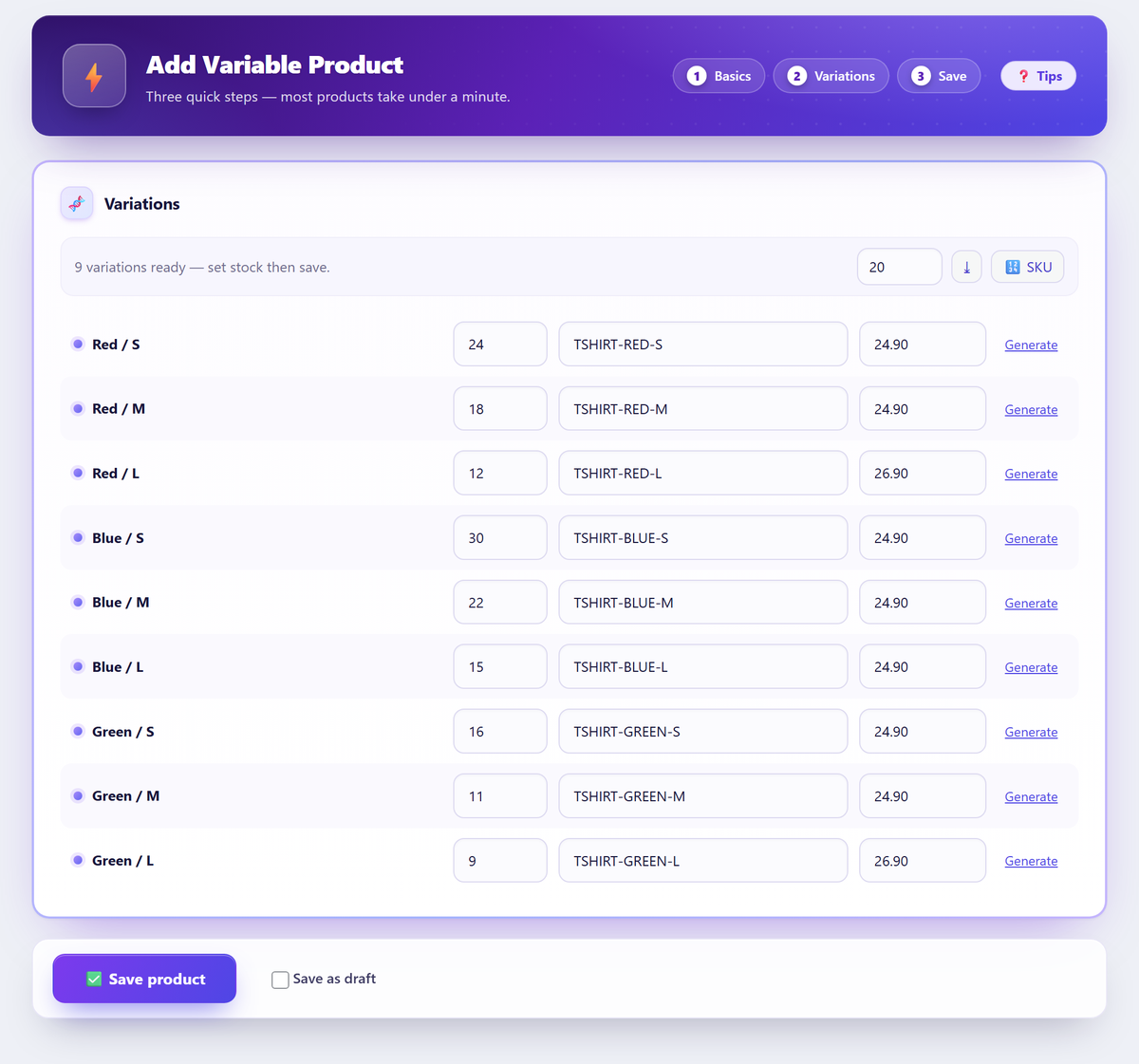
- Fill stock, SKU and price per row Set a stock quantity, a SKU and (optionally) an overriding price on each row — all on the same page.
- Save the product Press Save product and the whole variable product is written in one pass.
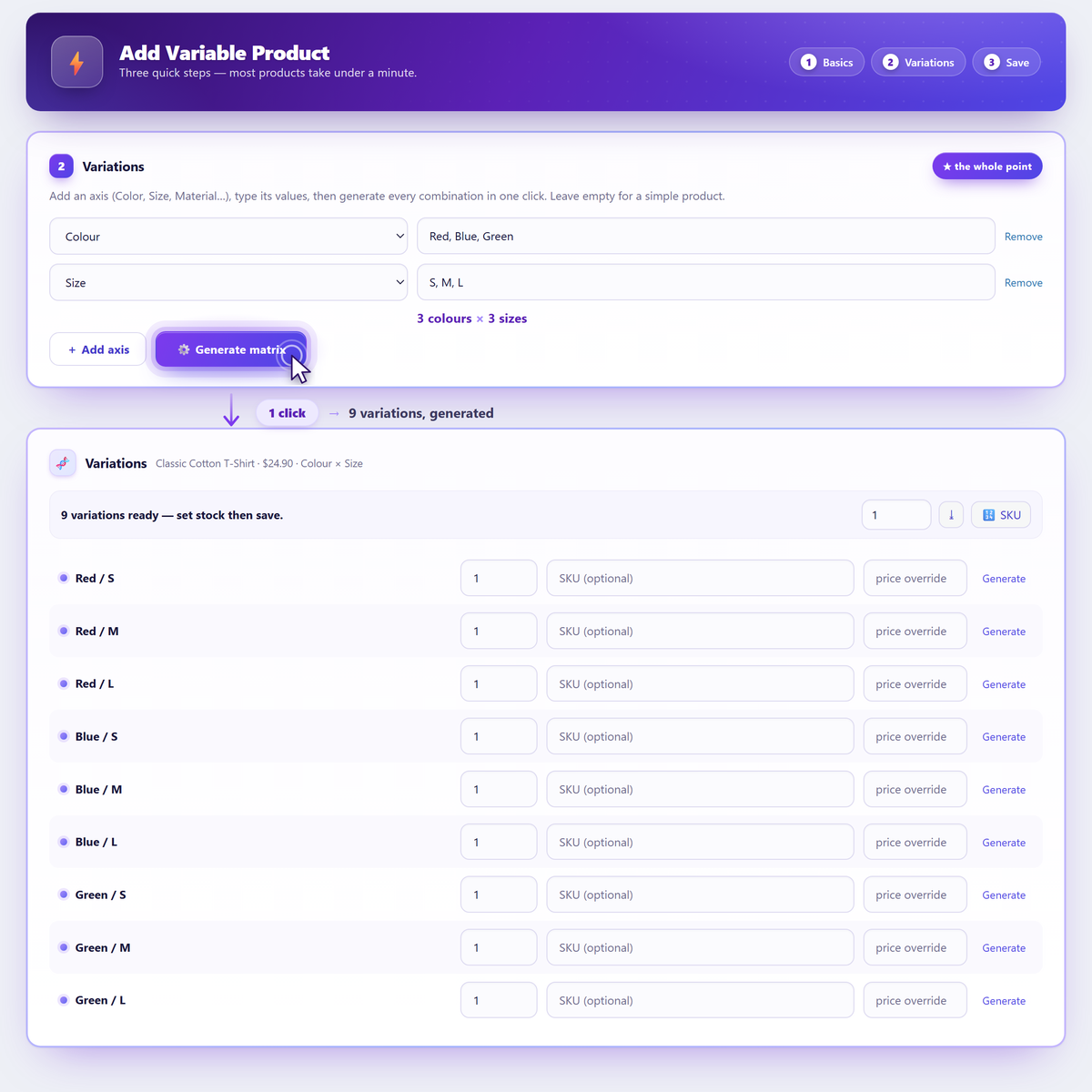
There is no CSV import or spreadsheet step in the free plugin. You type the attribute values and the variations are generated in place — you never leave WordPress.
Attributes & axes
Each attribute you add is an axis. The values you type on that axis are multiplied against the values on every other axis to produce the variation matrix.
- Use the attributes you already have. Every global product attribute defined under
Products → Attributes(Size, Colour, Material…) is available to pick. - Or create one on the fly. Add a new attribute right on the screen — no need to open the Attributes admin first (subject to the term-management capability above).
- Values map straight to variations. Two axes — Colour with three values and Size with three values — produce 3 × 3 = 9 variations, one per combination.
- Leave an axis blank for “Any”. An attribute added to the product but left without a specific value on a variation reads as Any in WooCommerce, exactly as a hand-built variable product would.
| Colour | Size | Result |
|---|---|---|
| red, blue, green | S, M, L | 9 variations (red/S, red/M, red/L, blue/S …) |
| red, blue | — (blank) | 2 variations, Size = Any |
| red, blue, green | S, M, L, XL | 12 variations |
Generating every combination
One press of Generate matrix builds the full cartesian product of all your axes at once — not a partial set you have to expand row by row.
WooCommerce's own editor asks you to generate variations in pages; Quick Variable Products creates the whole combination set in a single pass. A large product with many axes is no problem.
To protect your server from an accidental runaway request (say a typo that would create tens of thousands of rows), there is a safety cap — 1500 variations by default. Developers can raise it with a filter:
| Filter | What it does |
|---|---|
erenqvp_max_variations | Sets the maximum number of variations a single request may create. Default 1500. |
For example, to allow up to 3000 variations, drop this in a small plugin or your theme's functions.php:
add_filter( 'erenqvp_max_variations', function () { return 3000; } );
If a typed value can't be resolved to a term — for example a brand-new value the current user lacks permission to create — that single variation is skipped rather than saved as an over-broad “Any” combination that could merge with its siblings. The reported variation count reflects exactly what was created, so the number you see is the number you got.
Filling rows: stock, SKU, price
Once the matrix is generated, every variation is a row on the same page — no opening one variation form at a time.
- Per-row fields. Each row has its own stock quantity, SKU and an optional price override. Leave a row's price blank and it inherits the base price you set at the top.
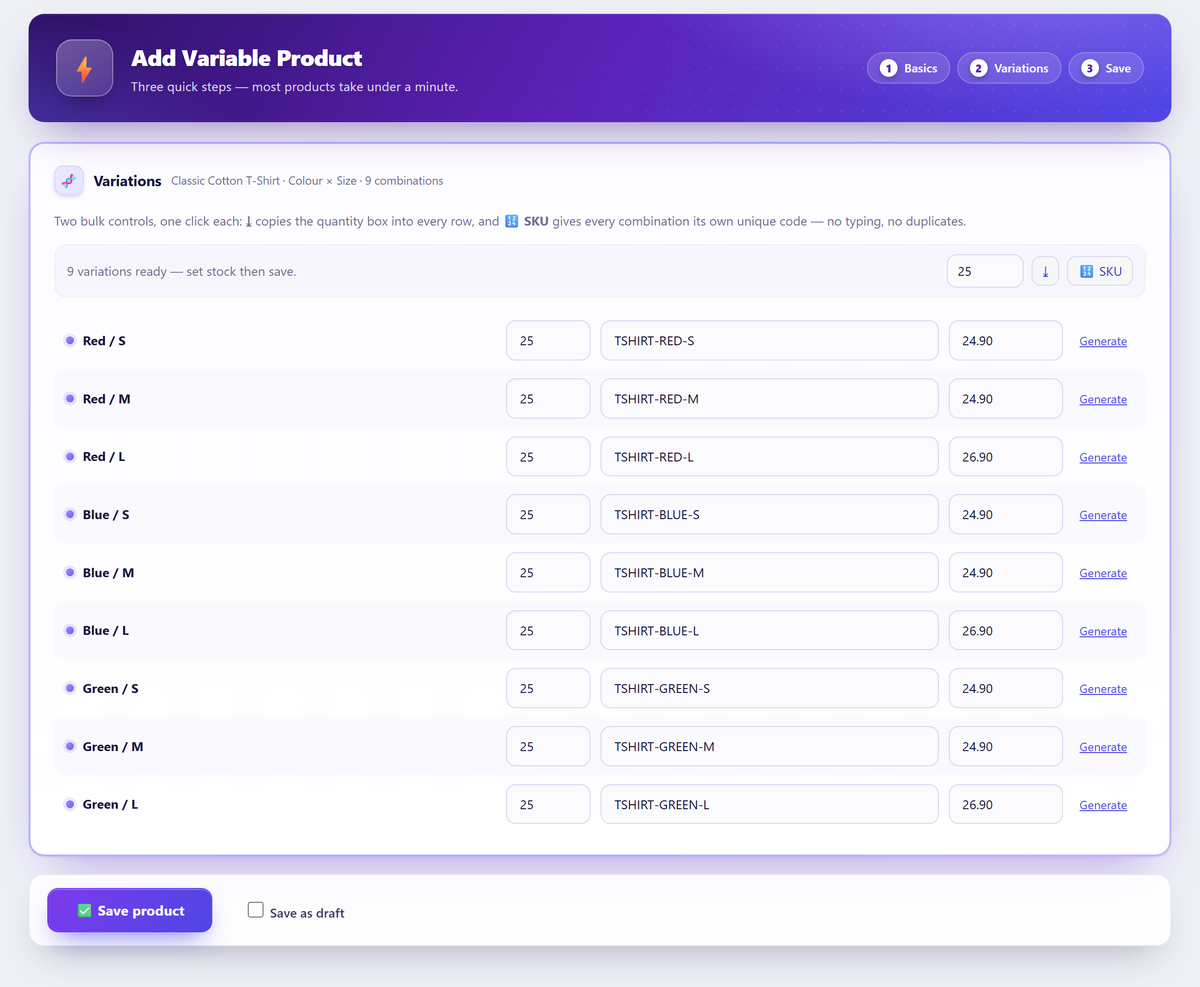
- Set all quantities. Fill one figure and apply it to every row at once, then adjust the exceptions by hand.
- Auto-generate SKUs. The built-in SKU generator can stamp a code onto every row in one click, or you can type your own when your codes follow a pattern.
- Barcode-friendly entry. Press Enter to jump to the next row, so a handheld scanner can walk the whole list without touching the mouse.
Per-variation images
Turn on the per-variation image option (it is off by default) and you can attach one photo to each value of a chosen axis while you create the product — one image for Red, one for Blue, one for Green.
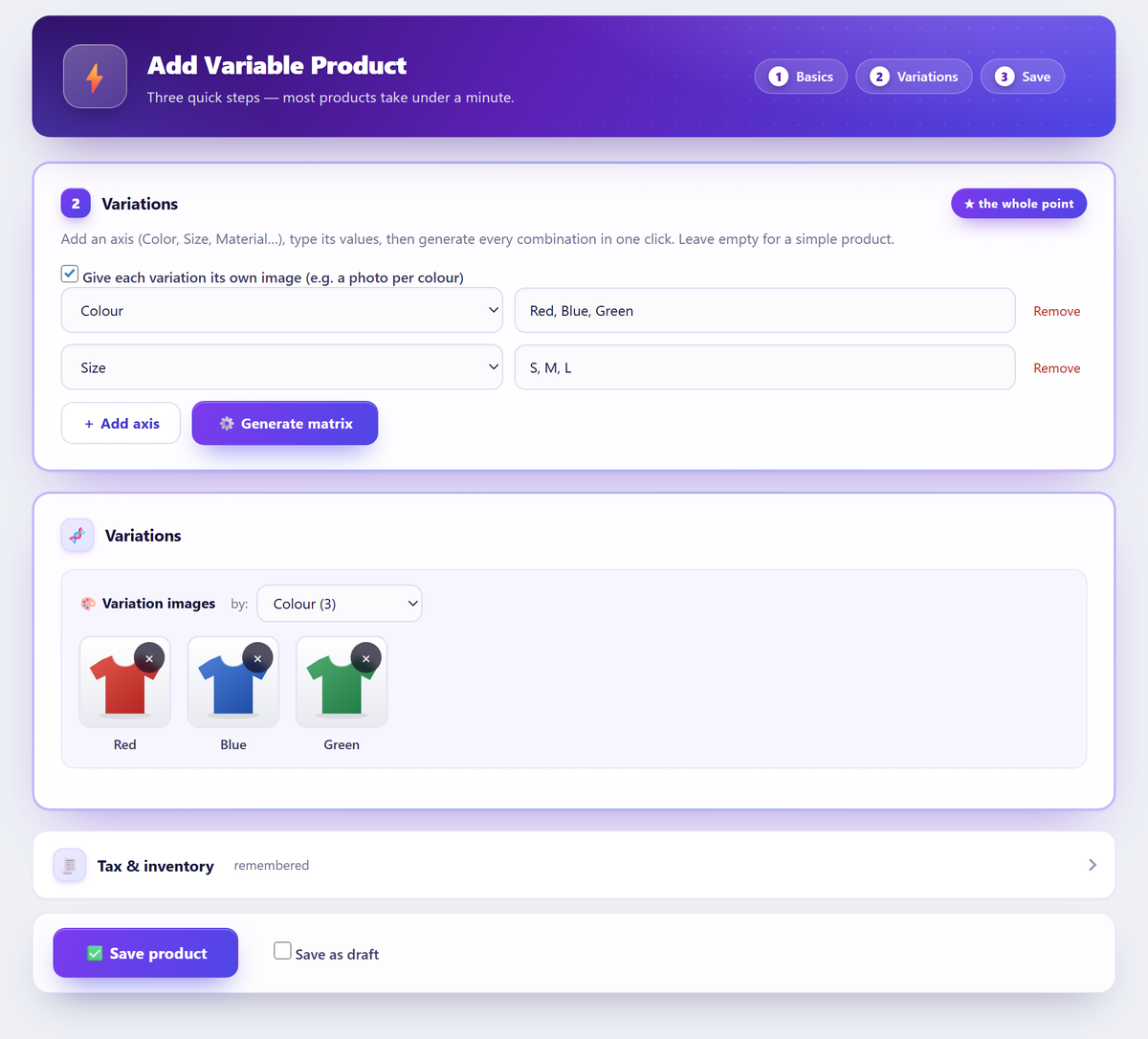
WooCommerce stores a single image per variation natively, and that is what this option assigns. If you need several photos for one value — a full gallery per colour — that is a PRO feature (galleries per value).
Shared stock pool
By default each variation manages its own stock. If your variations should instead draw from one shared quantity, opt in to the shared stock pool: a single figure is managed on the parent product and every variation deducts from it.
- WooCommerce-native. This uses WooCommerce's own parent-level stock management — no shadow inventory, no custom counters.
- When to use it. Good for products where the variations differ only cosmetically and all pull from the same physical pile, or where you simply don't want to track a separate number per variation.
- Confirm-guarded. Turning it on asks for confirmation, because it changes how stock is counted for the whole product.
Simple products
The same fast screen creates simple products too. Leave the attributes empty and press save — you get a plain simple product, entered just as quickly as a variable one.
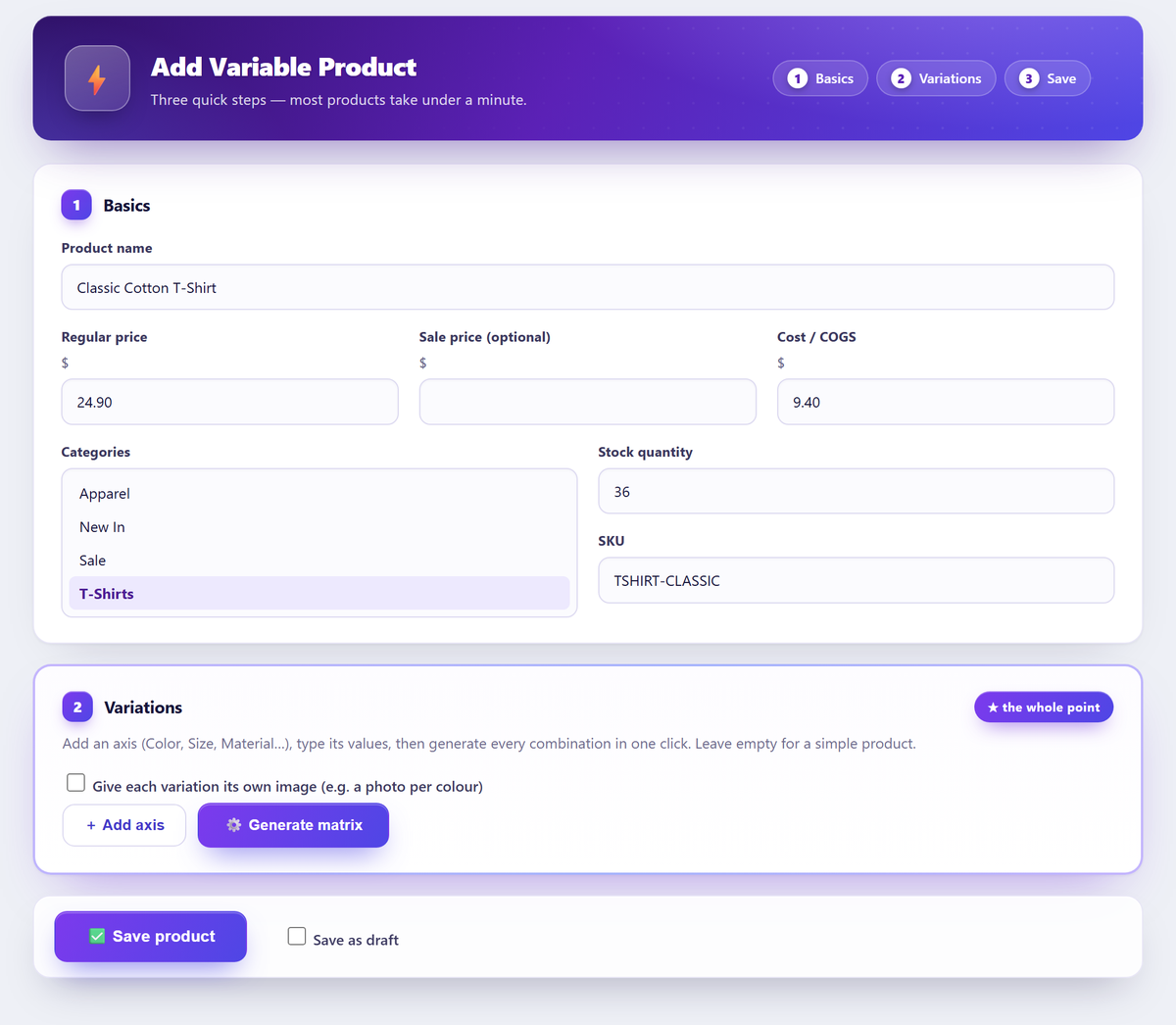
Simple or variable, the create screen carries the fields you actually reach for: cost / COGS, tax, inventory, shipping, categories, tags and brand.
Compatibility & safety
Everything the plugin makes is a standard WooCommerce product — there is no lock-in.
- Standard products, standard tables. Variations are written through the WooCommerce API into the normal product tables, so the WooCommerce editor, reports, feeds and every other extension treat them like any other product.
- Deactivate-safe. Turn the plugin off and everything you created stays exactly as it is.
- Admin-only, HPOS-compatible. Zero storefront footprint, and it works with High-Performance Order Storage and the standard product editor, so anything you make can still be edited the usual way.
While a product and its variations are written, the plugin briefly detaches core post hooks so one broken third-party save_post callback cannot abort the loop and leave you with a partial product. It then re-fires the key hooks once for the finished product, so Yoast, Rank Math, WPML, Polylang and search indexers still process it normally.
Free vs Pro
Everything marked FREE is in the plugin on WordPress.org, with no limits and no locked buttons. Quick Variable Products Pro is a separate add-on (distributed through Freemius) that adds a catalog operations workspace for stores that also need to change products they already have.
| Capability | Free | Pro |
|---|---|---|
| Create screen: any attributes, generate every combination, stock/SKU/price per row | Yes | Yes |
| One image per variation | Yes | Yes |
| Built-in SKU generator | Yes | Yes |
| Shared stock pool | Yes | Yes |
| Simple products from the same screen | Yes | Yes |
| Cost/COGS, tax, inventory, shipping, categories, tags, brand | Yes | Yes |
| Admin-only, HPOS, standard WooCommerce products | Yes | Yes |
| Add variations to products that already exist | — | Yes |
| Bulk edit variation prices & stock across the catalogue | — | Yes |
| Extend one attribute across many products (preview + undo) | — | Yes |
| Galleries per value (several photos for one value) | — | Yes |
| Smart views (on sale, no cost, low margin, low stock, missing SKU) | — | Yes |
| Exact dry-run before → after preview | — | Yes |
| Conflict-safe undo of any recent run, with run history | — | Yes |
| Saved filter + operation recipes and reusable templates | — | Yes |
| CSV import / export | — | Yes |
Pro is its own add-on that requires and extends the free plugin — it does not replace it. Your create-fast screen keeps working exactly as before; Pro simply adds the catalog workspace next to it.
Data, privacy & uninstall
- No custom tables. Products and their meta are stored the standard WooCommerce way. The plugin keeps only a handful of its own options and a per-user preferences record for the create screen.
- Uninstall is tidy. Deleting the plugin removes its own options and user preferences. The products you created stay — they are ordinary WooCommerce products and are not the plugin's to remove.
- Freemius is opt-in. The optional connection to Freemius powers Pro licensing, updates and checkout. Nothing is sent unless you click “Allow & Continue” during the optional opt-in; skip it and no data is transmitted.
Only if you allow it: non-sensitive environment data — site URL, WordPress and PHP versions, active theme/plugins and your admin email — to enable licensing and updates. See the Freemius Privacy Policy.
Troubleshooting
My attributes don't appear in the list
The screen lists every global product attribute defined under Products → Attributes. If yours is missing, define it there first — or create a new attribute right on the create screen.
Creating brand-new attributes and terms inline needs the product-term management capability. If the “create new” option is missing for your user, that capability is what's absent.
Some rows weren't created
A variation is skipped when its typed value can't be resolved to a real term — most often a brand-new value the current user lacks permission to create. The plugin skips it cleanly rather than saving an over-broad “Any” row, and the count it reports is exactly what was created.
Fix it by creating the term first under Products → Attributes, or by using an account with the product-term management capability, then generate again.
I need more than 1500 variations
1500 is a safety cap, not a hard ceiling. Raise it with the erenqvp_max_variations filter (for example return 3000;), or split the product into smaller batches and generate more than once. The cap only exists to stop an accidental runaway request.
A variation shows no image
Per-variation images are single-image: WooCommerce stores one photo per variation. Turn on the per-variation image option and assign one photo per attribute value. If you were expecting several photos for a single value, that's a gallery — galleries per value are a PRO feature.
Can I add variations to a product that already exists?
Not in the free plugin — it is focused on creating new products fast. Pro adds an “add variations to existing products” tool, plus a catalog editor that can bulk-edit variation prices and stock across many products at once.
Do I need a CSV import or a spreadsheet?
No. There is no CSV import or export in the free plugin — you type the attribute values and the variations are generated in place. (Pro adds CSV import/export for stores that want it.)
Are the products it creates normal WooCommerce products?
Completely. Variations are written through the WooCommerce API into the standard tables, so the product editor, reports, feeds and other extensions treat them like any other product. Deactivating the plugin changes nothing about products you already created.
Will it slow down my shop or clash with my SEO plugin?
No. The plugin is admin-only with no storefront scripts, styles or queries. And because the key post hooks are re-fired once for the finished product, Yoast, Rank Math, WPML, Polylang and search indexers process what you create normally.
Get support
Stuck on something the docs don't cover? We'd rather hear about it than have you guess.
- Free users: the support forum on WordPress.org.
- Pro users: priority email support — support@erenlabs.net.
Telling us your WordPress and WooCommerce versions, how many axes and values you were generating, and what you expected to happen gets you a useful answer on the first reply. The plugin page lives at wordpress.org/plugins/quick-variable-products.