Blind Stock Counts: Why a Stock Audit Has to Be Blind
A stock audit proves nothing if the counter can see the expected quantity. What a blind count changes, when to insist on one, and how to run one.
Updated

In this article11 sections
Here is an uncomfortable question about your last stock count: how much of it was counting, and how much was confirming?
If the screen showed Expected: 100 while someone counted the shelf, you don’t fully know. That’s the problem a blind stock count solves — it hides the expected quantity so the person counting records what they actually find, not what the system suggested they should find.
It costs nothing to switch on, it’s a checkbox, and it is the cheapest change that makes the resulting numbers worth anything.
The exercise itself goes by different names depending on where you trade — a stock audit in Australia and the UK, an inventory audit or a physical inventory count in the US — and in all of them the same small question decides what the result is worth: could the person counting see the number they were supposed to be checking?
What a blind count is#
In a normal (open) count, the counter sees the system’s expected quantity next to each product and types what they counted. In a blind count, that expected number is hidden. The counter enters a figure with nothing to compare it against; the variance is calculated afterwards, by the system, out of their sight.
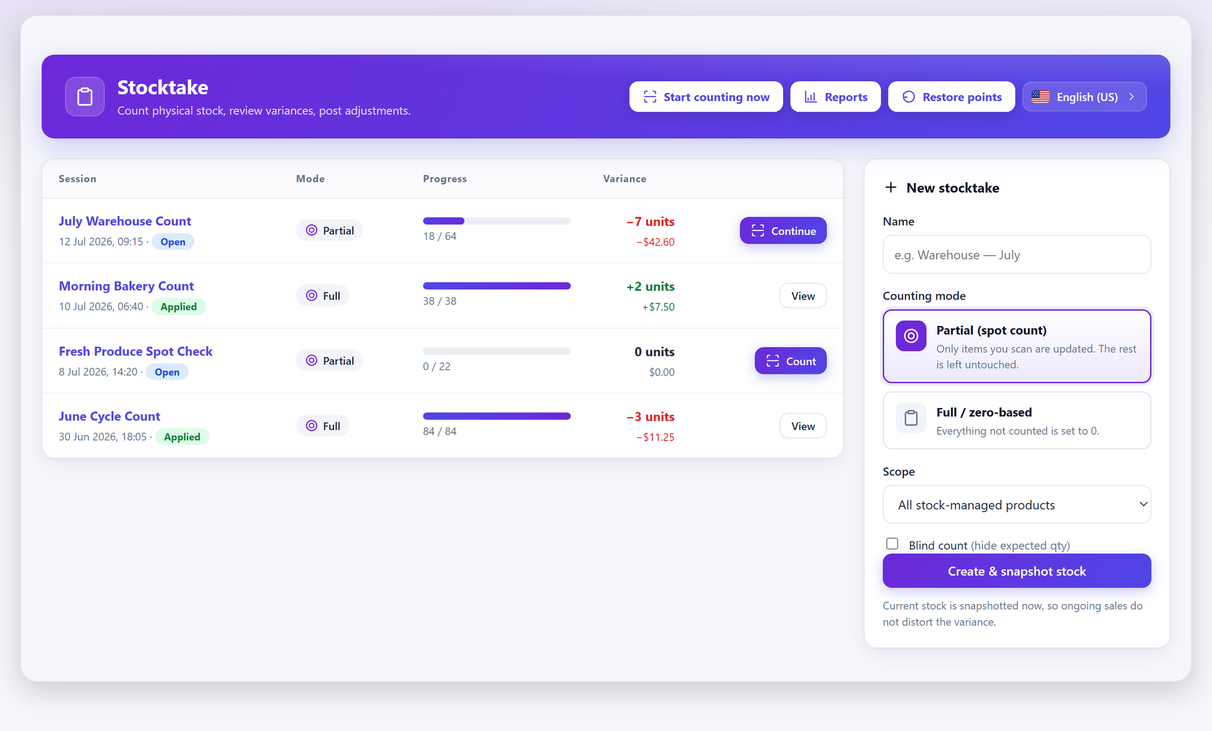
That’s the whole mechanic. Everything interesting about it is what happens in the counter’s head.
The bias you’re removing#
Nobody sets out to fake a count. What happens is subtler and much more common.
When a number is on screen before you start, it stops being a record and becomes a hypothesis. Counting turns into checking whether the hypothesis is right. And checking behaves differently from counting in three specific ways:
- You stop early. Counting a bin of small items, you reach 97, 98… the screen says 100, and the remaining ambiguity resolves upward. Not dishonestly — the brain treats “close to the expected value” as “the expected value”.
- You don’t recount. If your count matches, you move on. If it doesn’t, you count again. So mismatches get scrutiny and matches don’t, which systematically pushes results toward the system number.
- You resolve ambiguity in the system’s favour. Is that opened box a unit or not? Does the damaged one count? With a target on screen, those judgement calls land wherever they need to land.
None of this requires a bad employee. It happens to owners counting their own stock, which is worth remembering before you decide you don’t need blind counts because you trust your team.
What an open count actually measures#
Here’s the part that makes blind counting more than a nice-to-have.
Suppose you run an open count and it comes back with almost no variance. What have you learned? Two explanations fit that result equally well:
- Your stock records are accurate.
- Your counters confirmed the numbers on screen.
An open count cannot distinguish between them. A clean result is exactly what you’d expect in both cases, which means the result carries no information. You’ve spent a day counting and learned nothing you didn’t assume at the start.
A blind count is an independent measurement. When it comes back clean, that’s a real finding.
When a blind count matters most#
- Anyone other than you is counting. Not because of suspicion — because you can’t audit a judgement call you didn’t watch.
- The count has consequences attached. A loss investigation, a year-end figure that goes to an accountant, anything connected to someone’s performance. The moment a count can produce a bad outcome for the counter, an on-screen “correct answer” is an invitation.
- High-value lines. The items where a two-unit discrepancy is worth investigating are exactly the items where you need the count to be independent.
- You suspect something and want to know. If you already believe stock is walking out, an open count will very politely tell you it isn’t.
When not to bother#
Blind counting is not a moral obligation. Skip it when:
- You’re checking a delivery against a packing note. You’re verifying a specific document, not measuring your stock position — the expected number is the point.
- You’re doing a five-item spot check on something you’re about to reorder, on your own, and speed matters more than rigour.
For anything that ends up in a report, count blind.
The cost: blind counts are slower, and that’s the point#
Be honest with yourself about the trade-off. A blind count takes longer, and it produces more variances to review — some of which are real discrepancies and some of which are ordinary counting errors that an open count would have silently absorbed.
That extra review work isn’t waste. It’s the information an open count was hiding from you. But it does mean you need a rule for what happens next, and you need it before you start.
Here is a threshold set that works in a small shop. Treat it as a starting point rather than a standard — the right numbers depend on what you sell and how it is packed:
| Line value | Recount when the variance exceeds |
|---|---|
| Low-value, high-count lines | 5 units, or 10% of the counted figure, whichever is larger |
| Mid-value lines | 2 units |
| High-value lines | 1 unit |
| Serialised stock, or anything kept locked up | Any variance at all |
Two rules make that table work. The recount is done by a different person, and it is blind again: a recount with the first figure on screen is the same failure one level down. In the free plugin the second pass is another blind session and a note you keep yourself — recording a recount as a recount, with an approval step, is Pro.
Write it down. The reason to fix the threshold beforehand is that “recount the ones that look wrong” reintroduces exactly the bias you just removed — one level up, at the supervisor. If you only recount results you dislike, you’ll converge on the system’s numbers again, just more slowly. The percentage floor on cheap, high-count lines is the other half of that: it stops you recounting a bin of screws over a rounding error.
How to run a blind count in WooCommerce#
In Stocktake for WooCommerce, blind count is a per-session toggle set when you create the session — Blind count (hide expected qty). It’s included in the free version.
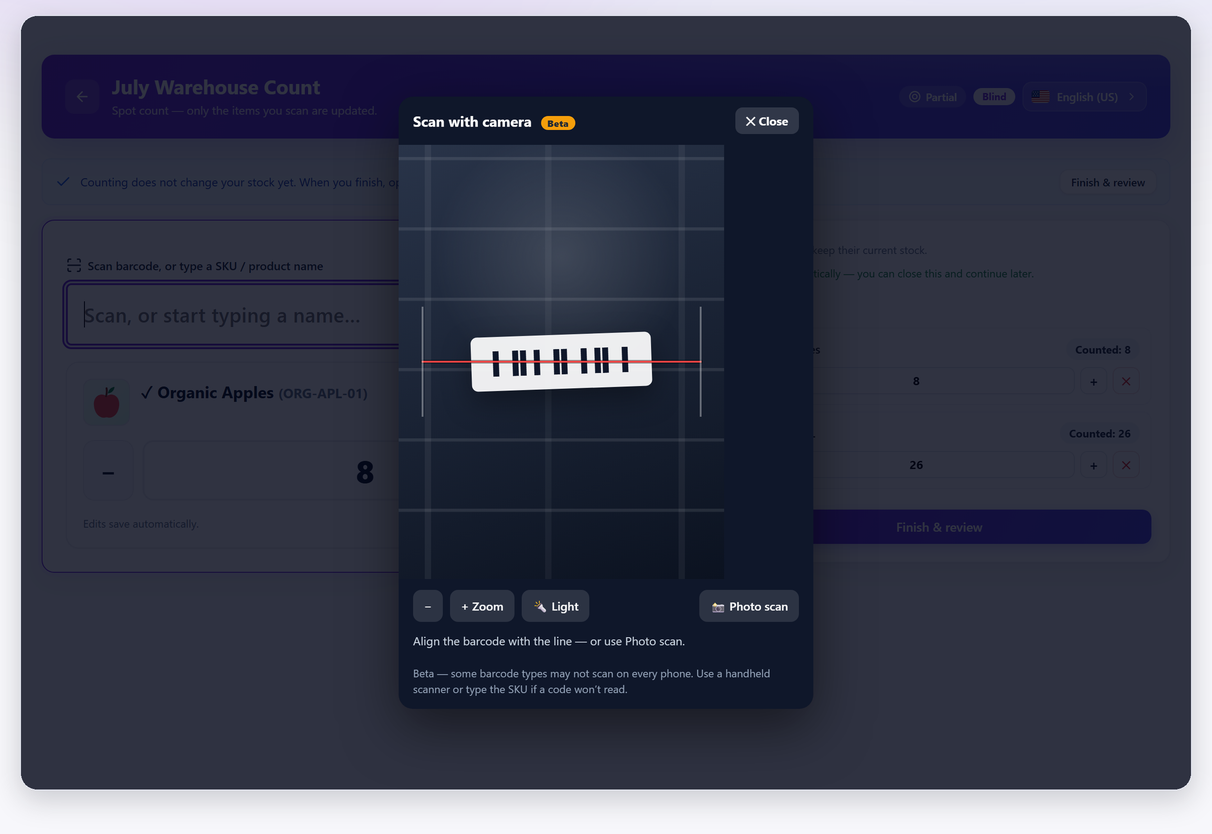
Scanning still works exactly the same way: a recognised barcode counts the item on the spot, scanning again adds on top. The counter simply never sees what the system thought. A session can also be paused and resumed, and the expected figure stays hidden across the gap — worth naming, because an interrupted count is the moment a counter is most likely to go and look something up.
The variance appears when you finish and open the review — expected against counted, with the differences and their value, all calculated after the counting stopped. From there it’s the same as any other count: review, investigate the outliers, then apply.
A practical sequence for a store with staff:
- Create the session with blind count on, scoped to one section.
- Whoever is counting works through it without ever seeing wp-admin’s product screens.
- You open the review, apply your recount threshold, and send the outliers back for a second count — by someone else if you can.
- Apply the adjustment once you believe the numbers.
Step three is the one with no method attached, so here is the method. A blind count produces more variances than an open one by design, and most of the extra ones are not losses. Rule out three ordinary explanations before you write anything down as shrinkage:
- An order that landed while you were counting. The expected figure is a snapshot taken when the session was created, not a live number, so anything sold since then reads as a shortfall — orders arriving during a stock count covers how to handle the overlap.
- Goods received but not yet booked in. A delivery sitting on the floor and not in WooCommerce reads as a surplus, and it is the easiest of the three to spot: the whole line is over rather than under.
- A systematic cause rather than a missing unit. A bad CSV import, or variation stock managed at the parent instead of the variation, shows up as the same signature repeating across dozens of lines rather than as one odd shelf — the usual reasons WooCommerce stock levels go wrong is the checklist for that.
What survives all three is your real number, and a blind count is the only kind you can honestly build one from — an open count tends to return the figure you already had. Turning what survives into a shrinkage figure takes it from there. And if the session covers sizes, colours or flavours rather than single products, counting by variation is where blind counting earns the most: adjacent variations of the same product are the easiest thing in a shop to count into the wrong row.
Four places the expected quantity leaks anyway#
Step two above says the counter works without ever seeing wp-admin’s product screens, and that sentence quietly contains the harder half of the job. Stocktake hides the expected quantity inside its own count screen. WordPress and WooCommerce carry on printing it in four other places, and any one of them hands the answer key back to the person you were keeping it from.
- The Products list in wp-admin. The Stock column prints In stock (37) on every row, so a single screen gives away the expected figure for a whole page of products at once, and the search box narrows it to whatever the counter is standing in front of.
- The product edit screen, and Quick Edit. The same number, one product at a time. Quick Edit shows it without even opening the product.
- The shop front. If WooCommerce → Settings → Products → Inventory → Stock display format is set to Always show quantity remaining in stock, every product page prints “37 in stock” to anybody with a phone. No login needed.
- Low-stock emails, and WooCommerce → Reports → Stock. The emails quote quantities to whoever is on the notification address, and the stock report lists them for anyone who can open WooCommerce’s reports at all.
Close the shop front first, because it is the only one of the four with a complete fix, and the fix needs no code: set Stock display format to Never show quantity remaining in stock for the duration of the count. It has to be the setting rather than anything cleverer. A counter walking the aisles is looking at your shop on their own phone, signed out, so nothing that depends on who is logged in reaches them.
The Products list is next, and this one does want a snippet. If your counters have a role of their own — say stock_counter — you can take the Stock column away from it:
add_filter( 'manage_edit-product_columns', function ( $cols ) {
    if ( in_array( 'stock_counter', (array) wp_get_current_user()->roles, true ) ) {
        unset( $cols['is_in_stock'] );
    }

    return $cols;
}, 20 );
That hides the column, not the number. The product edit screen and Quick Edit still carry it, so the snippet is only worth having alongside a role that cannot open a product for editing in the first place.
And that is where the honest limit sits. Counting screens in WooCommerce sit behind the same administrative capability as the rest of WooCommerce, and that capability is also what opens Reports → Stock. Role separation gets you most of the way, not all of it. Before you rely on it, sign in as your counter’s role once and walk the menus yourself.
None of this is a complaint about the plugin, and none of it is something a plugin setting could fix. Stocktake hides the expected quantity inside its own count screen; it does not hide stock from the rest of WordPress, and it does not claim to. Isolating a counter is a WordPress roles job — and it is the half of a blind count that nobody does for you.
What makes it an audit rather than a count#
A count becomes an audit at the point where somebody else can check it. That is a paperwork question rather than a counting one, and it is easier to answer before the accountant, the insurer or head office asks than afterwards.
Five things make the record checkable, and the free plugin produces all five:
- The session itself, with its date and its scope — what was counted, and what was deliberately left out.
- The fact that blind mode was on, sitting in the session list rather than in your memory. The dashboard shows the mode, progress, variance and value of every session, which makes it a record rather than a claim.
- The count sheet exported to CSV before the adjustment is applied, unedited, showing the figures as they were counted.
- The variance in units, and in money — though the value column only means anything once WooCommerce’s cost of goods data is filled in, so check that before you quote a figure to anyone.
- The restore point Stocktake takes automatically just before an apply, which is what lets you show what stock looked like before you corrected it.
Three things stop at the free version, and it is worth knowing which before you promise them to anybody: attribution, meaning who counted which lines; a recount recorded as a recount rather than as a decision you remember making; and a kept trail of past applies rather than a single undo. Those three are Pro features. The free plugin gives you the count, the blind mode, the export and the restore point.
None of it replaces an auditor’s own test count, and none of it makes the result a certified stock audit. What it gives you is a count somebody else can check — which is the whole difference between a number you produced and a number you can defend.
Making the result stick#
One blind count tells you where you are. Two tell you which direction you’re going, and that’s the number worth managing. Export the count sheet each time and compare the variance value between sessions — if it’s shrinking after you changed a receiving process, the change worked.
If you want the whole workflow rather than just this one setting, the full stocktake guide walks through snapshot, count, review and apply from start to finish.
Blind count FAQ#
What is a blind stock count?
A count where the system’s expected quantity is hidden from whoever is counting. They enter what they find with nothing to compare it against, and the variance is calculated afterwards. The alternative, an open count, shows the expected figure next to each product.
Does blind counting mean I do not trust my staff?
No. The bias it removes is not dishonesty, it is the ordinary human tendency to treat a number on screen as the answer and the count as a confirmation. It happens to owners counting their own stock just as reliably as it happens to anyone else.
Is a blind count slower?
Yes, and it produces more variances to review, some of which are ordinary counting errors rather than real discrepancies. That extra review work is the information an open count was hiding from you, but you should budget for it.
Should I recount every variance?
Set a threshold before you start — for example any variance over five units or over a set value gets a second count, ideally by a different person. Deciding what to recount after you have seen the results reintroduces exactly the bias you removed, one level up.
Is blind count available in the free version of Stocktake?
Yes. It is a per-session toggle set when you create the stocktake, and it is included in the free plugin on WordPress.org.
Is a blind count the same as a stock audit?
Not quite. A stock audit is the whole exercise: verifying what the records say against what is physically on the shelf, and producing a record somebody else can check. Blind counting is the one mechanic that makes the verification independent, which is why an audit run with the expected figures on screen is not really an audit.
Can the person counting see the expected quantity somewhere else?
Yes, unless you stop them. Stocktake hides the expected figure inside its own count screen, but it does not hide the Stock column in the wp-admin product list, the product edit screen, or the quantity printed on the shop front. Switch the stock display format so it never shows the quantity remaining for the duration of the count, and keep counters out of the product screens. The four places it leaks are listed above.
When should I not use a blind count?
When you are checking a delivery against a packing note, because there the expected number is the whole point of the exercise. Also for very small solo spot checks where speed matters more than rigour. For anything that ends up in a report, count blind.