Orders During a WooCommerce Stock Count: What Apply Writes
Sales during a WooCommerce stock count look after themselves — the snapshot sees to that. Goods arriving do not. What an apply writes, and when to close.
Updated

In this article12 sections
Here is the question that stops most shop owners before their first stocktake, and it is a good question: if I count a shelf at 10am and three of those items sell at 11am, what happens when I apply my count?
The fear is specific. You counted 40. Three sold. WooCommerce now says 37. You press Apply with your 40 in hand, and the software writes 40 — silently undoing three real sales and putting stock back on the shelf that has already left the building.
If that were how counting worked, nobody could ever count without closing, and running a stocktake without shutting the shop would be marketing rather than method. It is worth being precise about why it is not, because the answer changes what you have to plan for. Sales during a count look after themselves. Goods arriving during a count do not — and that is the cut-off problem worth your attention.
The fear, stated precisely#
Every guide that tells you to “count outside trading hours” is dodging this rather than answering it. So let us set it out properly, because the shape of the problem determines the shape of the fix.
A stock count produces one number per line: what is physically there. WooCommerce holds a different number: what it believes is there. The gap between them is the variance, and the variance is the entire point of counting.
The trouble is that both numbers move. Your physical count moves as you walk the shelf. WooCommerce’s number moves every time somebody buys something. If the software compared your count against whatever the live figure happened to be at the moment you pressed Apply, the variance would be part shelf-truth and part accident of timing — and worse, applying it would overwrite the sales.
So the mechanism has to separate the two. It does.
What “expected” actually means: the snapshot#
When you open a counting session, the expected quantities are frozen at that moment. That frozen set is the snapshot, and it is what your counted numbers are compared against for the rest of the session — not the live stock figure, which carries on moving.
The product says so on the session-creation screen itself, in the note under the scope selector:
Current stock is snapshotted now, so ongoing sales do not distort the variance.
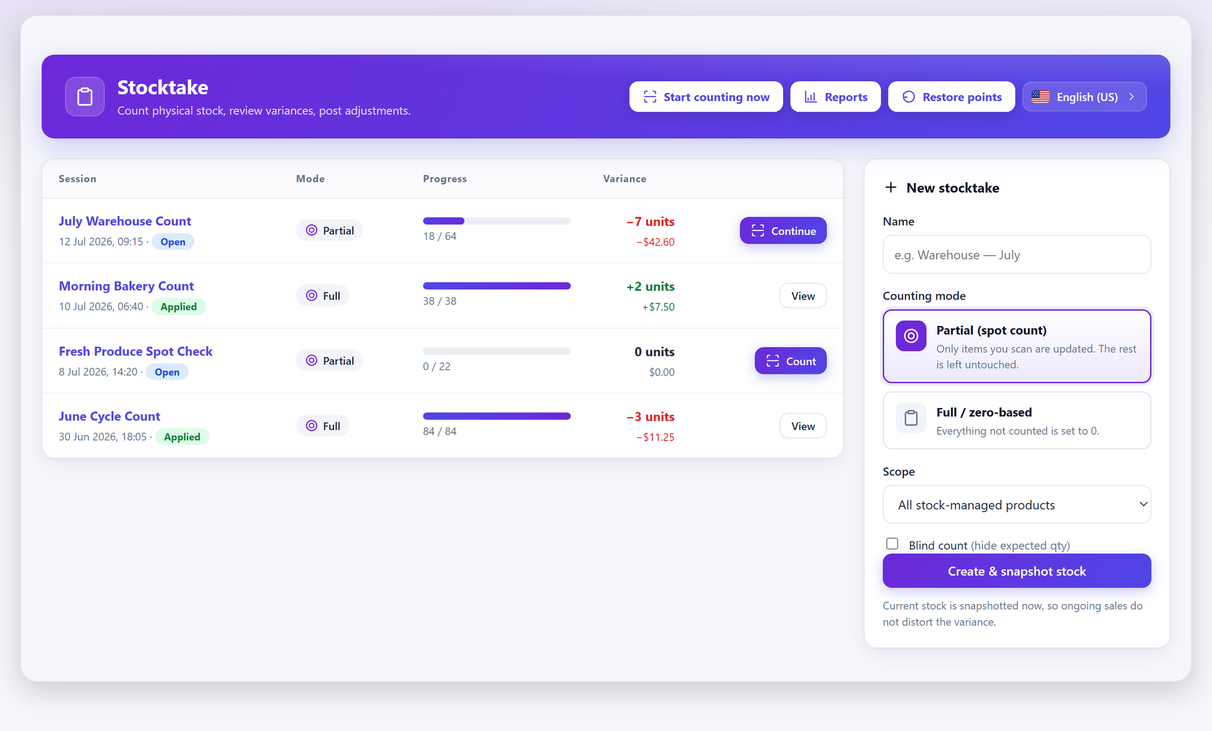
That single sentence is the difference between a count you can run on a Tuesday afternoon and a count that needs the shutters down. Free versions of the plugin list it as count while the store keeps selling (snapshot variance), which is the same commitment written from the other direction.
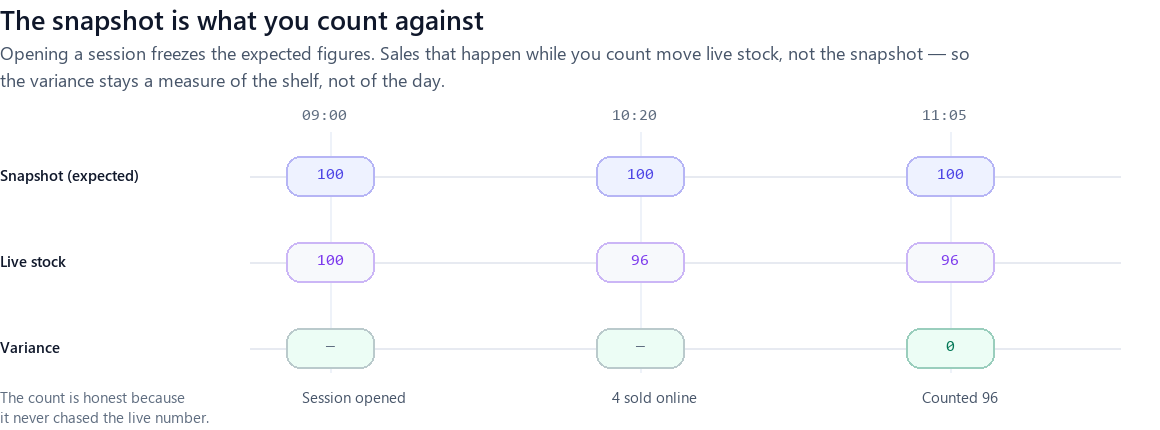
Read the middle lane and the top lane as two independent things and the whole worry dissolves. At 09:00 the session opens and expected is fixed at 100. At 10:20 four sell, so live stock drops to 96 while expected stays at 100. At 11:05 you count 96 and the variance is zero — correctly, because the shelf agrees with the system once you account for the four that left.
Why the variance stays honest while the shop trades#
There is a subtlety here worth drawing out, because it is the bit that makes people nervous even after they have understood the snapshot.
The variance is not “count minus snapshot”. If it were, every sale during the session would show up as a shortfall, and a busy afternoon would look identical to a theft problem. What you want the variance to answer is narrower: after allowing for everything the system already knows about, is the shelf still wrong?
Sales are something the system already knows about. They moved live stock through WooCommerce’s own machinery, they are recorded against orders, and they need no help from you. The count’s job is to find the movements nobody recorded — the breakage, the mis-picks, the returns that were never processed, the two units that walked out of the door. Those are the movements that turn into a shrinkage figure once you have counted enough times to see a pattern.
That is why the arithmetic works out to zero in the diagram above, and why it should. A count that reported “−4” there would be reporting the shop’s normal Tuesday as a loss.
What the apply actually writes#
This is the step people picture going wrong, so it deserves to be described plainly.
Applying a session does not blast your counted numbers over the catalogue. It works line by line, and for each line it asks whether the count found something the system did not already account for. Lines you did not count are not touched at all — the report is explicit about this, and says so on screen:
Uncounted items keep their current stock.
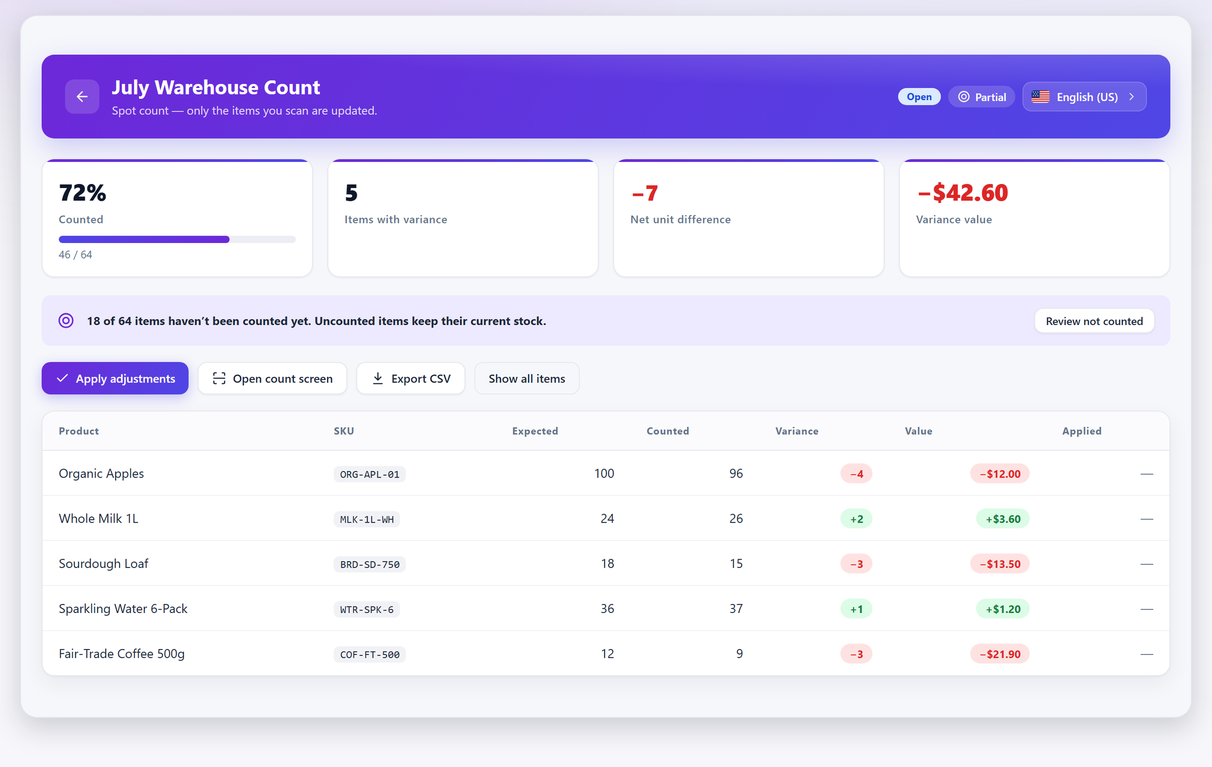
That last point is worth pausing on, because it is the difference between a partial count and a catastrophe. In a zero-based or full count, anything you did not find is genuinely zero, and that is the mode you choose when you have swept everything. In a partial or spot count, silence means “I did not look”, not “there are none”. Choosing the wrong one is the single most destructive mistake available on this screen, and it has nothing to do with orders arriving mid-count.
You pick that mode when you create the session, alongside the blind-count option. It is a per-session decision precisely so that it cannot become a global setting you forget you switched on — the same reasoning behind hiding the expected quantity from whoever is counting.
The real cut-off problem is not orders — it is goods arriving#
Here is where the honest answer stops being reassuring.
Sales are safe because they flow through WooCommerce. A delivery is not, because for the window between the van arriving and somebody booking it in, those units exist on your floor and in no system at all. If they reach the shelf before you count that shelf, you will count them, and your count will legitimately exceed a snapshot that never knew about them. The plugin cannot help you here, because there is nothing for it to know.
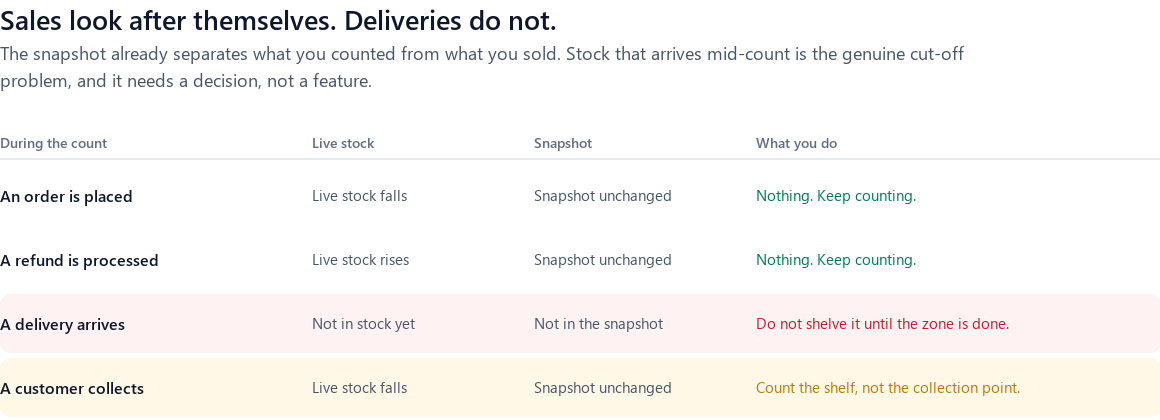
Three rules cover essentially every case:
- Deliveries: do not shelve into a zone you have not finished. Park the pallet, count the zone, then put the goods away. If that is impossible on your floor, book the delivery in before you start counting so the snapshot includes it, and count normally.
- Returns and refunds: process them, then carry on — but check the restock box. WooCommerce only puts a refunded unit back into stock if Restock refunded items is ticked in the refund dialog. Ticked, a refund is a sale in reverse and needs nothing from you. Unticked, the unit is on your shelf and in nobody’s records, which makes it an unbooked delivery in disguise — give it the delivery rule. A physical return sitting in a returns tray that nobody has processed is the same thing again.
- Click-and-collect: count the shelf, not the collection point. An order that is picked but not handed over has already left live stock. If the box is sitting behind the counter and you count it as shelf stock, you will invent a surplus that does not exist.
None of these need software. They need somebody to say them out loud before counting starts, which is the actual reason counts go wrong far more often than any technical mechanism.
The mirror image: stock that has left the system but not the shelf#
There is a second cut-off case, and it catches online shops rather than shops with a stockroom. It runs in the opposite direction to a delivery. It is not goods that arrived without being recorded — it is goods that were deducted without leaving.
WooCommerce does not reduce stock when an order is placed. It reduces stock when the order reaches a status that means the sale is real: payment complete, processing, on-hold or completed. Before that, a customer sitting in the checkout has the units reserved in a separate table rather than deducted — the product’s stock figure has not moved at all, and if the basket is abandoned it never will. Cancel an order or let an unpaid one expire and the units come back the same way.
So an order that is paid but not yet picked is already gone from the numbers and still sitting in your bay. If it was paid before your session opened, the snapshot has let it go too, and when you count that bay you will count a unit that belongs to somebody else. The variance shows a surplus of one. The surplus is real in the sense that the unit is physically there. It is simply not yours to sell.
Apply that surplus and you have put a customer’s goods back on sale. Somebody buys it, and the order that follows is the one you cannot fulfil — which is a worse outcome than the miscount you were trying to fix.
The rule is one line: count what you can still sell. Anything committed to a customer — picked, packed, waiting for the courier, waiting behind the counter — belongs on a bench that sits physically outside every count zone. That is a shelving decision rather than a software setting, and it is the single change that makes an online shop countable during trading hours. A shop that picks straight off the shelf as orders arrive meets this ambiguity on every count; a shop that pulls to a bench never meets it again.
The same logic settles the case that sounds hardest, which is a paid order whose units are still sitting in the aisle. If it was paid during the session, the arithmetic looks after itself: the sale moved live stock, the snapshot kept the unit, you counted the unit, variance zero. If it was paid before the session opened, the snapshot has already released it and counting it invents stock. Notice that the correct action depends on a timestamp you cannot see from the shelf — which is exactly why the answer is to move the goods, not to remember the rule.
Every event that can happen mid-count, and what it does#
This is the summary sheet. Live stock is the figure WooCommerce is trading on; snapshot is the frozen expected figure your count is measured against.
| What happens during the session | Live stock | Snapshot | What you do about it |
|---|---|---|---|
| A sale, online or at the till | Falls | Unchanged | Nothing |
| An order is cancelled, or an unpaid one expires | Rises | Unchanged | Nothing |
| A customer is in the checkout but has not paid | Unchanged — reserved, not deducted | Unchanged | Nothing |
| A refund with Restock refunded items ticked | Rises | Unchanged | Nothing — but put the unit back on the shelf before you count that bay |
| A refund with that box left unticked | Unchanged | Unchanged | The unit is on the shelf and in no record: treat it as an unbooked delivery |
| A delivery booked in mid-session | Rises | Unchanged | Do not count those units, or book the delivery in before you open the session |
| A delivery shelved but not booked in | Unchanged | Unchanged | The genuine cut-off problem. Park the pallet until the zone is finished |
| A picked order waiting on the pack bench | Already fell | Already excludes it | Do not count the bench |
| Somebody edits a stock field by hand | Moves | Unchanged | Stop them — see below |
Only two rows there need anything from you, and neither is a sale. The last one deserves saying out loud, because it is the one case where the mechanism works perfectly and the outcome is still wrong. A hand edit is a movement WooCommerce recorded, so it is treated exactly like a sale and survives the apply — correct behaviour, bad result, because a hand edit is almost always somebody correcting the very shelf you are counting. The shelf then gets corrected twice: once by them, once by you. If a session is open on a zone, nobody edits stock in that zone — and if one of those hand edits looks as though it did not save, that has its own set of causes. That rule needs enforcing rather than explaining, and it is the reason a count with three people on the floor is safer than a count with three people on the floor and one in the admin screen.
Counting a zone that is being picked from#
A shop that is genuinely busy has one more wrinkle: staff pulling stock out of the very bay you are counting.
The answer is not a rule about orders. It is a rule about sequence: finish a bay before anyone else touches it. That is easy to arrange in practice, because counting a bay takes minutes, not hours — which is exactly why counting in zones is the technique that makes trading-hours counts practical.
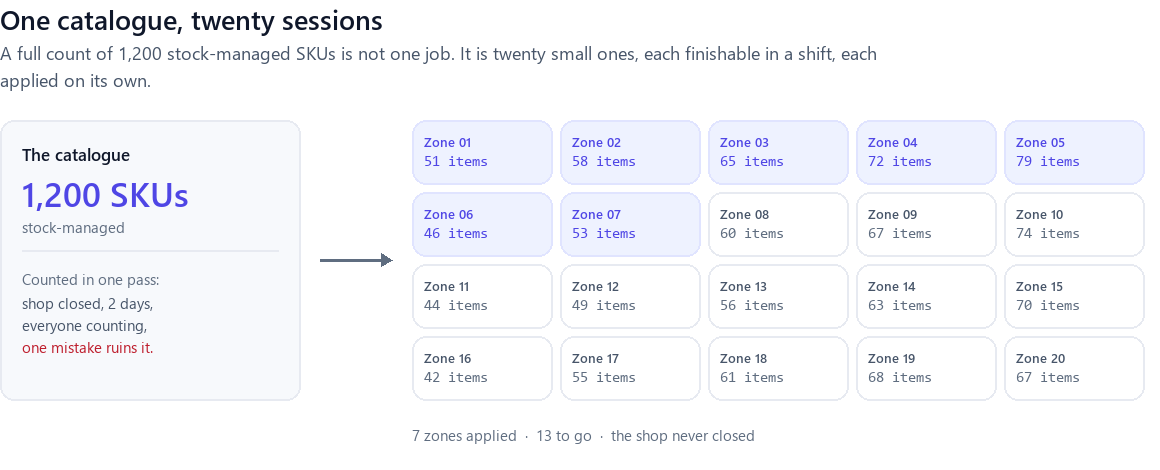
This is also the honest answer to “how big a shop can do this?”. A 1,200-line catalogue counted as one heroic session is a bad idea whether or not you are trading. Counted as twenty sessions of forty to eighty lines, each one applied as it finishes, it is an ordinary week — and any zone that goes wrong costs you one bay, not the whole shop. That last property matters more than the speed.
When you should close#
A page that only ever says “yes, you can” is selling something. Two cases genuinely justify shutting the doors, and both come from the same root: the count needs a moment where nothing is moving physically.
- A year-end count that has to tie to a filed figure. Not because the arithmetic breaks — it does not — but because an accountant reasonably wants a single stated moment that the closing figure belongs to, and “we counted over four days while trading” makes that harder to attest than “we counted on the 31st”. This is a reporting requirement, not a technical one.
- A floor where stock physically moves faster than you can count a bay. A busy warehouse pick face during a peak week is genuinely a moving target, and the fix is to count it at 6am, not to argue with the software.
Everything else — the ordinary shop, the ordinary Tuesday — is fine.
One caveat that is not about trading hours at all: if your stock has been wrong for weeks rather than since this morning, counting will show you the damage but not the cause. The eight things that quietly break WooCommerce stock levels is the companion to this page, and worth reading before you conclude the count itself was the problem.
Proving it to yourself before you trust it#
You should not take this on faith from a page written by the people who built the plugin. Here is the rehearsal, and it takes about ten minutes:
- Create a partial session scoped to five products you can physically see.
- Note the expected quantity the session shows for one of them.
- Place a test order for that product yourself, and let it reduce stock.
- Go back to the session. The expected figure will still be the number from before your order — that is the snapshot holding.
- Count the shelf honestly and open the report. The variance should reflect the shelf, not your test order.
- Apply, then check the product’s stock field and the restore-points list.
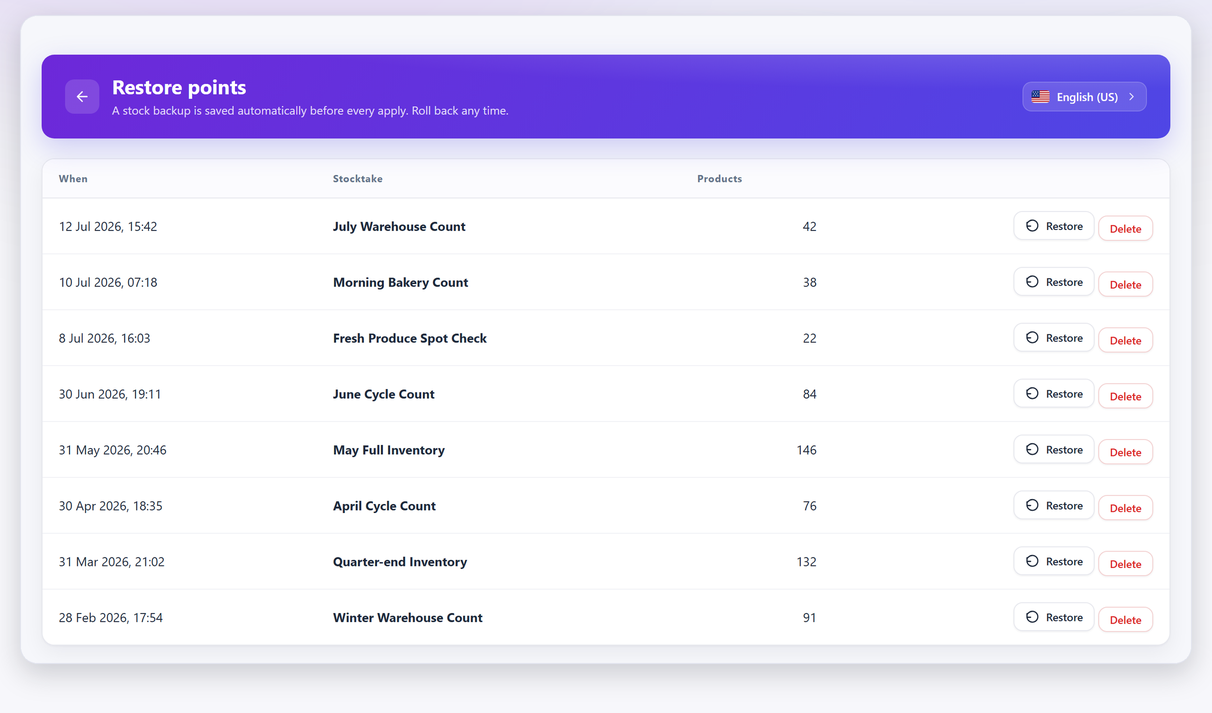
Two things make that rehearsal safe to run on a live shop. The scope is five products, so the blast radius is five products. And the apply is backed by an automatic restore point, so undoing it costs one click. If you would rather not touch live stock at all, run it against five products you have deliberately set to a known quantity first.
Cycle counting is the version that never needs this decision#
Everything above is about making one large count survive contact with a trading day. There is a way to sidestep the question entirely, which is to stop having large counts.
Counting one zone a week means every session is short enough that the trading question never really arises, the variance arrives while the cause is still findable, and no single apply can do much damage. It is a slower answer to “when will my whole catalogue be counted?” and a much better answer to “when will I next know my numbers are wrong?”
If you have not settled on a tool yet, the snapshot behaviour described here is not universal — it is worth checking which of them reconciles against a frozen figure rather than against live stock. And if the two-day version of this job is the reason you have never done it, a cycle-counting schedule you will actually keep is the page to read next.
Frequently asked questions#
Can I count stock in WooCommerce while the shop is open?
Yes. Opening a counting session freezes the expected quantities as a snapshot, and sales made during the session move live stock without changing that snapshot. The variance you review is a measure of the shelf, not of the day’s trading. The thing that does need a rule is stock arriving mid-count.
If three items sell while I am counting, will applying my count put them back in stock?
No. The count is reconciled against the snapshot taken when the session opened, and the apply adjusts for what the system did not already know about. Sales are movements WooCommerce recorded itself, so they are not treated as counting errors.
What happens to products I did not count?
In a partial (spot) count, uncounted lines keep their current stock and are not touched — the report states this on screen. In a full or zero-based count, anything not counted is treated as zero, which is the correct behaviour for a complete sweep and a destructive one for a partial. You choose the mode when you create the session.
What should I do if a delivery arrives in the middle of a stocktake?
Do not shelve it into a zone you have not finished counting. Park it, finish the zone, then put it away. If that is not practical, book the delivery in before you start so the snapshot already includes it.
Do I need to close the shop for a year-end count?
Not for technical reasons. The usual reason to close is that a closing-stock figure filed with accounts is easier to attest when it belongs to a single stated moment. If your count is for operational accuracy rather than for filing, trading through it is fine.
How do I undo an apply that went wrong?
A restore point is saved automatically before every apply, so the last one can be rolled back in a click. The free version covers undoing the most recent apply; a full history of restore points is a Pro feature.
Does WooCommerce reduce stock when an order is placed or when it is paid?
When it is paid — or more precisely, when the order reaches processing, on-hold or completed. A customer still in the checkout has the units reserved in a separate table rather than deducted, and an abandoned basket never touches the stock figure at all. That is why a busy checkout does not disturb a count.
Should I count orders that are picked but not yet shipped?
No. Those units have already left both live stock and the snapshot, so counting them invents a surplus — and applying it puts a customer’s goods back on sale. Keep picked orders on a bench that sits physically outside every count zone.
Can staff edit stock in the product screen while a session is open?
They can, and they should not. A hand edit is a movement WooCommerce recorded, so it survives the apply exactly like a sale. The trouble is that a hand edit is usually somebody correcting the same shelf you are counting, so the shelf ends up corrected twice.