Stocktaking Software: What Actually Counts, and What It Costs
Most stocktaking tools edit stock; few can count it. Eight options compared on workflow, write-back, undo and price, with every figure sourced.
Updated

In this article16 sections
Stocktaking software and stock management software are not the same thing, and the gap between them is why shops keep paying for a tool that cannot do the job they bought it for. A stocktake means walking the shelf, recording what is physically there, comparing it against what the system believes, and posting the difference. Almost every tool in this category edits stock. Very few of them count it.
This is a buyer’s guide built around that one distinction, for a shop whose stock lives in WooCommerce: what the platform gives you for nothing, the two most-installed free stock plugins, the standalone scanner apps, and the SaaS route. Every figure is checked against each tool’s own documentation or pricing page on the day of writing, and where something is not published, it says so rather than guessing.
Disclosure, up front: we make one of the tools in the table below. That is a reason to check everything here against the sources rather than to take it on trust, so every claim is attributed to a page you can open yourself. It is also why the section on what our own plugin does not do is the longest one about it.
Stock management and stock counting are two different jobs#
The confusion in this whole category comes from one word doing two jobs.
Stock management is keeping the numbers in WooCommerce tidy: editing quantities, bulk-updating a category, importing a supplier feed, watching for low stock, deciding what to reorder. All of it happens at a desk, and all of it treats the number in the database as the thing being worked on.
Stock counting is the opposite direction of travel. It starts on the shop floor with a physical object, produces a number that nothing in your system knew, and ends by reconciling that number against the one WooCommerce is trading on. The database is not the subject. It is the thing being checked.
A tool built for the first job can be excellent and still be no help at all with the second, because the second needs things the first has no reason to have: a session that stays open while you walk, expected quantities frozen at the moment the session opened, a variance you review before anything is written, and a way back if the write was wrong.
The question that sorts the whole shelf#
You can classify any tool in this market with one question, and it saves reading twenty feature lists:
After the last scan, what happens to the number?
Every tool here can scan a barcode. Scanning is a solved problem and has been for years — a phone camera does it now. The difference between the tools is entirely in the last step, and the last step is the one nobody demonstrates in a video.
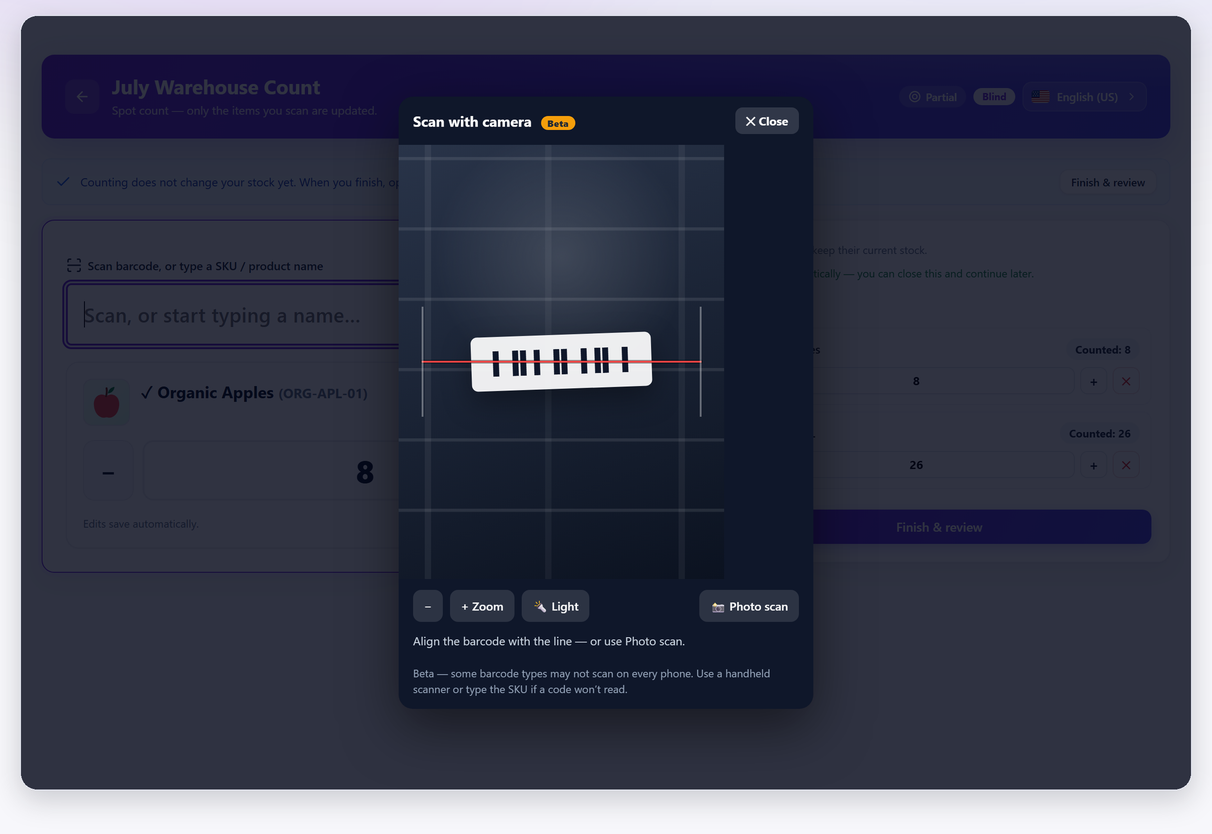
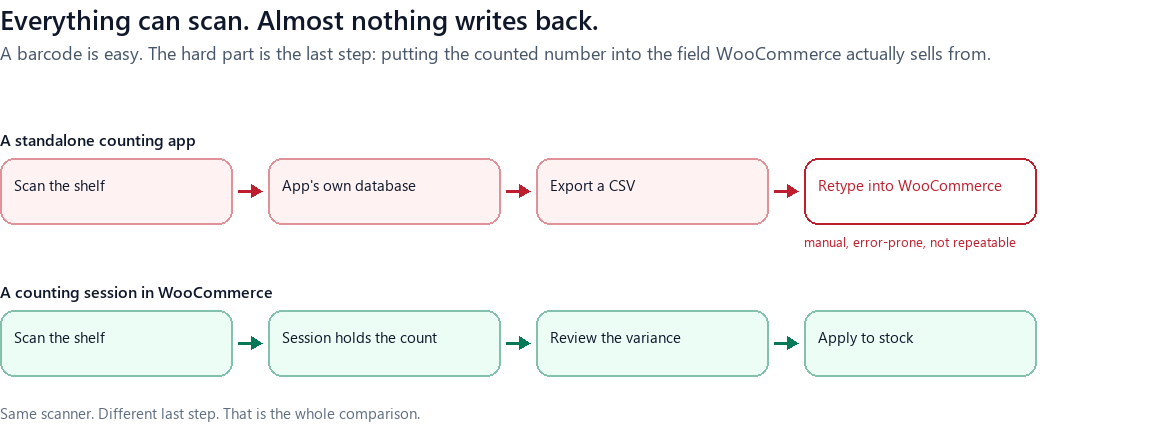
Three endings are possible. The number goes nowhere useful — it lives in an app’s own database and reaching WooCommerce means an export and a retype. It goes straight into the stock field, which is an edit rather than a count and carries every hazard of an edit. Or it goes into a session that reconciles it against a snapshot, shows you the variance, and writes once, with a record of what it replaced.
What WooCommerce core gives you, and exactly where it stops#
Core is more capable here than people assume, and it is worth knowing precisely where the wall is before paying to cross it.
Under WooCommerce → Settings → Products → Inventory, WooCommerce 11 gives you exactly eight settings: Manage stock, Hold stock (minutes), Notifications, Notification recipient(s), Low stock threshold, Out of stock threshold, Out of stock visibility and Stock display format. Alongside them, the product screen edits one product’s quantity, Quick Edit and the bulk editor change many, and Products → Export and the CSV importer move quantities in and out in bulk.
That is a complete set of tools for managing stock. What is absent is anything for counting it. There is no session, so nothing holds a partial count while you walk a shop floor. There is no snapshot, so nothing can distinguish a shelf discrepancy from a sale that happened while you were counting. There is no variance report, so there is no screen that shows you what is about to change before it changes. And there is no undo: nothing in core keeps a copy of the quantity a write replaced.
So the honest description of counting on core alone is: a CSV export, a spreadsheet, a walk around the shop with a printout, and a re-import — with all the risk concentrated in that last step, and no way back from it.
The two most-installed free stock plugins, and what they actually do#
Search wordpress.org for woocommerce stock management and, setting aside payment gateways and page builders, two plugins have far larger install bases than anything else in the category. Both are good. Neither runs a count.
Stock Manager for WooCommerce (StoreApps)#
20,000+ active installations, version 3.10.0, last updated 5 September 2026. Its own description says it lets you “manage product stock and their variations from one screen”, “Edit and manage product stock status, quantity, prices, SKU, taxes. etc.”, and “import and export stock data to CSV”. It also has a “Stock log page” where you can “see each product’s stock history”.
That is a genuinely useful bulk editor with an audit trail, and if what you need is to change three hundred quantities quickly it is a better tool for that than anything else on this page. What its description does not claim, anywhere, is a counting session, a variance report against a snapshot, or an undo of an applied change. It is the first row of the diagram above: the number goes straight into the stock field.
ATUM WooCommerce Inventory Management and Stock Tracking#
10,000+ active installations, version 2.0.3.2, last updated 28 July 2026, 128 ratings. ATUM is the most ambitious free tool in this space — Stock Central, inventory logs, suppliers, purchase orders — and its free plugin is a serious piece of work.
Its wordpress.org description does not mention a stock take, and that is not an oversight. Counting is a separate paid add-on, which is the subject of the next section.
If you already use ATUM: Stock Takes is a paid add-on#
This is the single most useful thing to know if you are already an ATUM user, because it is the answer to a question the free plugin’s page does not raise.
ATUM Stock Takes is a real counting tool, and its own product page describes it fully: stock-take lists with a status of Counting or Reconciled; a builder that filters your catalogue by category, type, supplier, location or Multi-Inventory status; a counting screen where “Each row shows the current ATUM quantity alongside the count field”; a summary that reports “total items counted, count differences, value discrepancy, and individual product-level variances”; and a printable PDF count sheet with configurable columns. It supports variable products. Reconciling is one click, and it updates both WooCommerce and ATUM stock.
That is a proper count, and if you are already invested in ATUM it is the natural choice. Three things to know before you buy:
- It requires the free ATUM plugin. Stock Takes is an add-on, not a standalone product.
- It is $246 a year for one site, or $630 for three and $840 for five, billed yearly — as printed on its own page, with a currency selector offering dollars, pounds and euros (€210 for one site). There is a 14-day trial with no payment required.
- Its page does not describe an undo. Reconciliation is one click and the page says what that click writes; it does not say what happens if the click was wrong. Ask before you rely on it, rather than assuming either way.
Worth saying plainly: you do not have to leave ATUM to count. If ATUM is already how you run stock, adding a counting tool alongside it — theirs or anyone’s — is a smaller change than replacing it.
Standalone counting apps: excellent scanners with nowhere to put the number#
Search for “inventory count app” and you land in a different market: mobile-first apps built for equipment, tools, parts and warehouse bins. Sortly is the best-known of them, and it is genuinely good at the counting part.
The gap is the write-back, and it is worth being exact rather than dismissive. Sortly’s own integrations page lists Amazon Business US, QuickBooks Online, Slack, Microsoft Teams, Webhooks and the Sortly API. No e-commerce platform appears on it, WooCommerce included. The API exists, and Sortly’s developer documentation says it is “Available on the Sortly Enterprise Plan” — the tier whose price is a custom quote.
So for a WooCommerce shop the route from a Sortly count to your live stock field is either a manual export and re-import, or a developer building against an API on the top tier. Neither is a reason not to use Sortly for what it is good at. Both are reasons not to expect it to close the loop.
The pricing is also worth understanding because it is charged by items, which for a WooCommerce catalogue is the wrong unit in an expensive direction: free covers 100 unique items and one user; Advanced is $24 a month for 500 items; Ultra $74 a month for 2,000; Premium $149 a month for 5,000; Enterprise is a custom quote above that. A 1,200-line catalogue — which for a clothing shop is a few hundred products once you multiply out the variations — starts at the $74 tier.
The Sortly figures of $24, $74 and $149 are monthly equivalents of annual first-year offers for new customers. Its page specifies different renewal discounts. These are not month-to-month subscription prices or a promise of the same renewal amount.
The SaaS route: Zoho Inventory does run a real count#
Most comparison posts in this category quietly skip the tools that would beat them. Zoho Inventory runs a genuine stock count, has a WooCommerce integration, and deserves a straight description.
Zoho’s own documentation defines it exactly as you would want: “Stock Counts is when you physically check and record the stock of an item and match them to the system records.” The count produces an inventory adjustment, posted to a Cost of Goods Sold account with the default reason “Stock taking results”. Counts can be scheduled to recur, which is cycle counting by another name.
Two conditions decide whether it is available to you:
- Plan. Zoho’s US pricing page includes stock counting in Premium at $79 per organisation per month, billed annually. Plus is $129 and Enterprise $249. Region, tax and add-ons can change the total; confirm the current plan scope before subscribing.
- Location and scope. The current stock count guide asks you to select a warehouse and an assigned user. Plan the count around the warehouse structure in your own account.
Veeqo is the other name that comes up here. Its shipping product is free and WooCommerce is a supported sales channel — “Ship orders from Amazon, Shopify, eBay, Walmart, WooCommerce, Rithum and more” — with inventory plans from $19 a month, priced by order volume, and a high-volume tier from $350. Its pricing page describes automated inventory sync across channels and demand forecasting, and does not mention physical counting; if a count is what you are buying for, ask them directly before assuming either way.
The capability table#
One row per tool, and the columns are the four things that actually differ.
| Tool | Runs a physical count | Writes back to WooCommerce stock | Undo of an applied count | Price |
|---|---|---|---|---|
| WooCommerce core | No — no session, snapshot or variance report | n/a — it is the stock field | No | Free |
| Stock Manager for WooCommerce (StoreApps) | Not described — it is a bulk stock editor with a stock log | Yes, directly | Not described | Free |
| ATUM Inventory Management | No — counting is a separate add-on | Yes | n/a | Free |
| ATUM Stock Takes (add-on) | Yes — lists, counting screen, variance summary, PDF sheets | Yes, via ATUM | Not described on its page | $246/yr, 1 site · requires ATUM · 14-day trial |
| Sortly | Yes, as a standalone app | Not listed — no e-commerce integration on its page; API is Enterprise-tier | n/a | Free to 100 items · $24–$149/mo (first year, annual billing) · Enterprise on quote |
| Zoho Inventory | Yes — Stock Counts, with recurring counts | Yes, via its WooCommerce integration | Adjustment-based; no undo documented | Premium from $79/mo; Plus $129/mo; Enterprise $249/mo — US, billed annually |
| Veeqo | Not mentioned on its pricing page | Yes — WooCommerce is a sales channel | n/a | Shipping free · inventory from $19/mo by order volume |
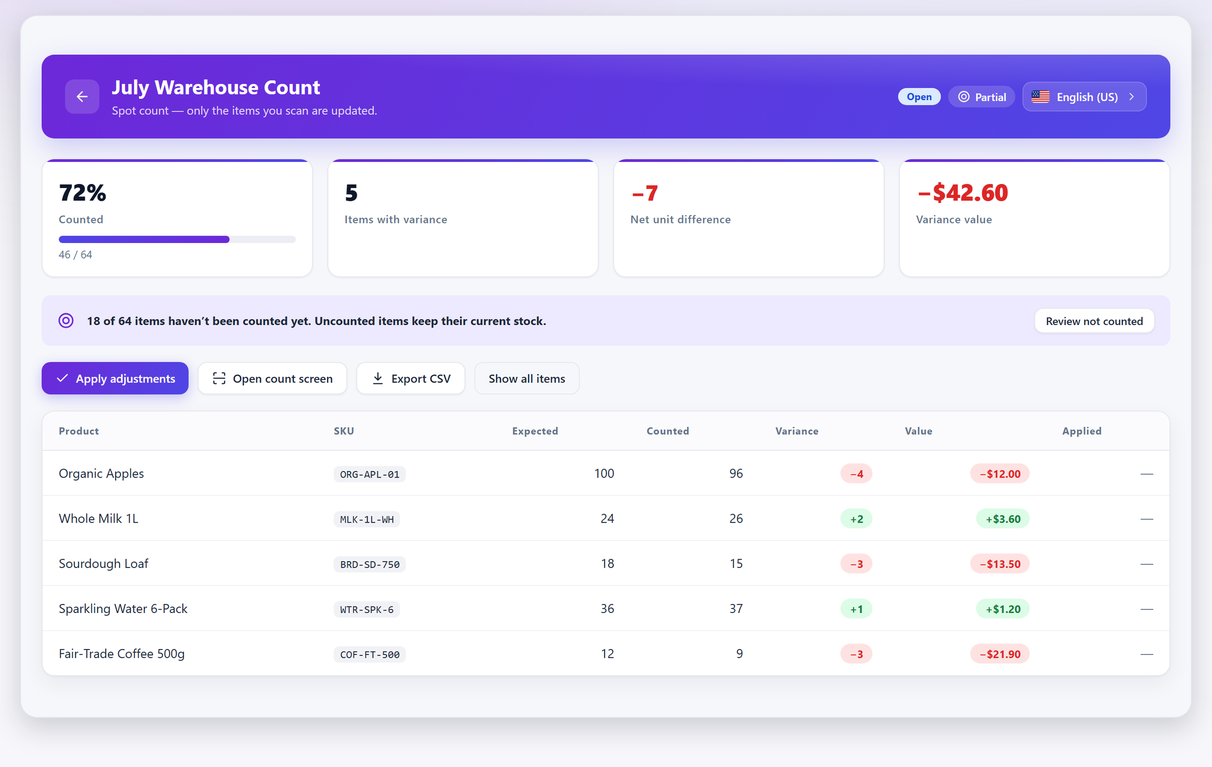
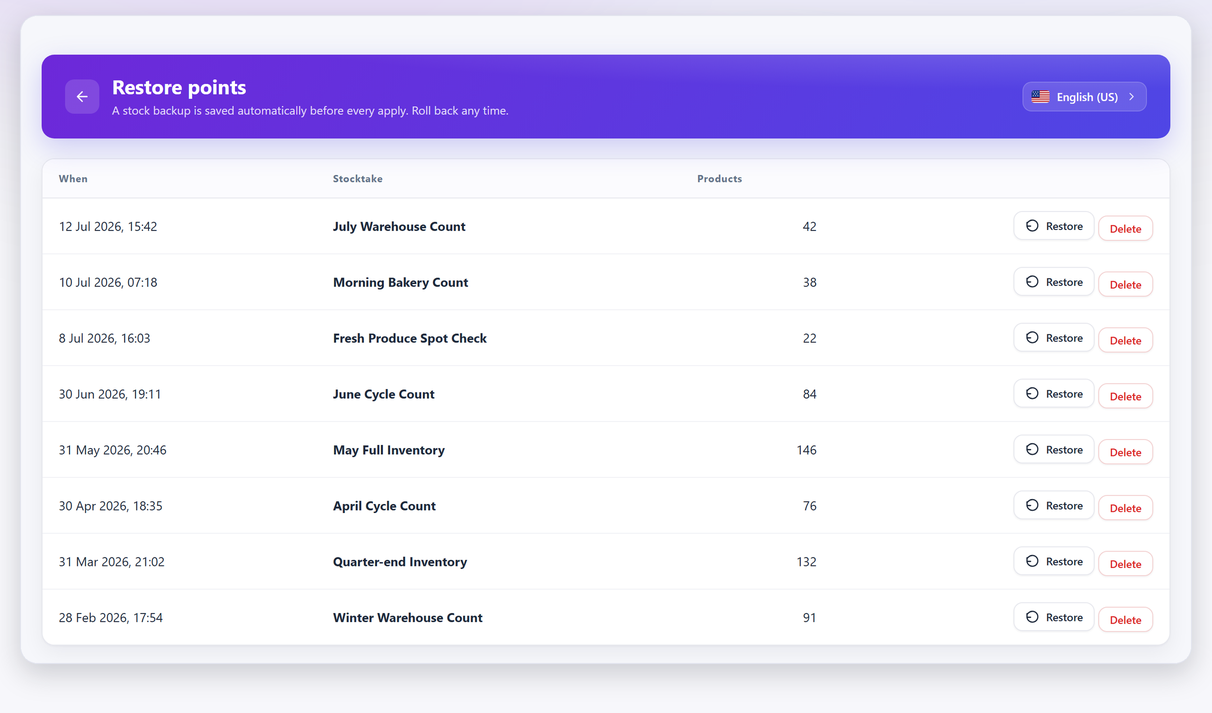
| Stocktake | Yes — snapshot sessions, blind counts, variance review | Yes, one click | Yes — automatic restore point before every apply | Free · Pro $79/yr, 1 site |
Table first reviewed 8 September 2026; prices and plan scope updated 10 September 2026, using each tool’s own wordpress.org listing, product page or documentation. “Not described” means the tool’s own page does not claim it — not that it is impossible. Where a price is set by quote, the table says so rather than estimating.
What counting actually costs: the ladder from zero upward#
The money question is easier to answer than the feature question, because the rungs are far apart.
| Rung | What it is | Yearly cost | What you give up |
|---|---|---|---|
| 0 | Core plus a spreadsheet | $0 | No snapshot, no review, no undo. The risk sits on the re-import |
| 1 | A free counting plugin | $0 | Reporting, team features, scheduling |
| 2 | A paid counting plugin or add-on | $79 – $246 | Nothing structural; you are buying reports and governance |
| 3 | An inventory SaaS that also counts | $948 (Zoho Premium, US, annual) | Nothing on counting — you are buying a whole inventory system |
| 4 | A WMS or ERP | Price not published | Nothing; the cost is implementation time, not the licence |
The interesting jump is between rungs 2 and 3, and it is a factor of roughly four to twelve. It is worth every penny if you actually need what rung 3 sells — multi-warehouse, purchase orders, landed costs, an accounting ledger. It is a poor trade if all you needed was to know what is on your shelves, because the counting itself is not the expensive part of an inventory system and never was.
Three shops, three right answers#
Nothing about this decision is universal, so here are three shapes and the honest recommendation for each.
A single shop with a few hundred products and no stockroom. Rung 1. Count in zones, keep the whole thing inside WooCommerce, and spend nothing. The features you would be paying for at rung 2 are all about many counters and many counts, and you have one of each.
A shop with 1,000+ lines, staff who count, and a year end that has to tie to a filed figure. Rung 2. What you are buying is not the ability to count — that is free — but the ability to prove the count: who counted what, a supervisor sign-off, a valuation report, and a full history to roll back through. A closing figure you can file is the thing that justifies the line item.
A business with two warehouses, purchase orders, and stock that has a cost as well as a price. Rung 3, and the counting is a rounding error in that decision. Choose the inventory system on how it handles purchasing and valuation; it will count adequately whatever you choose.
What Stocktake does not do#
Since we make it, this section has to be the specific one.
Stocktake counts stock and posts the result. It is not an inventory system: no purchase orders, no supplier records, no landed costs, no multi-warehouse, no accounting ledger. It does not sell anything — if you want a till inside WooCommerce that is a different plugin. It will not forecast demand or tell you what to buy beyond a low-stock shortlist, and what it can and cannot compute about the value of your stock has its own boundary. If your problem is purchasing rather than accuracy, the tools higher up this page are the right answer and this one is not.
It is also new. As of 8 September 2026 the free plugin is on version 1.1.30 with fewer than ten active installations and no ratings, which is a fact a buyer’s guide should state rather than bury — particularly one written by the people who made it. ATUM has been shipping since 2017 and Stock Takes since April 2023. Longevity is a real thing to weigh, and if it is the deciding factor for you, that is a reasonable decision.
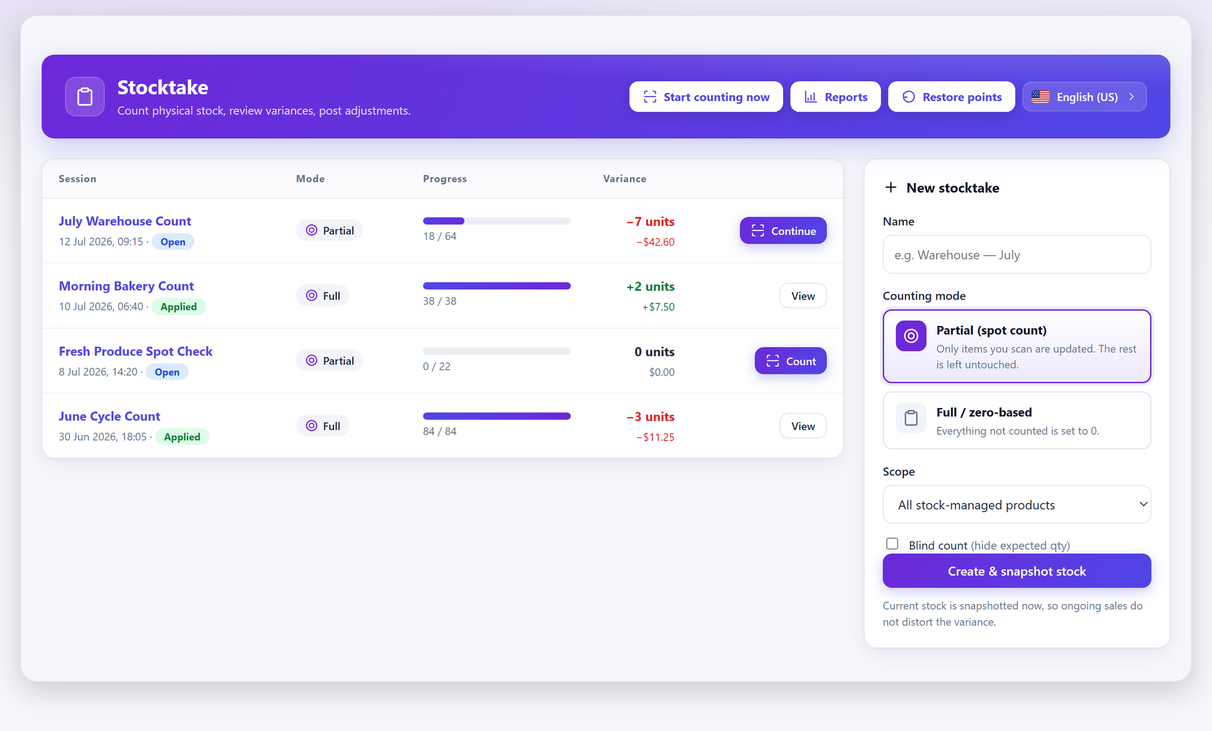
What it does do, it does completely in the free version: unlimited sessions, partial and full or zero-based counts, barcode and phone-camera scanning, blind counting, counting while the store keeps selling, one-click apply with an automatic backup and undo of the last apply, and CSV export. Pro adds reporting, goods-in mode, full restore-point history, valuation, multiple counters with attribution and approval workflow, at $79 a year for one site.
How to check any of this yourself#
Every claim here is checkable, and checking takes minutes rather than hours. Three habits, if you are evaluating anything in this category:
- Read the tool’s own pages, not the comparison posts. Including this one. A vendor’s own feature page is the only thing they are accountable for; everything else is somebody’s summary of it, going stale.
- Ask the last-step question in the trial. Install it, scope a session to five products, count them wrongly on purpose, and see what happens when you commit. What you learn in that ten minutes outranks every table.
- Ask about the undo explicitly. It is the capability least often documented and the one you will need on your worst day. If a page does not mention it, that is a question for support rather than an assumption in either direction.
And when you have chosen, the method for actually running the count is the same whatever is written on the box.
Frequently asked questions#
Can WooCommerce do a stock count without a plugin?
Not as a count. Core gives you eight inventory settings, per-product and bulk stock editing, and CSV import and export — everything for managing stock and nothing for counting it. There is no session, no snapshot of expected quantities, no variance report and no undo, so counting on core means a spreadsheet and a re-import with all the risk on the last step.
Is ATUM Stock Takes free?
No. The core ATUM Inventory Management plugin is free on wordpress.org; Stock Takes is a paid add-on that requires it. As printed on its own page on 8 September 2026 it is $246 a year for one site, $630 for three and $840 for five, with a 14-day trial that needs no payment.
What is the difference between an inventory plugin and a stock counting plugin?
Direction of travel. An inventory plugin edits the numbers in your database — bulk edits, imports, reorder lists. A counting plugin starts with a physical object on a shelf, produces a number nothing in your system knew, and reconciles it against what WooCommerce believes. The second needs a session, a snapshot, a variance review and an undo; the first has no reason to have any of them.
Can I use a standalone inventory app like Sortly with WooCommerce?
For counting, yes; for closing the loop, not straightforwardly. Sortly’s own integrations page lists Amazon Business US, QuickBooks Online, Slack, Microsoft Teams, webhooks and its API, with no e-commerce platform among them, and its documentation says the API is available on the Enterprise plan. Getting a count from Sortly into your WooCommerce stock field means an export and re-import, or a developer.
Does Zoho Inventory do stocktakes?
Yes. Zoho documents physical and recurring stock counts. Its US pricing page lists stock counting in Premium ($79/month, billed annually) and higher plans. A count selects a warehouse and an assigned user; check current availability for your region and plan.
How much should a WooCommerce stock count cost?
There are four rungs: nothing at all with core and a spreadsheet; nothing with a free counting plugin; roughly $79 to $246 a year for a paid counting plugin or add-on; and $948 a year and upward (Zoho Premium, US pricing) for an inventory SaaS that also counts. The jump between the last two buys a whole inventory system, not a better count.
Which plugin should I use if I already run ATUM?
Most likely their own Stock Takes add-on, because it is built into the tool your stock already lives in and the integration work is already done. The alternative is running a counting plugin alongside ATUM, which also works — counting posts to WooCommerce stock, which is what ATUM reads. Either way you do not have to abandon ATUM to count.
What should I test during a free trial?
Scope a session to five products, enter deliberately wrong quantities, and commit it. You will learn in ten minutes whether the tool showed you the variance before writing, whether it reconciled against a snapshot or against live stock, and whether there is a way back. Those three answers decide the purchase more reliably than any feature table.
Sources and billing notes#
Prices and plan scope were reviewed again on 10 September 2026 using the primary sources below. Amounts are in US dollars; tax, region, promotions and renewal terms can vary. Installation figures dated 8 September remain historical snapshots.
- WooCommerce inventory settings
- Stock Manager for WooCommerce
- ATUM Inventory Management
- ATUM Stock Takes: features and pricing
- Sortly: pricing and renewal terms
- Sortly: integrations
- Sortly: API availability
- Zoho Inventory: US plans and annual pricing
- Zoho Inventory: stock count workflow
- Veeqo: pricing
- Stocktake: published free features
- Stocktake: Free and Pro plans