Inventory Valuation in WooCommerce: No FIFO, and What to Use Instead
WooCommerce keeps one cost per product, not cost layers, so FIFO is out. Two ways to work out a stock value you can defend, no Pro plugin needed.
Updated

In this article12 sections
“What’s my stock worth?” sounds like a question a shop system should be able to answer. In WooCommerce it usually can’t — not because of a missing report, but because of what WooCommerce stores about cost in the first place.
This explains the difference between the valuation methods you’ll read about, what inventory valuation in WooCommerce can actually produce from the data you have, two ways to produce it without a Pro plugin, and when you genuinely need something more.
- WooCommerce’s cost of goods data holds one current cost per product or variation. There is no record of the purchase lots behind it.
- So FIFO and LIFO aren’t computable — not unimplemented, but missing data. No plugin can derive them from what WooCommerce recorded.
- What you can produce and defend is a latest-cost or weighted-average valuation: stock value = Σ (quantity on hand × unit cost).
- Check you have costs at all first. WooCommerce > Settings > Advanced > Features > Cost of Goods Sold, or whichever cost plugin you already run. With no cost data there is no valuation, only a unit count.
- The figure is only as good as the count behind it, so value straight after a stocktake.
Two different questions people mean by “stock value”#
Before any method, get clear on which question you’re asking, because they have different answers and different uses:
- At cost — what you paid for what’s on the shelf. This is the figure your accounts need, and the one that feeds your closing stock.
- At retail — what it would bring in if you sold all of it at current prices. Useful for insurance conversations and for sanity-checking how much money is sitting still. Never a balance-sheet figure.
Quoting a retail figure where a cost figure belongs records profit you haven’t earned. It’s the most common valuation mistake in small stores and it inflates both your assets and your tax bill.
The methods, briefly#
Any valuation method is just a rule for deciding which cost to attach to the units you still have, when you bought them at different prices.
| Method | The rule | Effect when costs are rising |
|---|---|---|
| FIFO First in, first out | The oldest costs go to cost of goods sold; the newest stay in stock | Lower COGS, higher reported profit, higher stock value |
| Weighted average | Every unit carries the same blended cost | Sits between the other two |
| LIFO Last in, first out | The newest costs go to COGS; the oldest stay in stock | Higher COGS, lower reported profit |
| Retail method | Estimate cost by applying a cost-to-retail ratio to retail value | An approximation, used where per-item costing isn’t practical |
One thing worth knowing before you get attached to LIFO: it is not permitted under IFRS, though it is under US GAAP. Which methods are available to you depends on where you file, so this is a question for your accountant rather than a preference.
What WooCommerce actually stores#
Here’s the part that determines everything else, and it’s rarely spelled out.
WooCommerce’s cost of goods data holds one cost figure per product or variation. A single current number, attached to the product record. What it does not hold is a history of purchase lots — it doesn’t know that you bought 40 units at €8 in March and 60 more at €11 in September.
Without those layers, FIFO and LIFO are not computable. Both methods are entirely about which purchase batch a unit came from, and that information was never recorded. No plugin can derive it after the fact, because it isn’t a calculation — it’s missing data.
So which method are you actually using?#
Whatever you type into that cost field. In practice, small stores land on one of four behaviours, usually without deciding:
| What you do with the cost field | The method you can honestly name | Where it breaks |
|---|---|---|
| Update it when a delivery arrives at a new price | Latest cost — close to a replacement-cost view, and near FIFO when prices move steadily | Overstates stock value when the last buy happened to be unusually expensive |
| Recalculate the blended cost by hand when prices change | Weighted average, maintained manually | Drifts silently the first time someone forgets |
| Whatever was typed when the product was created | No method — a stale figure | Margins and closing stock have been wrong for as long as it has been stale |
| No cost set at all | None — you have units, not money | A valuation covering part of the catalogue has to say which part |
Whichever row you’re on, the deliverable is one sentence your accountant can read: which method you’re using, the date you last reviewed it, and which lines have no cost at all.
None of the first three is wrong in itself; the fourth isn’t a method at all. What is wrong is not knowing which one you’re on, because you can’t explain your closing stock figure to anyone — including yourself next January.
If you settle on weighted average, note the date you last recalculated. If you settle on latest cost, make updating it part of your receiving routine. Consistency between years matters more to an accountant than which method you chose.
Making it part of receiving is where a tool earns its place. PurchaseDesk writes the cost as the goods are received, into the same field WooCommerce and the established cost-of-goods plugins already read, so the latest-cost method stays true without anyone having to remember. Weighted-average costing as stock arrives is a Pro feature. No cost layers are created either way, though: a blended average is still one cost per product, recalculated, which is why nothing in a receiving flow gets you to FIFO.
What goes into the cost field#
There is no landed-cost field in WooCommerce. Freight, duty, insurance and customs handling either go into the one cost figure or they don’t exist in your accounts at all — and if they don’t, you’re undervaluing stock and overstating margin on every sale.
Including them means apportioning them, and there is more than one defensible way. Say a shipment of 100 units costs €4,000 in goods plus €400 in freight and duty. Split that €400 by value and a unit that cost €80 carries €8 of it, while a unit that cost €20 carries €2. Split it evenly per unit and both carry €4.
By value is usually right for mixed-value shipments; by weight or volume is usually right for bulky low-value goods, where the freight bill tracks size rather than price. The only genuinely wrong answer is doing it a different way each time. Whichever you pick, the apportioned figure is what goes into the cost field when the goods are received — not the supplier’s invoice price.
PurchaseDesk will carry whatever apportioned figure you decide on through to the product’s cost of goods, but it won’t work the apportionment out for you — it does not spread freight, duty, insurance or customs handling across the lines of a receipt. That allocation stays your decision; the field takes the number you arrive at.
Getting a stock value out of WooCommerce#
The arithmetic is simple; the inputs are the problem:
Stock value = Σ (quantity on hand × unit cost)
There are two ways to run that sum on a store with no Pro plugin at all. Both give you the same number; pick whichever you’re more comfortable checking.
Route 1: the product export and a spreadsheet#
Go to WooCommerce > Products > Export, include the Product variations type, and tick “Yes, export all custom meta”. Your cost arrives as one of the meta: columns.
Before you sum anything, delete every row where the Stock column is blank. Those are variable parents whose variations own the number, and variations that inherit their stock from the parent — leave them in and you count the same units twice, which is the single most common way a hand-built valuation spreadsheet goes wrong. Then =SUMPRODUCT(stock_column, cost_column), and filter for blank costs before you trust the total.
Route 2: WP-CLI#
The same sum, with the double-counting handled for you and a count of the lines it had to leave out. Save it as stock-value.php and run wp eval-file stock-value.php:
// 1. Find out where your cost actually lives BEFORE you run anything.
//    WooCommerce core: WooCommerce > Settings > Advanced > Features > Cost of Goods Sold.
//    If that switch is off there is no core cost field at all, and your cost lives in a
//    third-party plugin's own meta key. Find it with:
//        wp post meta list <id of a product that has a cost>
$cost_key = '_cogs_value'; // replace with your own key if you use a third-party cost plugin

global $wpdb;
$ids = $wpdb->get_col(
    "SELECT ID FROM {$wpdb->posts}
      WHERE post_type IN ('product','product_variation')
        AND post_status IN ('publish','private','draft','pending')"
);

$total = 0.0; $no_cost = 0; $not_managed = 0; $negative = 0;

foreach ( array_chunk( $ids, 500 ) as $chunk ) {
    foreach ( $chunk as $id ) {
        $product = wc_get_product( $id );
        if ( ! $product ) { continue; }

        // A variation that inherits its parent's stock reports 'parent' here, and the
        // parent row is the one holding that number, so nothing is counted twice.
        $manage = $product->get_manage_stock();
        if ( true !== $manage || ! $product->managing_stock() ) { $not_managed++; continue; }

        $qty = (float) $product->get_stock_quantity();
        if ( $qty < 0 ) { $negative++; continue; } // backorders: units you owe, not units you hold
        if ( 0.0 === $qty ) { continue; }          // nothing on the shelf, nothing to value

        $cost = 0.0;
        if ( is_callable( array( $product, 'get_cogs_value' ) ) ) {
            $cost = (float) $product->get_cogs_value(); // core Cost of Goods Sold, when it's on
        }
        if ( $cost <= 0 ) {
            $cost = (float) get_post_meta( $id, $cost_key, true );
        }
        if ( $cost <= 0 && $product->is_type( 'variation' ) ) {
            $cost = (float) get_post_meta( $product->get_parent_id(), $cost_key, true );
        }
        if ( $cost <= 0 ) { $no_cost++; continue; }

        $total += $qty * $cost;
    }
    wp_cache_flush(); // keeps memory flat on a large catalogue
}

printf(
    "Stock value at cost: %s | No cost: %d | Not managing stock: %d | On backorder: %d\n",
    number_format( $total, 2 ), $no_cost, $not_managed, $negative
);
The cost meta key differs between WooCommerce’s own Cost of Goods Sold field and the third-party cost plugins, which is why you look yours up rather than trusting a key you read on a blog. No cost is the number that decides whether the total means anything — a big figure there and you have a partial valuation, not a valuation. Not managing stock is mostly variable parents whose variations hold the stock, plus products with stock management switched off; those have to be valued by hand. On backorder is lines with negative stock, excluded rather than netted off, because a unit you owe a customer is not a unit sitting on your shelf.
Whichever route you take, the total needs two things to be true at once:
- Your quantities are correct. Multiplying a wrong quantity by a right cost produces a confidently wrong number, and stock levels drift for a long list of ordinary reasons. A valuation is only as good as the count behind it — which is why valuation belongs immediately after a stocktake, not on a random Tuesday.
- Your costs are current. Cost fields set once at product creation and never revisited are the second half of the problem.
If you don’t have costs on everything, don’t let that stop you. Set costs for your highest-value lines first — the same A items you’d cycle count most often. They dominate the total, and a valuation covering 80% of your stock value precisely is far more useful than one covering 100% of it as a guess.
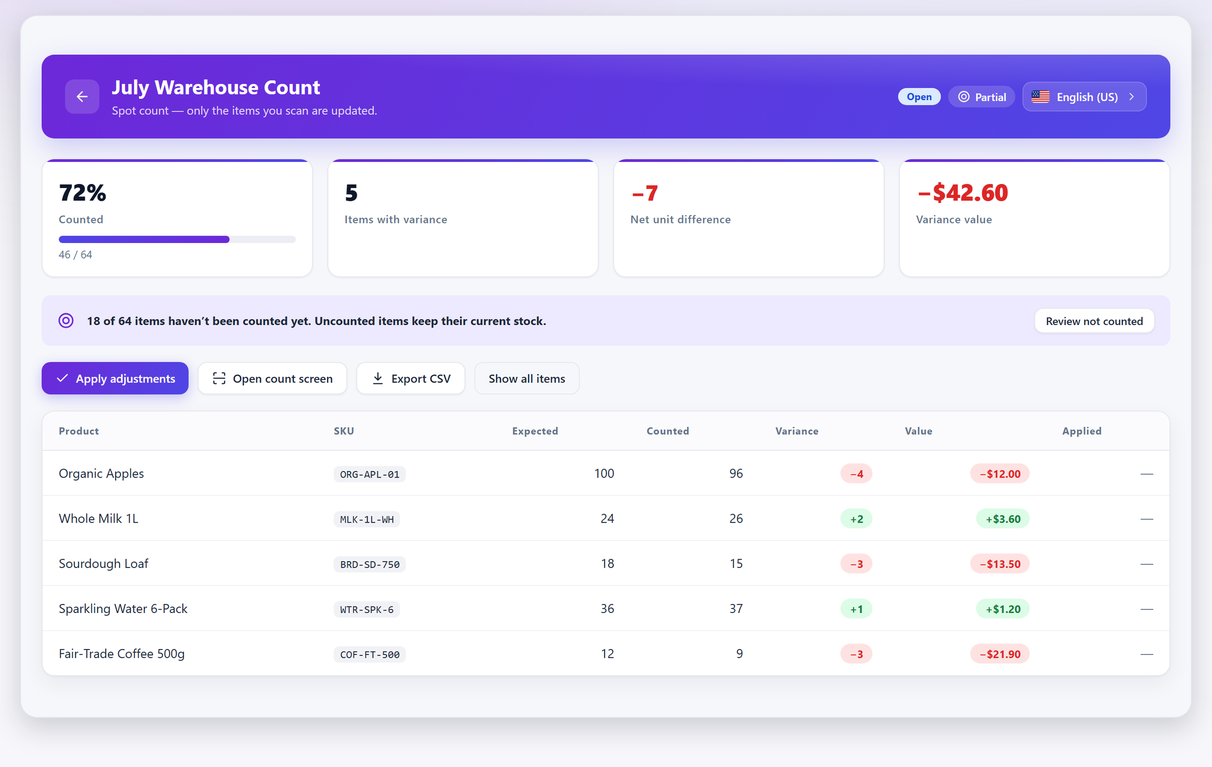
In Stocktake, the free version prices variance at cost when cost of goods data is set, so a count tells you what the discrepancy was worth. Total stock value at cost is a Pro feature, and it comes out with the Excel export. There is no retail valuation, deliberately — for the reason given at the top of this page.
Neither plugin creates cost layers, so a Pro valuation is still a single-cost valuation: larger, faster and broken down for you, but arithmetically the same sum as Route 2 above. If an auditor has asked for FIFO specifically, no setting in either plugin produces it, and “When you need real cost layers” below is the honest answer.
Where the number goes wrong#
- Valuing obsolete stock at what you paid. Three years of an unsellable line is not an asset at full cost. But don’t write it down by editing the product’s cost field: that field is your ongoing costing basis, so editing it corrupts next year’s comparison, silently changes every margin figure the shop reports from then on, and leaves no trace of the judgement you made. Record the write-down as a separate line against the valuation — product, quantity, cost value, written-down value, reason, date — and leave the cost field as what you actually paid. A line with no sale in twelve months is the usual candidate; how far down it goes is the lower of cost and net realisable value question, which belongs with your year-end.
- Mixing cost and retail in one total. Usually happens when some products have a cost set and others fall back to price. Check for it before you file anything.
- Valuing stock you don’t own. Consignment items sit on your shelves and belong to someone else.
- Changing method between years. Even a change from “latest cost” to “weighted average” makes this year incomparable with last year — and it’s exactly the kind of thing an accountant will want explained.
When you need real cost layers#
A single cost per product is enough for most small retail. It stops being enough when:
- Your buy prices move a lot. Imported goods with currency swings, commodities, anything where March and September prices differ by more than a rounding error.
- You need per-batch traceability for expiry dates, recalls or regulated goods. That’s a lot-tracking requirement, and valuation comes along with it.
- Your auditor asks for FIFO specifically. No amount of spreadsheet work reconstructs lot costs you never recorded.
- Stock is a large share of your balance sheet. The bigger the number, the less approximation is acceptable.
At that point you’re looking at inventory or accounting software that records purchases as lots — where receiving 40 at €8 and 60 at €11 stores two layers rather than overwriting one field. That’s a different category of tool from a shop plugin, and it’s the honest answer when the requirement is real.
A practical routine#
- Decide your method — latest cost or weighted average — and write it down with the date.
- Set costs on your A items, including landed cost if you’ve decided to include it.
- Count before you value. A stocktake immediately before valuation is what makes the quantity half of the equation trustworthy.
- Value at cost by either route above, adjust obsolete stock down as a separate line rather than by editing cost fields, and keep the working.
- Repeat the same way next time. The comparison between two consistent valuations tells you something; two inconsistent ones tell you nothing.
Inventory valuation FAQ#
Can WooCommerce do FIFO inventory valuation?
No, and no plugin can add it from WooCommerce data alone. FIFO is entirely about which purchase batch a unit came from, and WooCommerce stores a single current cost per product rather than a history of purchase lots. That information was never recorded, so it cannot be derived afterwards.
Should I value stock at cost or retail?
At cost for anything that goes into your accounts. A retail valuation is useful for insurance and for seeing how much money is sitting still on your shelves, but recording it as your closing stock books profit you have not made.
Which valuation method am I using if I never chose one?
Usually either latest cost, if you update the cost field when prices change, or a stale figure entered when the product was created. Neither is wrong in itself, but not knowing which one you are on means you cannot explain your closing stock figure. Pick one, write it down, and keep it consistent between years.
Should shipping and duty be included in the unit cost?
That is your decision, but make it deliberately and apply it everywhere. Excluding landed costs undervalues your stock and overstates your margin on every sale. Whichever way you go, note it with your valuation method so next year is comparable.
Do I need cost data on every product?
No. Start with your highest-value lines, which dominate the total anyway. A valuation covering 80% of your stock value accurately is far more useful than one covering everything as a guess.
When do I need proper inventory software instead?
When your buy prices move significantly between orders, when you need per-batch traceability for expiry dates or recalls, when an auditor asks for FIFO specifically, or when stock is a large enough share of your balance sheet that approximation stops being acceptable. Those needs require software that records purchases as lots.