Year-End Inventory Count in WooCommerce: Closing Stock You Can File
What your accountant needs from a year-end count, when to run it, why zero-based mode matters, and how to turn a WooCommerce stocktake into closing stock.
Updated

In this article14 sections
Most stock counts exist to help you run the shop. The year-end inventory count exists to produce one number for someone else: your closing stock figure, which goes into your accounts and changes how much tax you pay.
That different purpose changes how you should run it — the timing, the counting mode, what you value the stock at, and what you have to keep afterwards. This covers all four, for a WooCommerce store.
What the year-end count is actually for#
Your closing stock is an asset on the balance sheet, and it’s one side of the calculation that produces your cost of goods sold:
Opening stock + Purchases − Closing stock = Cost of goods sold
Read that formula again with an eye on the middle of your profit and loss. A closing stock figure that’s too low inflates your cost of goods sold, which understates your profit. Too high does the reverse. This is not a number you want to estimate, and it’s not a number you want to be unable to defend if anyone asks.
It’s also the one count of the year where “we counted everything” has to be literally true.
Is this an inventory audit?#
For a small store the year-end count and an inventory audit are the same walk round the shop. What separates the two isn’t equipment or a longer list. It’s that the expected figures were recorded before anyone started counting, that the counters couldn’t see them, that every variance was investigated before a single number was applied, and that the sheets still exist six months later. Do those four things and the count stands up to questions. Skip any one of them and what you have is a stock update.
The other sense of the word is an external auditor attending your count. That’s someone watching you count and sampling a few lines to check your arithmetic — not a different procedure. The procedure is the ordinary one, set out step by step in the stocktake walkthrough.
When to count#
Which year-end, first. The count follows your accounting year, not the calendar: 31 December for most of the United States and Europe, 30 June in Australia and New Zealand, and in the UK either 5 April for a sole trader or the company’s own accounting reference date. In Australia and the UK the exercise is called a year-end stocktake. The word changes; the work below doesn’t.
The instinct is to count on the last day of the financial year. In practice that’s often the worst day available — you’re trading, stock is moving, and everyone is tired.
What actually matters is that the count corresponds to a known point in time. Two workable approaches:
- Count while closed, as near to year-end as you can. The evening of the last trading day, or the morning before reopening. No movements during the count means no reconciliation afterwards.
- Count on a different date and roll the figure. If you count a week early, your closing stock is the counted quantity plus everything received since, minus everything sold since. This is legitimate and common, but every movement in that window has to be documented — which is more work than closing for an evening.
Two practical points in favour of counting slightly late rather than slightly early: stock is usually at its lowest after a year-end sale, so there’s less to count, and any deliveries that arrive in the gap are easier to track than sales.
Prepare the floor first#
An hour of tidying saves three hours of counting:
- Consolidate the same product into one place. Stock split between a shelf and a stockroom is the single most common cause of a double count.
- Quarantine damaged, obsolete and expired stock somewhere separate. You still count it — you just value it differently, and you need it identifiable.
- Deal with goods in transit. Something you’ve paid for that hasn’t arrived may still be yours on the day, depending on the shipping terms — the rule is in the next section.
- Separate anything that isn’t yours — consignment stock, customer repairs, items awaiting collection.
Goods in transit: whose stock is it on the day?#
The answer follows title, not location. If title passes at dispatch — ex works, FOB shipping point — a pallet that left your supplier on 28 June is already yours at a 30 June year-end, even though nobody in your building has seen it. It belongs in the count, usually as a separate line with the dispatch note attached. If title passes on delivery — DDP, FOB destination — it stays the supplier’s until it lands on your dock, however much of it you’ve already paid for.
One piece of precision, because the shorthand above is shorthand: Incoterms allocate risk and cost between the two parties, and it’s the supply contract that transfers title. They usually point the same way, which is why the rule works most of the time — and why “agree the treatment with your accountant” isn’t a dodge here. Read your supply terms, then confirm the treatment before you count rather than after.
Then the practical question of where that list lives, because WooCommerce doesn’t keep one. The nearest thing is your open purchase orders — the ones marked sent but not yet received — which is your goods-in-transit list and the one job on this page that PurchaseDesk does rather than Stocktake. Everything from here on is the count itself.
Full or zero-based: the one setting that matters here#
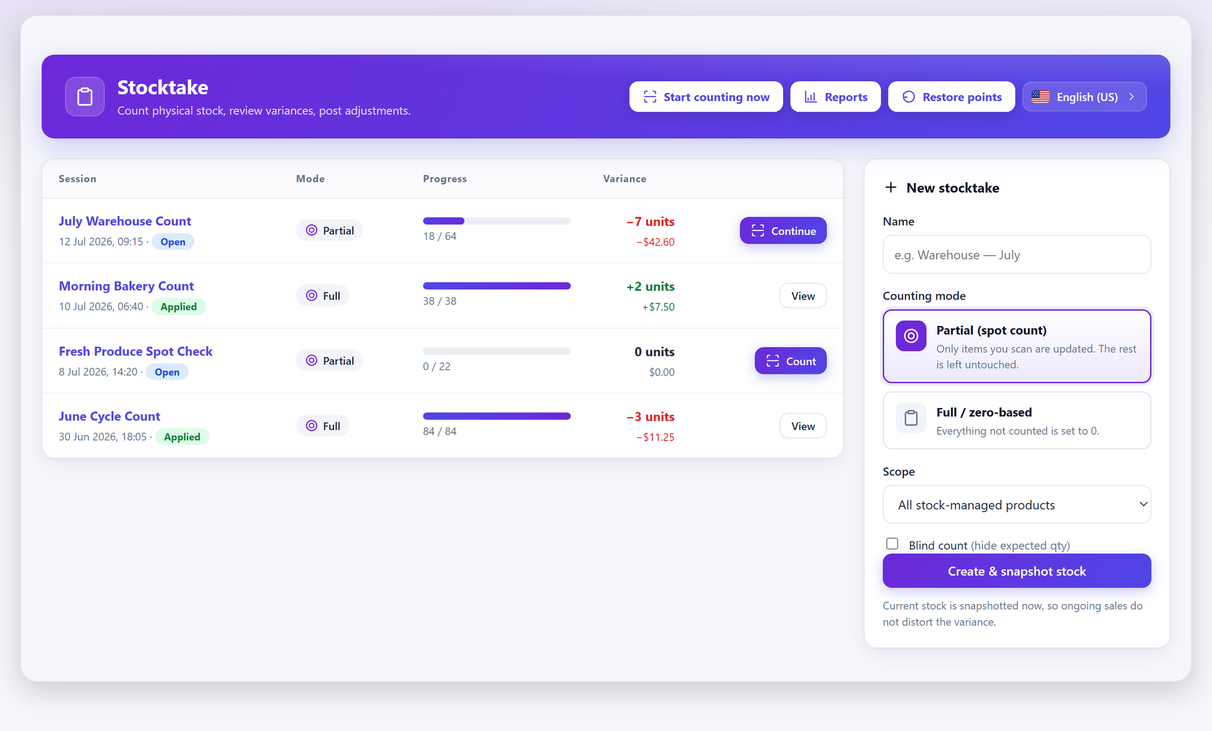
For every other count in the year you’ll use a partial (spot) count, which only updates the items you actually scan. For the year-end count you want the opposite: full or zero-based mode, where anything you didn’t count is set to zero.
This feels alarming and it’s exactly right. The statement you’re making at year-end is “this is everything we have”. If a product wasn’t found during a complete count of the premises, then you have none of it, and recording zero is the truthful answer — usually with a variance worth investigating attached.
Where this bites hardest is variable products, because every stock-managed variation is its own line. A rail of shirts counted by style rather than by size leaves most of the sizes unscanned, and in zero-based mode unscanned means zero.
Using partial mode for a year-end count quietly leaves the untouched products at whatever the system already believed, which is precisely the assumption the count was supposed to test.
Running the count#
The mechanics are the same as any other session — snapshot, count, review, apply — with a few year-end specifics:
- Create the session in full / zero-based mode, scoped to all stock-managed products.
- Count blind. If ever there’s a count where you want an independent measurement rather than a confirmation, it’s the one that goes to your accountant. Blind counting is a per-session toggle.
- Work by physical area, not by category, and mark each area done as you finish it. Missed sections are the classic year-end failure, and in zero-based mode a missed section produces a very loud, very wrong result.
- Review before you apply. Investigate the outliers now — after you apply, the evidence of what was wrong is gone. The total gap is also what the variance is worth as a shrinkage figure, so write it down while you still have it.
- Export the count sheet. This is not optional at year-end; see below.
Every step above is in the free version of Stocktake for WooCommerce — full and zero-based scoping, blind counting, the variance review, and the one-click apply with an automatic restore point taken before anything is written.
That restore point needs one qualification, because year-end is exactly where an unqualified version would be found out. The free version keeps the restore point from the last apply, so the undo is there on the evening of the count, which is when you need it. Apply on Sunday, notice the problem on Wednesday after two more applies, and only Pro’s full restore-point history can step back to the one you want. The habit that works on any plan: export the CSV before you apply as well as after, so the pre-count state is reconstructible whatever happens next.
Turning the count into a closing stock value#
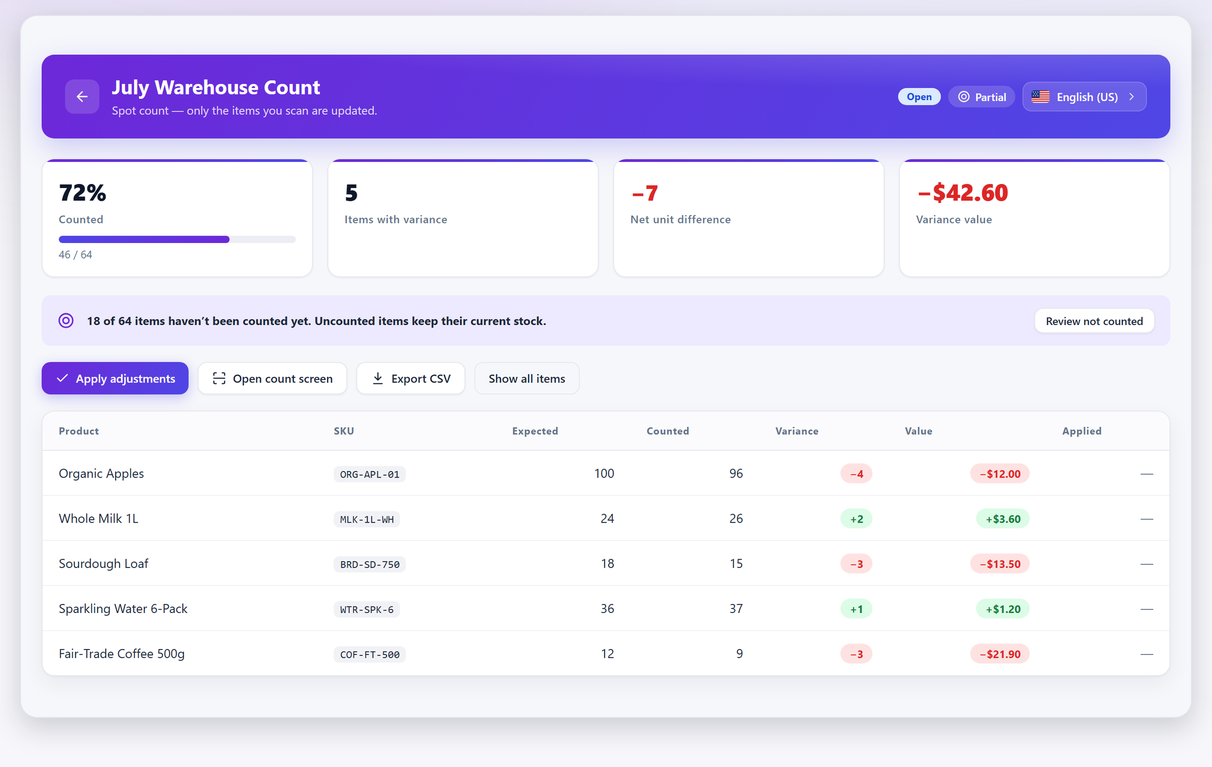
Worth saying plainly before the arithmetic, because it decides how you’ll spend the evening. The free version exports the counted sheet as CSV and you extend it in a spreadsheet — that is the whole route to a closing stock figure, and it genuinely works. Pro does the valuation for you, and adds an Excel (XLSX) export and a printable count sheet; the Compare Free & Pro table on the plugin page lists which is which. Nothing below depends on having Pro. On the free version you are doing the multiplication yourself.
You counted units. Your accounts need money. The conversion is straightforward in principle and has one trap:
Closing stock value = Σ (counted units × unit cost)
The trap is cost, not retail price. Valuing your shelves at what you’d sell them for records profit you haven’t earned yet. If you have WooCommerce Cost of Goods data set, the count can price the variance for you at cost; if you don’t, you’ll be doing this in a spreadsheet against a supplier price list.
Five lines to show the shape of the sheet, in whatever currency you keep your books in:
| SKU | Counted units | Unit cost | Value | Note |
|---|---|---|---|---|
| TSH-BLK-M | 48 | 6.40 | 307.20 | Matched expected. Nothing to explain. |
| MUG-RED-350 | 31 | 2.10 | 65.10 | Expected 28 — three more on the shelf than the system believed. Still valued at cost. |
| JKT-WNT-L | 12 | 8.00 | 42.00 | Water-damaged. Written down to 3.50 each, which is what they will actually fetch. |
| CNDL-VAN-01 | 60 | — | 0.00 | Supplier’s stock, not ours. Counted for them; not an asset of ours. |
| BLT-LTH-32 | 9 | not on file | — | No unit cost anywhere. Flagged, not valued at zero — chase it before you total the column. |
| Closing stock at cost | 160 | 414.30 | One line still to be priced. |
Three of those rows are worth spelling out. The first two are the adjustments stores most often get wrong; the last is the failure nobody notices:
- Damaged and obsolete stock. Standard practice in many jurisdictions is to value stock at the lower of cost and what you could actually get for it. A box of last season’s product you’ll clear at half price isn’t worth what you paid. This is why you quarantined it before counting.
- Stock that isn’t yours. Consignment items get counted for the supplier’s benefit, not valued as your asset.
- Lines with no cost on file. A blank cost multiplies out to zero, and a zero in a value column looks like a priced line rather than a missing one. Flag those rows and chase the cost, rather than letting them quietly shrink your closing stock.
The first two of those are accounting judgements rather than software settings, and the rules vary by country. Agree the treatment with your accountant before you count, not after — it changes what you need to record while you’re on the floor.
If you want a deeper look at costing methods and what WooCommerce can and can’t calculate, the inventory valuation guide covers that ground.
Getting the number out on the free version#
This is the gap between “we’ve counted” and “I have a figure to send”, and crossing it needs nothing but the free plugin and a spreadsheet. Three steps:
- Export the applied count sheet as CSV and open it in a spreadsheet.
- Add a Unit cost column from wherever your costs actually live — the WooCommerce cost field, a supplier price list, your last purchase order — and a Value column beside it.
- One formula for the total —
=SUMPRODUCT(B2:B500,C2:C500)if column B holds the counted units and column C the unit costs — or multiply row by row if you want the per-line values in front of you. That total, once the write-downs and consignment lines above are in, is your closing stock at cost.
One thing to be clear about, because it changes the number rather than the effort. WooCommerce holds a single cost figure per product or variation and no history of what each purchase lot cost you. So every line is valued at whatever cost sits on the record today — which is not FIFO and not a weighted average of what you paid during the year. For most small stores the difference is immaterial. If your buying prices moved sharply this year it isn’t, and the valuation guide above is where that argument is set out properly.
What your accountant will ask for#
Keep these five things. They take minutes at the time and are painful to reconstruct in March:
- The count date and time, and whether the shop was trading.
- The count sheets — the exported CSV of products, expected, counted and variance.
- The valuation basis — cost, and where those costs came from.
- The treatment of damaged or obsolete stock, itemised if it’s material.
- Who counted, and whether anything was recounted. The free version doesn’t record counter names or route a recount for approval, so write the names and the recounts onto the exported sheet yourself before you file it, and say who checked the outliers.
A count with an audit trail is worth considerably more than a bigger count without one.
Five ways a year-end count goes wrong#
- Counting during trading. Items sold mid-count get counted on the shelf and shipped the same afternoon. Close, or use a snapshot-based count and accept the reconciliation work — what actually happens when an order lands mid-count is worth reading first, not least because the harder cut-off problem turns out to be goods arriving rather than goods leaving.
- Valuing at retail. Inflates your assets and your tax bill.
- Double-counting. A product in two locations counted twice. This is what the tidying step prevents.
- Missing a section entirely. In zero-based mode this writes zero across real stock. Tick off areas on paper as you finish them.
- Keeping no record. The count happened, the numbers were applied, and six months later nobody can explain the adjustment. Export the sheet.
If you cycle count all year, do you still need this?#
For running the shop, largely no — a good cycle-counting rota covers everything at least once a year, finds errors far sooner, and leaves a per-session audit trail that an annual count doesn’t.
For the accounts, it depends on your jurisdiction and your auditor. Some are entirely satisfied by a documented cycle programme with good accuracy; others want a full count at year-end regardless. Ask before you assume — and if they do want one, arriving with twelve months of clean cycle records means the year-end count confirms what you already knew instead of ambushing you.
A realistic schedule#
- Four weeks out: ask your accountant about count date, goods-in-transit treatment and obsolete stock. Fix your unit costs.
- One week out: tidy and consolidate. Quarantine damaged stock. Run a cycle count of your highest-value lines so year-end isn’t the first time you’ve counted them — and if you don’t already have a list of those lines, a rule-based category built on price or stock quantity keeps one current for you.
- Count day: close, create the zero-based blind session, count by area, tick off areas.
- Same evening: review variances, recount the outliers, apply, export.
- Next day: send the sheet and the valuation basis to your accountant while it’s fresh.
The count itself is the easy part. Everything that makes the number defensible happens before and after it.
Year-end count FAQ#
When should I do my year-end inventory count?
As close to the end of your financial year as you can manage, ideally while the shop is closed so nothing moves during the count. If you have to count on a different date, that is fine as long as you document every receipt and sale between the count and the year-end so the figure can be rolled forward or back.
Is a year-end count the same as an inventory audit?
For a small store, yes — the same walk round the shop. What makes it an audit is the discipline around it: the expected figures recorded before counting began, counters who could not see them, every variance investigated before anything was applied, and the sheets kept afterwards. If an external auditor attends, they are watching you count and sampling a few lines to check your arithmetic, not running a different procedure.
Do I have to close the shop to count?
Not necessarily. A snapshot-based count measures against a frozen baseline, so trading during the count does not corrupt the variance — what actually happens when an order lands mid-count goes through the mechanics. But a year-end count uses zero-based mode and needs to be complete, so closing for an evening removes a category of reconciliation work you would otherwise have to do by hand.
Should I value stock at cost or at retail price?
At cost. Valuing your shelves at what you would sell them for records profit you have not earned yet, which inflates both your assets and your tax bill. Retail value is useful for insurance conversations, not for the balance sheet.
Which counting mode should I use for a year-end count?
Full or zero-based, where anything you did not count is set to zero. That is what the statement “this is everything we have” actually means. Partial mode leaves uncounted products at whatever the system already believed, which is the assumption the count exists to test.
What records should I keep afterwards?
The count date and whether you were trading, the exported count sheets showing expected against counted, the valuation basis and where your costs came from, how you treated damaged or obsolete stock, and who counted. A count with an audit trail is worth more than a larger count without one.
Does cycle counting replace the year-end count?
For running the shop, largely yes. For your accounts it depends on your jurisdiction and your auditor — some are satisfied by a documented cycle programme, others want a full count regardless. Ask before you assume, and if they do want one, twelve months of clean cycle records means it confirms what you already knew.