How to Count Stock by Variation in WooCommerce: Sizes and Colours
Six sizes in four colours is 24 lines to count, not one product. Where WooCommerce keeps each number, how to spot mixed stock, and what a size swap means.
Updated

In this article11 sections
A rail of T-shirts is one row in your product list and twenty-four numbers on the shelf. Almost every hard thing about counting clothing — or shoes, or paint, or anything else sold in sizes — follows from that single gap, and none of it is difficult once the gap is out in the open.
This page is about the count itself: how many things you are really counting, where WooCommerce is keeping the number, how to walk a rail so that a missed line is visible, and what a variance means when it lands on one size rather than on a product. The method for running a session at all lives on the stocktake guide, and the question of which tool to run it with has its own page; nothing here repeats either.
Your catalogue is not the size you think it is#
A product is a row in your admin list. A line is a thing with its own number on a shelf. For simple products those are the same, which is why the difference goes unnoticed until the first count on a rail.
The arithmetic is nothing more than multiplication, and it is worth doing out loud because the result is always larger than people expect. Six sizes in four colours is twenty-four countable lines. One product.
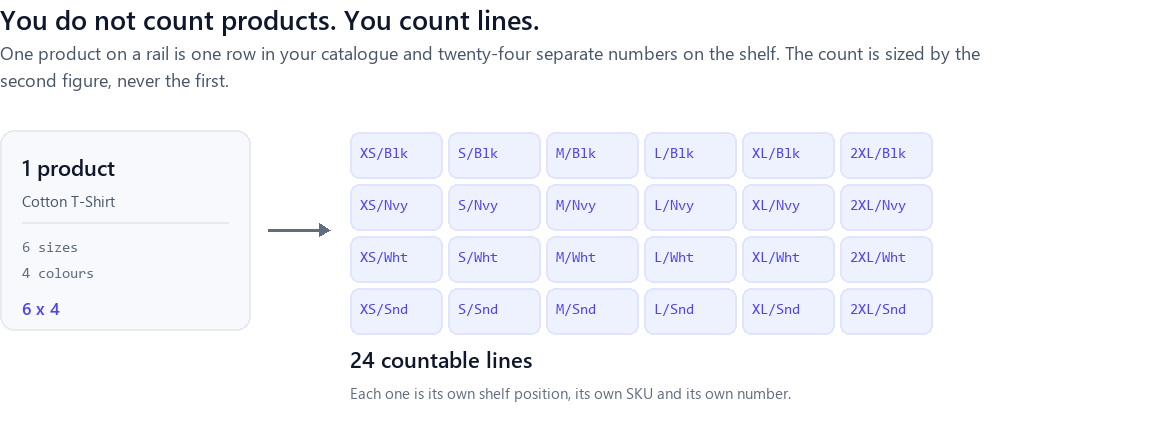
Scale that to a catalogue. Eight hundred products, of which two hundred are variable at an average of eight variations each, is six hundred simple lines plus sixteen hundred variation lines: 2,200 countable lines from an admin screen that reports 800 products. If you planned the day against 800, you planned a third of the work.
You do not have to estimate this. WooCommerce will tell you exactly. Go to Products → Export and, in the product-type list, tick Product variations alongside the ordinary types. Each variation comes out as its own row, with a Parent column pointing at the product it belongs to. Count the rows: that is your real line count, and it is the number to plan the count against.
Four ways WooCommerce can hold the stock#
Before any of that matters, there is a question with four possible answers, and it is per-product rather than shop-wide: where is the number?
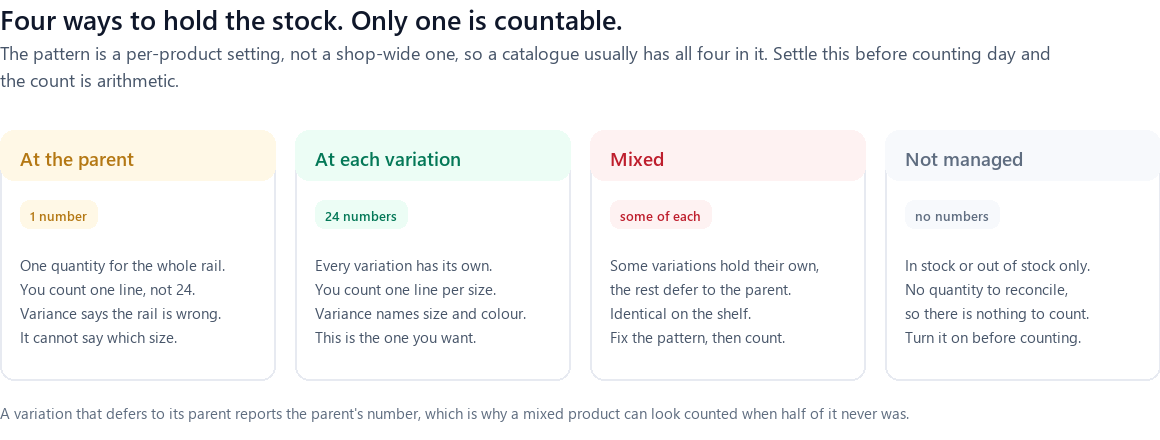
Stock can be held at the parent, where one quantity covers every size and colour. This is legitimate for things that genuinely pool — a product sold in one colour and one size that merely has variations for a gift-wrap option. On a rail it is nearly always a mistake, because the count it produces can tell you the rail is wrong and can never tell you which size.
It can be held at each variation, one quantity per line. This is what you want, and what the rest of this page assumes.
It can be mixed, and this is the case that catches people. A variation can manage its own stock while the variation hanging next to it defers to the parent, and there is nothing on the shelf to tell them apart. Half the rail counts properly; the other half reports the parent’s figure and looks counted when it never was.
Or stock can be not managed at all, in which case WooCommerce holds only in stock or out of stock and there is no quantity to reconcile. A count against it produces nothing, because nothing was ever being tracked.
Which pattern a product is on is a decision with consequences well beyond counting day, and it is worth reading the case for managing stock at the variation level before you standardise on one.
The five-minute pre-count audit#
The export you took to count lines is also the audit. Open it in a spreadsheet, sort by the Parent column so every variation sits under its product, and look at four things.
- A parent with a stock figure while its variations also have figures. That is the mixed pattern, or a leftover from before somebody switched. Decide which level is authoritative and clear the other.
- Variations with an empty stock column under a parent that has a number. Parent-managed. Fine if deliberate, and a problem if you were expecting per-size figures out of the count.
- Everything blank for a whole product. Stock management is off. It will produce no variance because it holds no quantity — and any number you type at it will not stick.
- Missing or duplicated SKUs. Sort the SKU column and look for blanks, and for the same value twice. Both break identification at the shelf, in different ways.
What comes out of this is a short list of products to fix. Fix them before the count, as their own job, because every one of them is a decision about where a number should live rather than a question about what is on the shelf.
SKU hygiene before counting day#
A count is a lookup. Somebody is standing at a rail holding a garment, and the only question that matters is which of 2,200 lines this thing is. Everything that makes that lookup instant makes the count fast, and everything that makes it a judgement call makes the count wrong.
Three rules cover it:
- Every variation has its own SKU. WooCommerce is happy to leave a variation without one, and the parent’s SKU is no substitute — it is the same value for all twenty-four lines, which is precisely the ambiguity you are trying to remove.
- SKUs are unique. A duplicate resolves to two lines, and a person who has to choose between two identical-looking rows will choose the first one every time.
- The SKU is readable at the shelf. In the database is not enough. On a swing tag, a shelf edge label, or a barcode on the garment is what counts.
A SKU that encodes the attributes reads back without a lookup at all — TSH-BLK-M tells a counter what it is before any screen is involved, and it makes a mis-typed one obvious rather than silent. If your variation SKUs are inconsistent or absent, setting them properly is a job worth doing once and never thinking about again.
The identification problem is a people problem first#
Here is the part that no plugin solves, and it is the part that actually determines whether your numbers come out right.
On a rail, the difference between two lines can be a shade of grey, a label that says M on one brand and 38 on another, or last season’s version of the same garment with the same name and a different fit. The software will happily record a number against whichever line the person selects. It has no way of knowing they selected the wrong one, and neither will you: a mis-identified count does not look like an error, it looks like two variances that cancel out.
So the standard to design for is this: a counter must be able to get from the object in their hand to exactly one line without exercising judgement. A barcode does that. A printed SKU on a swing tag does that. A product name in a list does not.
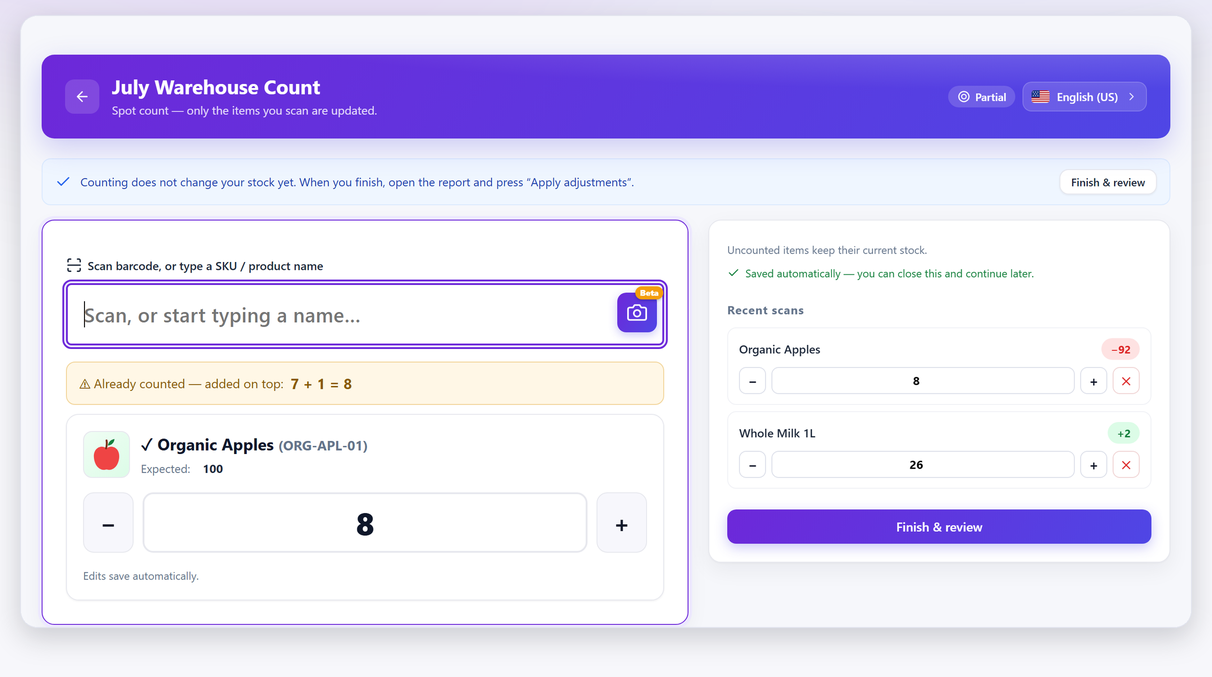
If you have barcodes on the garments already, scanning removes the judgement entirely, and you do not need a scanner to do it: a phone camera works as a scanner. If you do not have barcodes, the substitute is a printed SKU somebody can read and type — which is slower and still unambiguous, and unambiguous is the property that matters.
A walk order that never doubles back#
Twenty-four lines on one rail is not a hard count. It becomes one the moment the order you walk in is not an order at all.
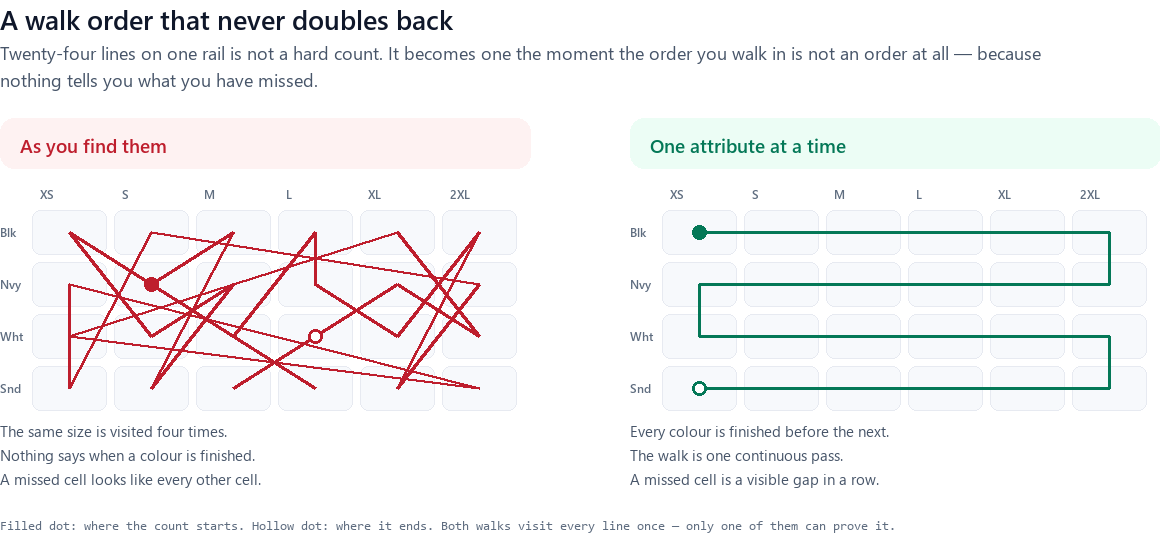
Count one attribute at a time and finish it: all six sizes of black, then all six of navy, and so on, turning back along the rail rather than returning to the start. The value is not the walking distance. It is that a colour you have finished is finished, and that a line you skipped shows up as a gap in a row rather than blending into a general sense of having covered everything.
Two practical points that make the difference between a plan and a habit:
- Match the walk to the physical arrangement, not to the spreadsheet. If the rail is hung size-ascending across colours, count size-ascending across colours. Forcing a shop floor to match a sort order is how a ten-minute count becomes forty minutes of walking.
- One rail is one session. Twenty-four lines applies in seconds and, if something goes wrong, costs you one rail. That is the same argument that makes counting a zone at a time work everywhere else in the shop, and it applies with more force here because variation lines are dense: a single bay can hold more countable lines than an entire aisle of simple products.
Why blind counting matters more here than anywhere else#
Hiding the expected quantity from whoever is counting is good practice everywhere. On a rail of near-identical items it stops being good practice and becomes the thing that makes the count worth doing.
On an ordinary shelf, showing the expected number biases the counter towards agreeing with it. On a rail it does something worse: it tells them which size to find. Expected 4, counted 3, and now a person is looking for one more medium — so the medium that somebody hung in the large section gets counted as a medium, because the number said there should be four. The count now confirms the system instead of measuring the shelf, and the mis-hung garment stays invisible for another quarter.
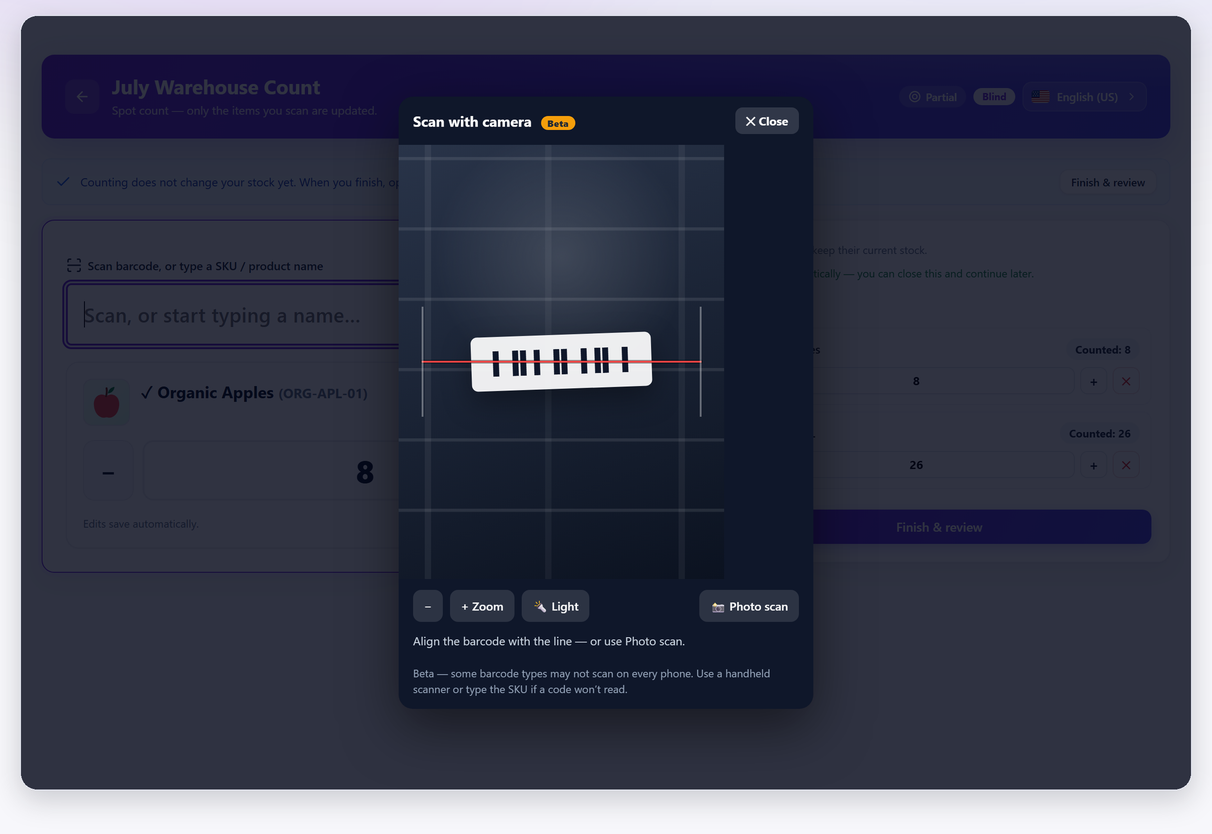
The mechanism and the reasoning are covered in full on the blind counting page. The only thing specific to variations is how much more it matters, and it is worth being blunt about that: an open count of a size-and-colour rail is close to worthless, because the two errors it cannot see — a swapped size and a mis-hung garment — are the two errors that rail actually has.
Reading variance at variation level: the size-swap signature#
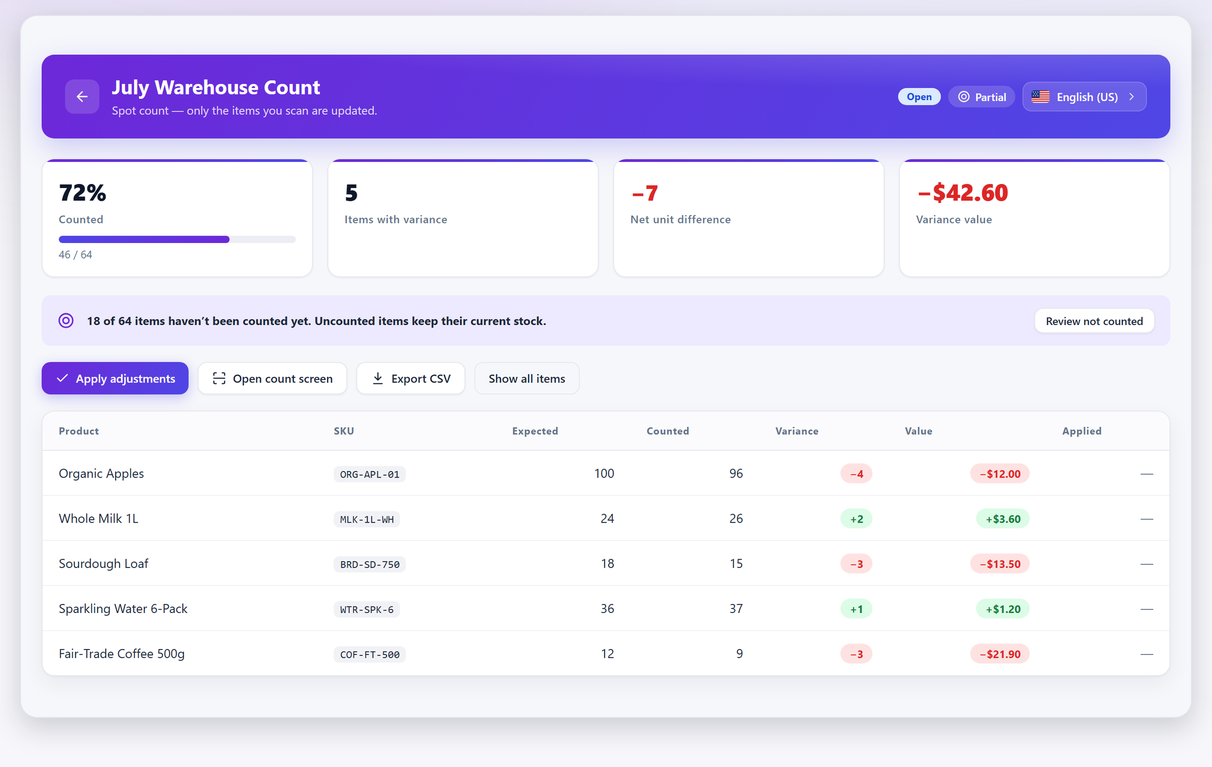
Once the numbers are in, the report is doing something a parent-level count can never do. At variation level a variance has a shape, and the shape usually names the cause.
| What the report shows | What it usually means | What to do |
|---|---|---|
| +2 on one size, −2 on the size next to it | Garments put back in the wrong place, or the wrong variation scanned at the till | Nothing is missing. Re-hang, and check the till’s scanning |
| −1 spread across several sizes of one colour | A real loss concentrated on one product, or a bulk sale that was never recorded | Check orders for that colour before treating it as shrinkage |
| Every size of one product short by the same amount | Usually a stock-holding pattern problem, not a loss | Check whether that product switched between parent and variation stock |
| One line large and positive, everything else clean | A delivery booked against the wrong variation | Find the goods-in record; correct it there, not on the shelf |
| Every line moved, and the net is close to zero | The lines are being identified wrongly at the shelf | Stop. Fix labelling before counting anything else |
| The parent shows a variance, no variation does | Stock is pooled at the parent | The count cannot tell you more. See the next section |
That first row is the one worth internalising, because it is by far the most common and it is routinely misread as theft. Two units gained on the medium and two lost on the large is not a loss of anything. It is four garments in the wrong place, and the correct response is a re-hang and a word with whoever is scanning at the till — not a shrinkage investigation. A parent-level count reports the same situation as a variance of zero and tells you nothing at all; the rail looks perfect and four items are in the wrong home. A shrinkage figure built without separating these two is measuring tidiness, not loss.
Pooled at the parent: one number for the whole rail#
If the audit found a product with its stock managed at the parent, you can still count it. You just have to be clear about what you get: a single figure for the rail, which will tell you the rail is wrong and will never tell you which size.
That is not worthless. It is enough to know that something on that rail needs attention. It is not enough to reorder from, which is the point at which most shops decide to change the pattern.
The temptation is to change it there and then, mid-count, with the rail in front of you. Do not. Moving stock management from the parent to the variations changes where the number lives, and applying a count across that change means writing figures against lines whose meaning changed underneath you. Note the product, finish the session, apply it, and do the switch afterwards as its own job on a day with no session open — then count the rail again, properly, and keep that count.
If you have already done it the other way round and the numbers are now wrong, the routes back are on the recovery page, in the order to try them.
Variations with no SKU on counting day#
You will find some. Every catalogue has a corner where variations were generated in bulk and nobody filled the SKUs in.
The instinct is to fix them on the spot, and it is the wrong instinct for the same reason as the section above: adding a SKU changes how a line is identified while a session is open on it. Instead:
- Count them by position — the line is still there in the session, listed by its attributes even without a SKU.
- Note which ones they were. A photograph of the shelf edge is a perfectly good note.
- Finish and apply the session.
- Fix the SKUs afterwards, as a batch, using a convention rather than one at a time.
The convention is worth ten minutes of thought because you will live with it for years. Product code, then attribute codes in a fixed order, in a fixed length: TSH-BLK-M, TSH-BLK-L, TSH-NVY-M. Fixed-length codes sort correctly, read consistently on a shelf edge, and make a typo visible instead of silent.
And once the SKUs are right, the count that follows is the one worth keeping. Everything before it was a measurement of your labelling.
Frequently asked questions#
How do I count stock by variation in WooCommerce?
Count at the level where the stock is held. If each variation manages its own stock, every variation is its own countable line with its own quantity, and a counting session lists them individually. If stock is managed at the parent, there is only one number for the whole product and no per-size count is possible until that is changed.
How many things am I actually counting?
Multiply out every variable product: six sizes in four colours is twenty-four lines, not one. To get the real total, export your products with Product variations ticked in the product-type list — each variation becomes its own row, and the row count is the number to plan the count against.
Should stock be managed on the parent or on each variation?
On each variation, for anything sold in sizes or colours. Parent-level stock produces a count that can tell you the rail is wrong but never which size, which means it cannot drive a reorder. Parent level is only reasonable when the variations do not represent separate physical items.
Some variations count correctly and others do not. Why?
Almost certainly a mixed pattern: a variation can manage its own stock while the one next to it defers to the parent. The two are identical on the shelf, so half the rail counts properly and the other half reports the parent’s figure. Check the stock column for each variation in an export before counting.
What does it mean if one size is over and the next size is under by the same amount?
It is a swap, not a loss. Garments were put back in the wrong place, or the wrong variation was scanned at the till. Nothing is missing; the fix is a re-hang and a check of how items are being scanned. Counted at the parent, the same situation reports a variance of zero and stays invisible.
Do I need barcodes to count variations?
No, but you do need something that identifies a line without judgement. A printed SKU on a swing tag or shelf edge is enough. What does not work is choosing from a list of product names, because on a rail several lines share the name and differ only by attributes.
What should I do about variations with no SKU?
Count them by position and finish the session first — adding a SKU changes how a line is identified, and doing that mid-count is asking for trouble. Fix them afterwards as a batch, with a fixed-length convention such as TSH-BLK-M.
Is blind counting necessary for variations?
It matters more here than anywhere else in the shop. Showing the expected quantity on a rail does not just bias the counter towards agreeing — it tells them which size to look for, so a mis-hung garment gets counted as the size the screen was expecting.