WooCommerce Variation SKUs: the N/A Problem and a Scheme That Lasts
Why your product page shows SKU: N/A, how to put SKUs on variations you already have, and a naming scheme that still works at 500 products.
Updated

In this article16 sections
SKUs are one of those things nobody plans and everybody eventually regrets. The scheme you invent for your first twenty products quietly becomes the scheme for your two thousandth, and by then it’s printed on labels, embedded in supplier orders and copied into your accountant’s spreadsheet.
This is about WooCommerce variation SKUs specifically: why the product page says SKU: N/A, how to put codes on variations you already have, whether variations need their own at all, and a naming scheme that still works at five hundred products.
Why your product page says SKU: N/A#
Most people who look up variation SKUs arrive with a narrower problem than naming conventions: the product page reads SKU: N/A, and choosing a size or a colour does not change it. Two pieces of WooCommerce produce that between them, and knowing which one you are looking at settles it in a couple of minutes.
The first is the template. templates/single-product/meta.php prints the SKU block whenever wc_product_sku_enabled() returns true and the product either has a SKU of its own or is a variable product. When a variable product’s own SKU field is empty, what it prints is the literal string:
<span class="sku_wrapper">SKU: <span class="sku">N/A</span></span>So N/A on a variable product with no parent SKU is core doing exactly what it was written to do. There is nothing to repair in the template.
The second is add-to-cart-variation.js, which rewrites that text once a selection resolves to a single variation. Its onFoundVariation handler finds the element with form.$product.find( '.product_meta' ).find( '.sku' ) and then does one of two things with it:
if ( variation.sku ) {
	$sku.wc_set_content( variation.sku );
} else {
	$sku.wc_reset_content();
}
wc_reset_content() puts the original text back — the parent SKU, or N/A — and onResetDisplayedVariation calls it again when the customer clears the selection. Core already swaps the SKU on selection, in other words. The snippets circulating for this problem are re-implementing something WooCommerce has done for years.
Which leaves four reasons you might be looking at it, in the order they are worth checking:
- The variation has no SKU of its own. This is the common case, and core is right: there is nothing to put in the element, so the parent’s text stays. The fix is the rest of this article.
- Not every attribute has been chosen yet. Nothing swaps until the selection resolves to exactly one variation. Two axes chosen out of three and the page is still showing the parent, correctly.
- The element is not where the script looks. It searches inside
form.$product— the.productwrapper holding the variation form — then.product_meta, then.sku. A theme that overridessingle-product/meta.php, a product page built out of blocks, or a layout that lifts the SKU into a sidebar or a tab outside that wrapper all produce a SKU that never changes. Inspect the SKU text on the page and confirm it really is a.skuelement, inside.product_meta, inside the product wrapper. The same script swaps the variation image, and it fails for the same reason — that post walks the identical failure in more depth, with the gallery in place of the SKU. - SKUs are switched off altogether.
wc_product_sku_enabled()is a filter, and some themes and catalogue plugins return false from it. Then there is no SKU block on the page at all, for any product.
If you are seeing N/A on a product whose variations all have codes of their own, it is the third one: the element is outside the wrapper the script can reach. If you are seeing no SKU line anywhere, it is the fourth. Neither is a problem with your data.
What a SKU is for#
A SKU — stock keeping unit — is your internal code for one distinct sellable thing. You invent it, you own it, and its only job is to be unambiguous.
Four codes get mistaken for each other, and only one of them is yours to invent:
| Code | Who assigns it | Where it lives in WooCommerce | What it is for |
|---|---|---|---|
| SKU | You | The Inventory tab — on the product, and on every variation | Picking, counting, reordering, your own reports |
| GTIN / EAN / UPC / ISBN | The manufacturer. The same code in every shop in the world | The separate GTIN field, added in WooCommerce 9.2 | Printed retail barcodes and product feeds |
| Supplier’s own code | Your supplier — and it changes when you change supplier | A supplier record, not the SKU field | Placing orders |
| Variation ID | WordPress | The post ID. Not editable | Internal only. Never print it on anything |
Putting an EAN in the SKU field works for scanning and makes a mess of everything else. Two more things a SKU is not: it is not a product description — BLUE-COTTON-TSHIRT-SUMMER-2026-SALE is not a code, it’s a sentence with hyphens — and it is not a place to keep data that changes, which is the mistake that hurts most and the first of the rules below.
Should variations have their own SKU?#
Yes — every stock-managed variation. The exception is the one that phrase quietly allows for: if the variations are not physically separate items, a code each buys you nothing. An engraving option, a made-to-order finish, or a product deliberately running one quantity on the parent are all cases where a single product-level SKU is the honest answer. What you give up is the ability to scan or count that variation on its own, which is most of the reason the codes exist — so it is worth being sure you really are running one shared stock pool rather than a number per variation before you decide.
The reason is that everything downstream of the product page operates at variation level. Picking an order means finding the Medium Blue, not the t-shirt. Counting stock means counting Mediums and Larges separately. Reordering means telling a supplier which sizes ran out. A variation with no SKU can’t be scanned, which means it can’t be counted properly either — you’ll be typing product names into a search box while holding a barcode scanner.
WooCommerce enforces SKU uniqueness across products and variations, which is helpful: it means a duplicate is a save-time error rather than a discovery you make six months later while investigating a stock discrepancy.
A scheme that survives#
The pattern that works for almost every small catalogue:
[PRODUCT]-[AXIS1]-[AXIS2]
TSHIRT-RED-S·TSHIRT-RED-M·TSHIRT-BLUE-L
Three properties make it work:
- The product token is stable. It identifies the family, not the season or the price.
- The axis order is fixed. Colour always before size, on every product, forever. This is what lets you sort a list and have it group sensibly.
- The tokens are predictable. Red is always
RED, neverRon one product andRDon another.
Once a catalogue runs to a few hundred products, or spans obviously different families, put a short family code in front: TS01-RED-S, HD02-BLK-XL. Slightly less readable, considerably easier to sort and to search by supplier or range — and it is the part of the pattern that still holds at five hundred products, where a scheme built out of full words has long since stopped fitting on a label.
Rules that save you later#
1. Never encode anything that changes#
Price, season, supplier, sale status, discount tier. All of these look stable when you invent the scheme and all of them move. A SKU containing -2026 becomes a lie in January; a SKU containing -1999 becomes a lie the first time you change the price. When the data changes you’ll either live with a wrong code or renumber — and renumbering is the thing this whole article exists to prevent.
Those details still have to live somewhere. The supplier a product comes from, and the code that supplier uses for it, belong in a supplier record rather than inside the SKU — PurchaseDesk keeps both against the product, so you can change supplier without a single label becoming wrong.
2. Keep a fixed length per token where you can#
S, M, L, XL is fine because it’s short and unambiguous. Where you have many values, fixed-width codes sort predictably: 001 through 120 rather than 1 through 120, which sorts as 1, 10, 100, 11.
3. Avoid ambiguous characters#
Capital O and zero. Capital I, lowercase l and one. These are fine on screen and awful on a printed label read out over the phone by someone in a stockroom. Pick one of each pair and never use the other.
4. Uppercase, hyphens, nothing else#
No spaces, no slashes, no ampersands, no accented characters. SKUs end up in CSV exports, URLs, barcode labels and accounting imports, and every one of those has an opinion about punctuation. A-Z, 0-9 and hyphen travel everywhere.
5. Never reuse a retired SKU#
When a product is discontinued, its code retires with it. Reusing it means your sales history now blends two different things, and the day you notice is the day you’re trying to explain a margin figure.
“Invalid or duplicated SKU”#
Rule 5 has a counterpart at save time. Give WooCommerce a code it has already seen and it refuses the save with Invalid or duplicated SKU. — which is the system doing you a favour, though it rarely feels like one at the time.
“Already seen” is wider than people expect in one direction and narrower in another. It covers every product and every variation in the shop, including variations belonging to some other product, and including products still sitting in Draft. It does not cover the Trash: WC_Product_Data_Store_CPT::is_existing_sku() filters on posts.post_status != 'trash', so a trashed product releases its codes immediately. Most of the advice you will find on this says the opposite, and sends people hunting through the Trash for a collision that was never there.
To find the real offender, paste the code into the search box on Products. The admin product search matches SKUs as well as titles, and because the query returns each matching row’s parent alongside the row itself, a colliding variation SKU surfaces as its parent product in the results — which is the only way you would ever find it, given that variations have no rows of their own on that screen.
One more thing catches people out here. Duplicating a variable product does not reuse its codes: core runs each one through wc_product_generate_unique_sku(), which appends -1, then -2, until the code is free. Duplicate a twelve-row matrix and it arrives full of TSHIRT-RED-S-1. Duplicate is still a good way to build a similar product — but re-generating the SKUs afterwards is a required step, not an optional tidy-up.
Generate them, don’t type them#
Every rule above is a rule about consistency, and consistency is exactly what humans are bad at across two hundred rows at four in the afternoon.
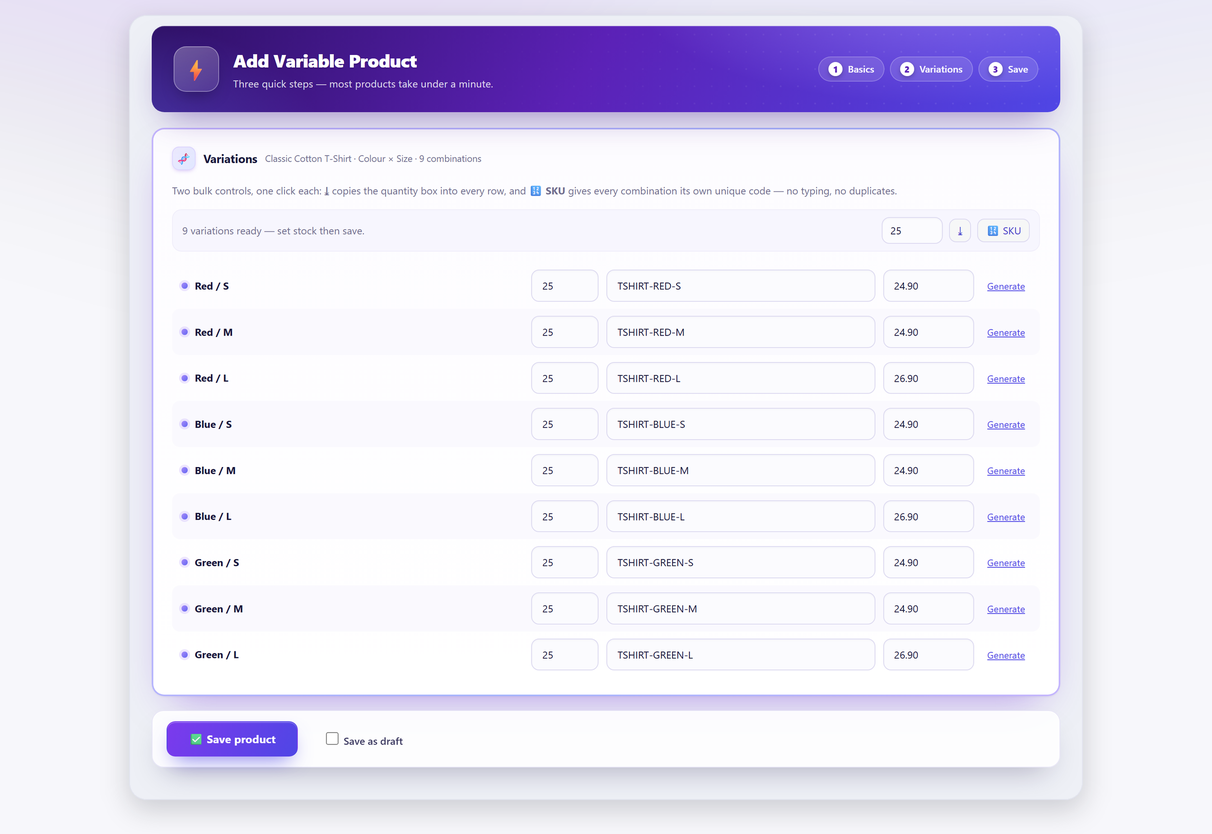
Generating them instead removes the two failure modes people actually have: typos, and drift. In Quick Variable Products it’s one click for the whole matrix, on the same screen where you generate the variations — and it fills only the rows that are still empty, so anything you typed by hand first survives untouched.
That last part matters. A generator should be a default, not a prison: there’s always one product where the manufacturer’s code is the code, and the scheme has to bend around it.
What generation does not give you is uniqueness in the abstract. WooCommerce is what guarantees that, by refusing the save when a code already exists anywhere in the shop — and if a code you typed on a row turns out to be taken, it is dropped rather than quietly written as a duplicate, with the dropped codes reported back to you.
One boundary worth stating plainly, because it decides whether the free plugin is any use to you: it generates SKUs on the create screen. It does not touch products you already have. For those there is the CSV route below, which is free, or the Pro catalogue editor, which does bulk SKU edits, a smart view for rows with no SKU, and an exact before-and-after preview with undo.
Setting SKUs on variations you already have#
Start with the honest no: WooCommerce cannot set variation SKUs in bulk. The bulk-actions dropdown on the Variations tab covers status, pricing, inventory, shipping and downloadable files, and there is no SKU entry anywhere in it. Quick Edit on the products list does not reach variations at all, because variations have no rows there to edit.
The free route is the CSV round trip, and it genuinely works:
- Products → All Products → Export. Under “Which product types should be exported?”, tick Product variations.
- Edit only the SKU column. Leave
ID,TypeandParentexactly as they came out. - Products → Import, upload the file, and tick Update existing products.
One detail decides whether that works at all: the importer keys on the ID column, and only falls back to matching on SKU when ID is blank. The SKUs you are adding do not exist yet, so ID is the only thing that can match an existing variation. Remove or empty that column and the import will cheerfully create three hundred new records instead of updating the three hundred you have. Keep Type as well — it is what tells the importer the row is a variation rather than a product.
The export is one row per variation, so a three-hundred-variation catalogue is a three-hundred-row edit. That is exactly why the pattern is worth building with a spreadsheet formula — concatenate the product token and the attribute columns, fill down, paste the result into the SKU column — rather than typing three hundred codes and reintroducing every failure mode the scheme exists to prevent.
And the paid alternative, once: bulk SKU editing of variations that already exist is what the Pro catalogue editor is for. The CSV route above costs nothing and has no row limit, which for a one-off renumbering is usually the right trade.
Changing SKUs later#
Treat this as a migration, not an edit.
By the time you want to change a scheme, the old codes exist in places WooCommerce can’t reach: printed labels, supplier order histories, past invoices, accounting exports, marketplace listings, a spreadsheet someone maintains. Changing the SKU in WooCommerce doesn’t change any of them — it just makes them disagree.
If you genuinely have to:
- Export first. Old SKU against new SKU, one row per variation. This mapping is the entire safety net.
- Change the new products first. Adopt the new scheme for everything you add from today, and leave the back catalogue alone until you’ve lived with it for a month.
- Migrate by family, not all at once, and re-print labels for a family as you go.
- Keep the mapping permanently. Someone will find a 2024 invoice and need to know what
TS-4471was.
Which is a long way of saying: spend twenty minutes on the scheme now.
A checklist before your next hundred products#
- Product token decided, stable, and short enough to read aloud.
- Axis order fixed and written down.
- Value codes fixed —
REDnotR, and the same on every product. - Nothing in the code that can change.
- Uppercase, hyphens, no ambiguous characters.
- Barcodes going in the GTIN field, not the SKU field.
- Generation turned on so the above happens without anyone remembering it.
Seven decisions, once. They’re the difference between a catalogue you can search and a catalogue you have to interpret.
Variation SKU FAQ#
Why does my product page show SKU: N/A?
WooCommerce prints N/A for a variable product that has no SKU of its own. When a customer picks a complete combination, the variation script replaces that text with the selected variation’s SKU, and puts N/A back if the matched variation has no SKU either. So N/A that never changes usually means the variations have no codes yet — or that a theme has moved the SKU element outside the product wrapper the script searches.
How do I add SKUs to variations I already created?
WooCommerce has no bulk SKU tool for variations: the Variations bulk-actions dropdown does not offer SKU, and Quick Edit does not reach variations. Export the variations from Products → All Products → Export with Product variations ticked, fill in the SKU column, then re-import with Update existing products ticked. Leave the ID column alone — the importer matches on it, and the SKUs you are adding cannot match anything yet.
Should each variation have its own SKU?
Yes, for every stock-managed variation. Picking, counting, reordering and supplier communication all happen at variation level. A variation with no SKU cannot be scanned, so stock counts fall back to typing product names into a search box.
What is the difference between a SKU and a barcode?
A SKU is your own internal code, invented by you and unique within your shop. A barcode — GTIN, EAN, UPC or ISBN — is allocated by the manufacturer and is the same in every shop in the world. WooCommerce has had a separate field for it since version 9.2, and that is where printed retail barcodes belong.
What is a good SKU format for variations?
Product token, then each axis in a fixed order: TSHIRT-RED-S. Keep the product token stable, keep the axis order the same on every product, and use the same code for the same value everywhere. Uppercase letters, digits and hyphens only.
What should I never put in a SKU?
Anything that can change: price, season, supplier, sale status. A code containing the year becomes a lie in January and a code containing the price becomes a lie the first time you reprice. Also avoid characters that are ambiguous on a printed label, like capital O against zero.
Should I generate SKUs automatically or type them?
Generate them. Every rule about SKU schemes is a rule about consistency, and consistency across two hundred rows is exactly what people are bad at. Generation removes typos and drift. It is not what makes the codes unique — WooCommerce does that, by refusing the save when a code already exists anywhere in the shop — and it should still let you override a row where a supplier’s code has to win.
Can I change my SKU scheme later?
You can, but treat it as a migration rather than an edit. Old codes live on printed labels, past invoices, supplier order histories and accounting exports that WooCommerce cannot reach. Export an old-to-new mapping first, adopt the new scheme for new products, and migrate the back catalogue family by family.