Are Gmail Extensions Safe? What OAuth Actually Grants
Some Gmail extensions read your entire mailbox; others only see the page you're on. How to tell which you're installing, and what you already granted.
Updated

In this article10 sections
A Gmail extension asks to “read, compose, send, and permanently delete all your email from Gmail”. You click Allow on the OAuth consent screen, because you wanted the follow-up reminders and the dialog is in the way.
That sentence is not marketing hyperbole — it’s a fair description of a common OAuth scope. This is about what Gmail extension permissions actually grant, the completely different mechanism some extensions use instead, and how to tell which one you’re installing.
The honest answer to “is this safe” is that it depends entirely on which of two mechanisms the extension uses, and the difference between them is roughly your whole mailbox: one is granted server-side access to your account and can read mail you have never opened while your laptop is shut, the other can only see the page in front of you. You can tell which one you’re about to install in about ten seconds, from the dialog Chrome shows before you click Add — the four checks are below.
Two different ways to read your mail#
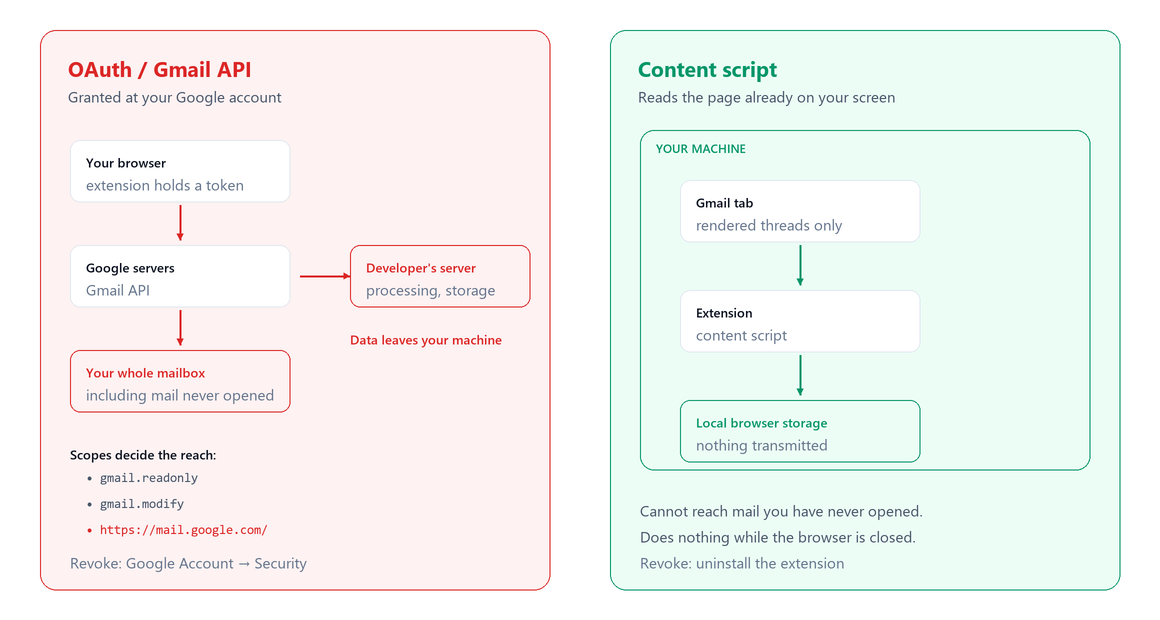
Almost every Gmail tool uses one of two mechanisms. They sound similar and are not remotely equivalent.
| OAuth / Gmail API | Content script | |
|---|---|---|
| What it accesses | Your mailbox, server-side | The page you’re looking at |
| Works when browser closed | Yes | No |
| Can read old mail you haven’t opened | Yes, all of it | Only what’s rendered |
| Can send mail as you | If granted | Only by driving the interface |
| Data leaves your machine | Usually, to their server | Only if the extension chooses to send it |
| Revoked by | Google Account permissions | Uninstalling the extension |
The OAuth route#
You’re redirected to Google, shown a consent screen, and you grant an application access to your account. The extension then talks to Gmail’s servers directly using a token.
This is the standard, well-designed way to build a mail integration, and there is nothing shady about it in itself. It’s how scheduling tools, CRMs and mail clients work, and it’s the only way to do things like sending a follow-up while your laptop is shut.
What matters is which scopes were requested, and they differ enormously. Nobody is ever shown the string gmail.modify, though — you are shown an English sentence and about thirty seconds of doubt, so the sentence is the useful way in. Google publishes a user-facing description for each scope, and that is what the consent screen is built from — but Google rewrites this wording from time to time, so read the left column as close to what you’ll see rather than as an exact quote.
| What the consent screen says | What it actually grants |
|---|---|
| “Read, compose, send, and permanently delete all your email from Gmail” | https://mail.google.com/ — full access, including permanent deletion. This is the broadest one, and it is the sentence at the top of this page. |
| “Read, compose, and send emails from your Gmail account” | gmail.modify — read, write and modify, including labels. Cannot permanently delete. |
| “Manage drafts and send emails” | gmail.compose — create, edit and send drafts, and send mail as you. No read access to the messages already in your mailbox. |
| “View your email messages and settings” | gmail.readonly — read all mail and settings. Cannot send or delete. |
| “Send email on your behalf” | gmail.send — send mail as you. Cannot read. |
| “View your email message metadata such as labels and headers, but not the email body” | gmail.metadata — headers only: who, when, subject. No message bodies. |
A follow-up tool genuinely needs to read threads and probably to send. It rarely needs full-mailbox delete rights. When you see the broadest scope requested for a narrow feature, that’s worth a pause — not because the developer is malicious, but because breadth increases the blast radius if they’re ever compromised.
The part people miss#
Granting OAuth access means a copy of your mail can end up on someone else’s server, because that’s usually where the processing happens. Your data is then subject to their security, their retention policy, their jurisdiction and their next acquisition.
Google runs a verification process for apps requesting sensitive Gmail scopes, including security assessments for the most sensitive ones. That’s a real check and it is not a guarantee about what happens to your data afterwards.
The content-script route#
A Chrome extension can run JavaScript in the context of a page you have open. An extension built this way sees the Gmail interface the same way you do — the threads currently rendered in your browser — and nothing else.
What this means concretely:
- No Google account access. Nothing appears in your Google Account permissions list, because nothing was granted there.
- No server-side reach. The extension cannot read a message you’ve never opened, because it isn’t talking to Gmail’s servers at all.
- Nothing reaches your mail while you’re away. Close Gmail and the content script has nothing to read — it only exists inside a page that’s open. The extension as a whole isn’t gone: a background service worker can wake on a timer with no tab open, and Chrome often keeps running after you close the last window. But that worker has no route to your mailbox either, so what it wakes up to is whatever the extension already stored.
- Data can stay local. It can, if the extension stores it in your browser profile. It doesn’t have to — a content script can still upload whatever it reads.
That last point is the honest caveat. A content script is a narrower capability, not automatically a privacy guarantee. The right question isn’t only “what can it reach” but “where does what it reads go”.
How to tell, before you click Add#
Four checks. Two of them happen before anything is installed, and if you only ever do one, do the second — that is the ten-second version.
- Open the Privacy practices tab on the Chrome Web Store listing. Developers have to declare what user data the extension collects and what they do with it, and certify that they don’t sell it or use it for purposes unrelated to the extension’s single purpose. Something that collects the contents of your email is supposed to say so there. It’s a declaration rather than an audit — but a listing that declares it collects nothing while the install dialog asks for your mailbox is a contradiction you can see from outside.
- Read the install dialog before you click Add. Roughly: “Read and change your data on mail.google.com”. That is a host permission — the content-script route — and it is not access to your Google account. Nothing in this dialog can grant an OAuth scope; the wording only ever describes what the extension can do inside pages you have open. Chrome rephrases these strings from time to time, so match the shape of the sentence rather than the exact words.
- After installing, open chrome://extensions and click Details. Permissions and Site access are both listed there. Site access is also where you can narrow a broad host permission to “On click”, so the extension only wakes up when you ask it to. A page can’t link to a chrome:// address — Chrome blocks it — so that one has to be typed into the address bar.
- Watch for a “Sign in with Google” button afterwards. That’s the OAuth route, and it is a second, separate decision: installing the extension did not make it for you. The consent screen lists the scopes before you agree to anything, so read them against the table above, and treat Cancel as a real option — backing out there leaves you with an installed extension and no account grant, which for a lot of tools is a working configuration.
If you never see that fourth screen, there is no account-level grant to worry about, because there is no way to obtain one without showing it to you. The audit in that case is the extension itself, not your Google Account.
The trade-offs, plainly#
Neither approach is simply better:
- OAuth buys you reach. Scheduled sending, server-side processing, working across devices, seeing mail you’ve never opened. If you need any of that, a content script cannot provide it.
- A content script buys you containment. Smaller surface, nothing granted at the account level, and the possibility of everything staying on your machine.
The question is whether the tool’s features require the reach it’s asking for. A follow-up tool that surfaces threads you’re already looking at doesn’t need server-side access to your entire mail history — and if it asks for it anyway, the mismatch is the interesting part.
Detecting that mismatch takes about fifteen seconds. Go down the feature list on the extension’s own page and ask, of each item, when does this happen. If every one of them happens while you’re looking at Gmail — a sidebar, a badge on a thread, a list that’s waiting for you when you next open the tab — then a host permission on mail.google.com is sufficient, and OAuth is a choice the developer made rather than a requirement. If anything on the list happens while your browser is shut — sending on a schedule, a digest that arrives by email, search across mail you’ve never opened — then OAuth is unavoidable, and the question stops being whether and becomes which scope, and where the copy of your mail lives.
How to check what you’ve already granted#
Worth ten minutes today:
- Open your Google Account → Data & privacy → Third-party apps and services, or go straight to myaccount.google.com/connections. It used to sit under Security as “Third-party apps with account access”, which is what most write-ups still tell you to click; it isn’t there any more. Every app holding a token is listed, and each one’s See details shows what it was granted.
- Look for anything you don’t recognise or no longer use. Tools you tried two years ago are still there.
- Remove access for anything you can’t justify. That stops anything further being read — but it doesn’t reach back for what has already been copied to their servers. If that part matters to you, a deletion request under their privacy policy is a separate action with its own timeline, and it’s worth sending the same day.
- Then check chrome://extensions separately — an extension with no OAuth grant won’t appear in the Google list at all, so these are two different audits.
People frequently find that the tool they stopped using in 2023 still holds read access to their mailbox.
Questions worth asking before you install#
- Does it ask for OAuth? If yes, which scopes, and do they match what it does?
- Where is my data processed? On my machine, or on their server?
- What’s stored, and for how long?
- What happens when I uninstall? Local storage goes with the extension; server-side copies do not.
- Does it need to work while I’m offline? If not, it doesn’t need server access.
- Is there an AI feature, and where does it run? “Summarise this thread” can mean on-device or a round-trip to a provider with your email in the request body. Those are very different, and where the model actually runs is the part to pin down.
If a company can’t answer these clearly on its own site, that itself is the answer.
Why we chose the narrow route#
Having set that bar, here are our own answers to the same six questions. CommitLatch uses no Gmail OAuth and no Gmail API. It reads the thread rendered in the tab you’re looking at, via a content script, and nothing else — not mail you haven’t opened, and nothing at all while that tab is closed. Its queue lives in your local Chrome profile and stays there until you clear an item or uninstall, at which point it leaves with the extension. The AI runs on the device by default, on Chrome’s built-in Gemini Nano, which means no network request is made to summarise a thread. There is nothing in your Google Account permissions list to revoke, because nothing was granted there — the audit for CommitLatch is chrome://extensions, not myaccount.google.com.
Two things do leave your machine, and it would be poor form to describe the above and leave them out. If you’d rather use a larger model than the on-device one, you can bring your own Claude, OpenAI or Gemini key; the thread text then goes from your browser straight to that provider, with no Eren Labs server in between — but it does go to them, under their terms rather than ours, and that is a choice you make per key, not a default. The extension also makes one licence check of its own. That’s the complete list.
That’s a deliberate trade with real costs: it can’t do anything while your browser is closed, it can’t reach mail you’ve never opened, and it doesn’t sync between machines. For a follow-up tool we think that’s the right side of the trade — but it is a trade, and you should pick the side that matches what you actually need it to do. If the thing you’re really after is a follow-through routine that survives a busy week, that’s worth settling before the permission question, because it decides which side of the trade you need.
Gmail extension permissions FAQ#
What does a Gmail extension actually get access to?
It depends entirely on the mechanism. An extension using OAuth and the Gmail API is granted server-side access to your mailbox under specific scopes, and can read mail you have never opened even when your browser is closed. An extension using a content script only sees the page currently rendered in your browser.
Which OAuth scopes should I be cautious about?
The broadest one grants full access including permanent deletion. Narrower scopes exist for read-only access, sending only, modification without deletion, and metadata only. The question worth asking is whether the scope requested matches what the tool actually does — a follow-up tool rarely needs full mailbox delete rights.
Is a content-script extension automatically safer?
It has a narrower capability, which is not the same as a guarantee. A content script cannot reach mail you have never opened and holds no account-level grant, but it can still upload whatever it does read. The right question is both what it can reach and where what it reads goes.
How do I check what I have already granted?
Open your Google Account, then Data & privacy, then Third-party apps and services — or go directly to myaccount.google.com/connections. It used to sit under Security as “Third-party apps with account access” and no longer does, which is why older instructions send you to a menu item that is not there. Every app holding a token is listed, and each one’s See details shows what it was granted. Removing access stops anything further being read, but it does not reach back for copies already taken; a deletion request under that company’s privacy policy is a separate step. Check chrome://extensions separately — an extension with no OAuth grant will not appear in the Google list at all, so these are two different audits.
Does uninstalling an extension remove my data?
It removes anything stored locally in the browser profile. It does not remove copies held on a developer’s server, and it does not by itself revoke an OAuth grant. If a tool had account access, revoke it in your Google Account as a separate step.
What if the extension has AI features?
Ask where the model runs. “Summarise this thread” can mean an on-device model or a network request with your email in the body, sent to a provider or to the developer’s own server. Those are very different arrangements, and a tool that does not say clearly which one it uses has answered the question.