How to Track Email Follow-ups in Gmail: Four Searches, Two Habits
The Gmail searches that find threads you never answered, plus one list in four states and a daily five-minute pass that survives a busy week.
Updated

In this article14 sections
Nobody loses track of the email they answered this morning. What goes missing is the one from eleven days ago where you said “I’ll send that over by the end of the week” — and then a week happened.
This is about building a follow-up system for Gmail that catches those: why the usual tactics stop working, the four searches that show you what your inbox is hiding, and a routine that survives a busy week.
The short version#
- You stop losing track of follow-ups by keeping one list in four states — what you owe, what you’re waiting on, what’s blocked, and what recurs.
- Write every entry as a verb. “Send the revised proposal”, not “the Acme thread”.
- Two habits, and the second is the one people skip: five minutes a day working the queue, fifteen minutes a week finding what never reached it.
- If you do one thing today, search
in:inbox -in:sent older_than:7din Gmail and read what comes back.
The four kinds of loose end#
“Follow-up” gets used for four different situations that need different handling. Naming them is most of the work:
| Type | The state you’re in | What it needs |
|---|---|---|
| You owe something | You promised a document, a price, an answer | A task with a date |
| You’re waiting | You sent it; they’ve gone quiet | A nudge after N days |
| It’s blocked | Neither side can move until something else happens | Visibility, not a reminder |
| It recurs | A renewal, a monthly report, an annual review | A date far in the future |
The reason a single “follow-up” label fails is that these have different failure modes. A thing you owe fails because you forgot. A thing you’re waiting on fails because the other person forgot. A blocked thing fails because nobody owns it. Treating all three as one list means the loudest one wins and the other two rot.
Why starring and labelling stop working#
Almost everyone starts here, and it works for a while. Then it doesn’t, for a predictable reason: a star records that something is important, not what has to happen next.
Look at a starred list after a month and you can’t tell, without opening each thread, whether you’re waiting on them or they’re waiting on you. So opening the list stops being useful, so you stop opening it, so the stars accumulate. Within two months the starred folder is an archive of things that were once urgent.
Labels have the same problem with an extra one: they need maintenance. A waiting label is only true until they reply, and nothing removes it for you.
What Gmail gives you natively#
More than people use, and less than they need.
| Tool | What it does | What it can’t do | Best used for |
|---|---|---|---|
| Snooze | Removes a thread now and returns it on a date you pick | Say why you snoozed it — the Snoozed folder lists the threads, not what you owe on them | Chasing one specific thing next Tuesday |
| Nudges | Surfaces threads Google’s heuristics think you should answer or chase | Explain itself, behave predictably, or be tuned beyond on and off | A free safety net you can’t plan around |
| Tasks | Turns a thread into a task with a date | Notice anything for you — it’s one manual step per thread | Commitments with a hard deadline |
Snooze and Tasks both start with you picking the thread. Nudges pick for you, but on terms you can’t see or plan around. That is the gap. Every native tool you can rely on requires you to have already spotted the commitment.
Four Gmail searches that find what you never answered#
Before any of the structure below, there is something you can do this afternoon with nothing installed. Four searches, typed into the Gmail box. None of them is exact — Gmail has no “nobody replied” operator and never will, because it doesn’t know what a reply was supposed to contain. What they do is cut a mailbox down to a list short enough to read.
1. Threads you never answered.
in:inbox -in:sent older_than:7d newer_than:90d -category:promotions -category:social -category:updates -category:forumsGmail matches at conversation level, so -in:sent throws out any thread that contains a message from you. What’s left came in, sat for a week, and got nothing back. The category exclusions keep marketing and notifications out of the result; drop them if your inbox is already filtered.
Be clear about what conversation-level matching costs you here, because it’s more than it sounds: this finds only threads you have never touched at all. A thread you started, they answered, and which now needs your reply — the ordinary business case — never appears. An empty result is not an empty conscience.
2. Threads you sent that went quiet.
in:sent -in:inbox older_than:5d newer_than:90dA reply would have landed the conversation back in the inbox, so excluding in:inbox leaves mostly the ones nobody answered. Two known faults: it flags threads you archived yourself after a perfectly good reply, and it misses any reply a filter routed past the inbox.
3. Promises you made in prose.
in:sent newer_than:60d ("I'll send" OR "I will send" OR "get back to you" OR "by the end of the week" OR "let you know")This is the one that finds the sentence you typed on a Thursday afternoon. Write the contracted and the uncontracted form as separate phrases: Gmail drops the apostrophe rather than expanding the contraction, so "I'll send" does not match "I will send". Add your own — everyone has three or four they use without noticing.
4. Star rot.
is:starred older_than:30dAnything still starred on mail more than a month old is finished, dead, or a commitment you’ve stopped looking at. All three want the same treatment: decide, then unstar.
Treat the four as approximations you skim, not lists you trust. One piece of mechanics makes them a habit rather than a party trick: Gmail can’t save a search, but the results page is bookmarkable. The URL is https://mail.google.com/mail/u/0/#search/ followed by the query, spaces written as + and any quotation marks as %22 — searches 1, 2 and 4 need only the plus signs, search 3 needs both. If you’re signed in to more than one Google account, the 0 is whichever you signed in to first and 1 the next, so check it before you save the bookmark. A filter is the wrong instrument: it can label the existing matches once, if you tick “Also apply filter to matching conversations”, but it never re-evaluates them afterwards. A bookmark is what you want for something you repeat.
The gap: nothing runs the scan unless you do#
Those four searches are a manual way to surface what you forgot, and they genuinely work — that’s why they’re worth bookmarking rather than admiring.
Here’s the structural problem with the entire category, native tools and extensions alike: nothing runs that scan unless you do. So it gets skipped in exactly the week you’re too busy to remember it exists — which is reliably the same week you promise something in a hurry on a Thursday afternoon and never process it.
And that’s the one that costs you. The follow-ups you remember, you mostly do. The damage comes from the ones that never entered the system at all.
So a follow-up system needs two halves: a queue for what you know about, and a way to surface what you don’t. Most tools only do the first. Reminder tools and discovery tools solve different halves of this, and the difference is worth settling before you install anything.
Building a follow-through queue#
Whatever tool you use, the shape that works:
One list, four states#
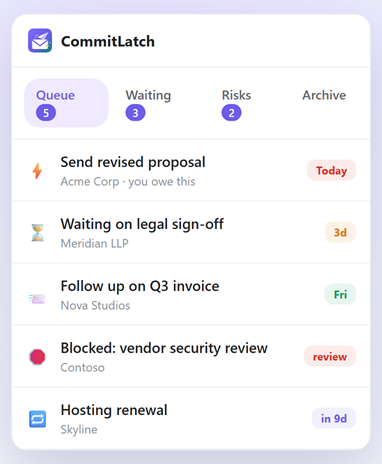
Not one flat “follow-up” pile. Separate what you owe, what you’re waiting on, what’s blocked, and what’s scheduled far out. Each gets read differently: the first is a to-do list, the second is a chase list, the third is a management problem, the fourth is a calendar.
A next step, in words#
“Follow up on the Acme thread” is not a next step. “Send the revised proposal” is. If the entry doesn’t contain a verb, you’ll reopen the thread every time you look at the list to work out what it meant — and after the third time, you’ll stop looking.
A date that means something#
Two different dates matter, and conflating them is a common mistake. The due date is when you promised it. The review date is when you’ll check whether they’ve replied. A thing you’re waiting on has a review date and no due date; a thing you owe has both.
A reply you don’t have to notice#
When they reply, noticing should not be your job. That is the standard worth holding a tool to: it spots the reply itself and offers to close the item in one click, instead of waiting for you to remember that the item is stale. CommitLatch does it that way — when a reply lands on something you’re waiting on, a “They replied — resolve?” prompt appears inside the thread. It detects; you confirm. One click is a fair price; remembering is not, because remembering is the first thing dropped in a busy week, and a list that depends on it quietly decays.
A routine that survives a busy week#
Two habits, both short:
Daily, five minutes. Open the queue, not the inbox. Do the things that are due. Nudge anything that’s been quiet past its review date. Don’t triage new mail during this — that’s a different activity and it will eat the whole slot.
Weekly, fifteen minutes. Find what never made it into the queue. This is the half most people skip and the half that catches the expensive misses, and it is concrete: open the two bookmarked searches — the one for threads you never answered, the one for messages you sent that went quiet — and work down each list. For every row, do exactly one of three things. Reply now, if that takes under two minutes. Add it to the queue with a verb and a review date. Or archive it deliberately, having decided it doesn’t need you. Anything that turns up in the scan a second week running isn’t a one-off; it’s a process failure, and the fix is upstream of the scan.
If a tool can do that second scan for you, take it — it’s tedious, it’s mechanical, and it’s exactly the kind of thing that stops happening the week you’re busiest, which is the week you most need it. Be honest about what it buys, though. A tool can do the reading; anything that lives inside Gmail still needs you to open Gmail and be looking at the right view. It shortens the habit. It doesn’t remove it.
What good looks like#
You should be able to answer these in under a minute, without opening a single thread:
- What did I promise someone this week that I haven’t delivered?
- Who owes me something that’s now late?
- What’s stuck, and on whom?
- What’s coming up that I agreed to a month ago and have since forgotten?
If answering those requires scrolling your inbox, you don’t have a follow-up system — you have an inbox and a good memory. The memory is the part that fails first.
CommitLatch is built around this shape, and the limit belongs before the pitch: it reads only the rows visible in the Gmail view you happen to be looking at. No OAuth, no Gmail API, no mailbox sync — a meaningful distinction if you’re putting anything near a work inbox, and the reason its loose-ends scan covers the list on screen rather than the whole mailbox. Choosing the view is still your job.
What it does in exchange is the thing the reminder model structurally can’t. At the moment you press Send it reads what you typed, on your machine by default, and turns “I’ll send the revised proposal Friday” into a tracked item with Friday already on it. That is the Thursday-afternoon promise, caught at the one moment you were ever going to notice it — which is the gap the searches above can only find after the fact.
It’s on the Chrome Web Store. The core tracking — Queue, Waiting, Risks, the Loose Ends Scan and the Waiting Radar — is free. Pro adds unlimited AI, with your own key, at $4.99 a month or $49.99 a year, and you can run Pro for fourteen days without a sign-up or a card.
Gmail follow-up FAQ#
How do I find emails I never replied to in Gmail?
Search in:inbox -in:sent older_than:7d. Gmail matches whole conversations, so excluding in:sent removes every thread you have answered and leaves the incoming ones you have not. Add -category:promotions -category:social -category:updates to keep marketing out of the result. It only finds threads you have never touched at all, so pair it with in:sent -in:inbox older_than:5d, which finds messages you sent that never came back.
How do I keep track of emails I am waiting on a reply to?
Separate them from everything else. A single follow-up pile mixes what you owe with what you are waiting on, and those need different actions — one is a to-do list, the other is a chase list. Whatever tool you use, the entry needs a next step written as a verb and a date for when you will check.
Why do starring and labelling stop working?
Because a star records that something is important, not what has to happen next. After a month you cannot tell from the list whether you are waiting on them or they are waiting on you without opening each thread, so you stop opening the list and it becomes an archive of things that were once urgent.
What does Gmail offer natively for follow-ups?
Snooze, which is genuinely good and underused; Nudges, which surface some threads Google thinks need a reply; and Tasks, which can turn a thread into a dated task. All three are useful, but Snooze and Tasks only act on threads you pick and Nudges cannot be planned around, so none of them reliably catches a commitment you have not already noticed.
What is the difference between a due date and a review date?
The due date is when you promised something. The review date is when you will check whether the other person has replied. Something you owe has both; something you are waiting on has only a review date. Conflating them is why follow-up lists become noisy.
Why do follow-ups still slip even with a system?
Because the commitments that cost you are the ones that never entered the system — made in the middle of a reply, or from a phone, or during the week you were too busy to process anything. A system needs a queue for what you know about and a way to surface what you do not.
What should a good follow-up setup let me answer?
Without opening a single thread: what did I promise this week and not deliver, who owes me something that is now late, what is stuck and on whom, and what did I agree to a month ago that is coming up. If answering those means scrolling your inbox, you have an inbox and a good memory rather than a system.