Gmail Follow-up Reminders vs Finding What You Already Forgot
Reminder tools only catch what you noticed. Finding the emails you forgot to reply to is a different job - here is how to tell which one you need.
Updated

In this article9 sections
Two sentences, in case that is all you need. If you already know what is outstanding and only want nudging at the right moment, install a reminder tool — that is exactly the job they do. If things reach you weeks later that you had completely forgotten about, no reminder tool will help, because you were never going to set one; what you want is something that goes and finds the emails you forgot to reply to.
Everything below is about telling those two situations apart. Choosing the tool is the smaller half of the problem — the other half is a follow-through routine that survives a busy week, which is its own post.
Every Gmail follow-up tool works one of two ways, and the difference decides whether it helps you. Most articles compare features. The feature that matters is which of these two things the tool does.
Reminders require you to notice a commitment and set something. Discovery goes and finds the commitments you never noticed. They solve different halves of the same problem, and most people install the first while suffering from the second.
Two different jobs#
| Reminders | Discovery | |
|---|---|---|
| Trigger | You, at send time | A scan of what’s already there |
| Answers | “Remind me about this” | “What have I forgotten?” |
| Fails when | You didn’t notice | The signals are ambiguous |
| Covers | Threads you flagged | Threads you didn’t |
Notice the third row. Both models fail, but they fail at opposite ends — and knowing which failure you actually suffer from tells you which tool to install.
The reminder model#
You send an email and, in the same motion, tell the tool to bring it back if there’s no reply in three days. Boomerang popularised this; Right Inbox bundles it with send-later and open tracking, CMDK with keyboard shortcuts and plain-English dates, and a long tail of Chrome extensions do versions of it.
What it’s genuinely good at:
- Precision. You chose the thread and the interval, so the reminder is exactly right.
- Reply detection. Most of these cancel the reminder automatically when someone replies, which is the feature that makes the whole model bearable.
- Send-time scheduling, usually bundled, which is separately useful.
- Low false positives. You never get nagged about something you didn’t ask to be nagged about.
Where it breaks#
The model has one assumption baked into it: you were paying attention when it mattered.
Three situations where you weren’t:
- The commitment was in the middle of a reply. You wrote four paragraphs and one of them said “I’ll check with legal and come back to you”. You weren’t in send-a-reminder mode; you were in answering-email mode.
- You were on your phone. Almost nobody sets follow-up reminders from a phone, and a lot of promising happens there.
- It was a busy week. The weeks where you most need the system are the weeks you’re least likely to operate it. This is not a discipline problem — it’s the model’s structural weakness.
Reminder tools give you a perfect record of the commitments you remembered to record.
The discovery model#
Instead of asking you to flag threads, the tool reads what’s already in the mailbox and works out which threads look unfinished — call it discovery, for want of an accepted name. You sent the last message and nothing came back; they asked a question you never answered; a thread went quiet after someone promised something.
What it’s good at:
- Catching what you missed — the entire point, and the thing reminders structurally cannot do.
- Working on mail that is already there. A reminder tool starts from zero the day you install it. A discovery tool can flag a thread from three weeks ago the moment that thread is in front of it — which is also the catch for anything that reads the page rather than the mailbox: the older the thread, the more likely you have to scroll back to it first.
- Requiring nothing at send time. No new habit to maintain during the weeks you’re busiest.
Where it breaks#
Discovery is inference, and inference is wrong sometimes. Where the inference runs is a separate question worth asking — it can be done without a cloud round-trip, on the machine in front of you, and not every tool works that way. Three things to expect:
- False positives. Newsletters, notifications, threads that ended naturally because the answer was “thanks” — all can look like loose ends. A tool that surfaces forty items on day one has told you nothing.
- It can’t read intent perfectly. “Let me think about it” might be a commitment or a polite no.
- It needs to see your mail. Which raises a question the reminder model mostly dodges — what the tool can actually access is worth understanding before you install anything that scans a work inbox.
The quality of a discovery tool is almost entirely about its false-positive rate. A list you trust is worth checking daily; a list that’s 60% noise gets ignored within a week, at which point it’s worse than nothing because you believe you’re covered.
That rate is worth measuring in your first week rather than taking on trust. Three tests that work on any of these tools:
- Count the first twenty. Of the first twenty items it surfaces, how many would you actually act on? Below about twelve and you will quietly stop opening the list — not on a decision, just by drift.
- Reply from your phone. Answer one surfaced thread on your phone, leave the item alone, and check back a day later. It should have cleared itself; if it only goes when you mark it done, it is a manual list wearing an automatic list’s clothes. Give it a fair chance to notice, though — a tool that reads the page rather than the mailbox cannot see your reply until that thread is in front of it again, on the computer where it is installed.
- Look for the exclusions. Check whether newsletters and no-reply senders are filtered out by default, or whether you are expected to write those rules yourself. The second answer is the one that turns into an afternoon.
Which one do you need?#
Answer honestly:
- “I set reminders and they work, I just want better scheduling.” → Reminders. You’re operating the system; get a good one.
- “Things reach me weeks later that I’d completely forgotten.” → Discovery. Better reminders won’t help, because you weren’t going to set one.
- “I remember the important ones and drop the small ones.” → Discovery, probably. The small ones are where relationships quietly erode.
- “My inbox is under control, I just need nudges on proposals.” → Reminders, and stop reading here.
A rough rule: if your problem is timing, use reminders. If your problem is memory, use discovery.
Using both#
They’re not mutually exclusive, and the combination is what a complete system looks like:
- Set a reminder when you’re deliberately waiting on something specific — a proposal, a quote, an approval. High stakes, and you’re aware of it.
- Let discovery run over everything else, and review its list weekly.
- Treat anything discovery surfaces twice as a process failure, not a one-off. If the same kind of commitment keeps escaping, the fix is upstream of the tool.
The discovery pass is the one to prioritise if you only adopt one, because it covers its own failure mode: if you forget to use it for a week, it’s still there when you come back with everything from that week in it. A reminder you didn’t set is gone.
What to ask before you install#
Two questions separate the models. The first is the one to ask before anything else, and the second is the price of the first.
- Does it work on mail that arrived before you installed it? Feature lists almost never say. Ask it plainly — if I install this today, does it know about last month? — because that single answer tells you which of the two models you are buying.
- What does it have to see in order to do that? Anything reading your mail should say plainly how it reads it, and whether anything leaves your machine. A tool that answers the first question by quietly requiring access to the whole mailbox has changed the trade without mentioning it.
The rest of a sensible checklist — items that clear themselves when someone replies, a list you can review rather than a stream of notifications, a clear split between what you owe and what you are waiting on — applies to both models equally, so it belongs with the routine rather than the choice of tool.
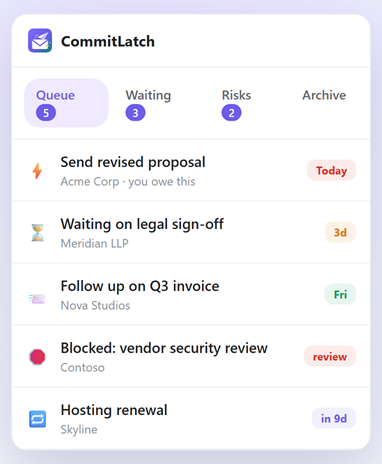
CommitLatch starts from the discovery side: it scans for loose ends rather than waiting for you to flag them, sorts them into what you owe, what you’re waiting on and what’s at risk, and does it without Gmail OAuth, and by default without a cloud round-trip. The qualifier is load-bearing — point it at your own provider key instead of the on-device model and thread text does leave the machine. What a Gmail extension can actually see is a question to put to every tool named on this page, CommitLatch included.
It does the reminder half too, from the other direction: rather than asking you to flag a thread at send time, it reads the promise out of the reply you have just sent, so “I’ll get you the revised proposal Friday” becomes an item with Friday already on it. What it does not do is send-later scheduling or read receipts — if those are what you came for, a reminder tool is the better fit. Running both is reasonable if you are willing to audit both: two extensions reading your mail is twice the exposure you were just told to check, so put the second question to the reminder tool as well. The wider routine matters more than either tool.
Follow-up tools FAQ#
What is the difference between a reminder tool and a discovery tool?
A reminder tool needs you to flag a thread, usually at send time, and brings it back later. A discovery tool reads what is already in the mailbox and works out which threads look unfinished. Reminders are precise about the things you noticed; discovery covers the things you did not.
Which one do I actually need?
If your problem is timing — you know what is outstanding, you just want nudges at the right moment — use reminders. If your problem is memory, and things reach you weeks later that you had completely forgotten, reminders will not help because you were never going to set one.
Where do reminder tools break down?
They assume you were paying attention when it mattered. Commitments made in the middle of a long reply, promises made from a phone, and everything that happens during a genuinely busy week all bypass them — and the busy weeks are exactly when you most need the system to work.
Where does the discovery model break down?
In false positives. Newsletters, notifications and threads that ended naturally can all look like loose ends, and a tool that surfaces forty items on day one has told you nothing. The quality of a discovery tool is almost entirely about how much noise it keeps out.
Can I use both?
Yes, and that is what a complete setup looks like. Set explicit reminders on the few high-stakes threads you are deliberately waiting on, and let discovery run over everything else with a weekly review. If that means two extensions, it also means two tools reading your mail, so put the same questions about access to both. If you only adopt one, discovery covers its own failure mode — skip a week and it is still there when you return.
What should I look for in either kind of tool?
Two questions tell the models apart. Does it work on mail that arrived before you installed it, and what does it have to see in order to do that? Anything reading your mail should say plainly how it reads it and whether anything leaves your machine. The rest of a sensible checklist applies to both models equally and belongs with the follow-up routine rather than the choice of tool.