Gemini Nano in Chrome: Why It’s Often Not Available, and What It Can Do
Why Chrome may never download Gemini Nano - the disk, GPU and OS requirements, the four availability states, and what the model is genuinely good at.
Updated

In this article9 sections
“AI-powered” on a browser extension usually means your data is being posted to a server somewhere. Increasingly it doesn’t have to: Chrome ships a small language model that runs on your own machine, and an extension can use it without a single network request.
This is a practical look at Chrome’s built-in AI — why the model so often never arrives, what it takes to get it, and what Gemini Nano is genuinely good at once you have it. The availability question turns out to matter more than the capability question, so it goes first.
The short version. Gemini Nano is the model behind Chrome’s built-in AI APIs, and it does not arrive with the Chrome installer. It is a separate multi-gigabyte download, fetched either in the background on a machine that qualifies or on the first call one of the APIs receives. It is desktop-only — there is no Chrome for Android or iOS support at all — and it arrives only on a machine that clears Chrome’s platform, storage, hardware and network thresholds, which are in the table further down. If any one of those is missing, the model will never arrive, and there is nothing wrong with your machine.
What “on-device” actually means#
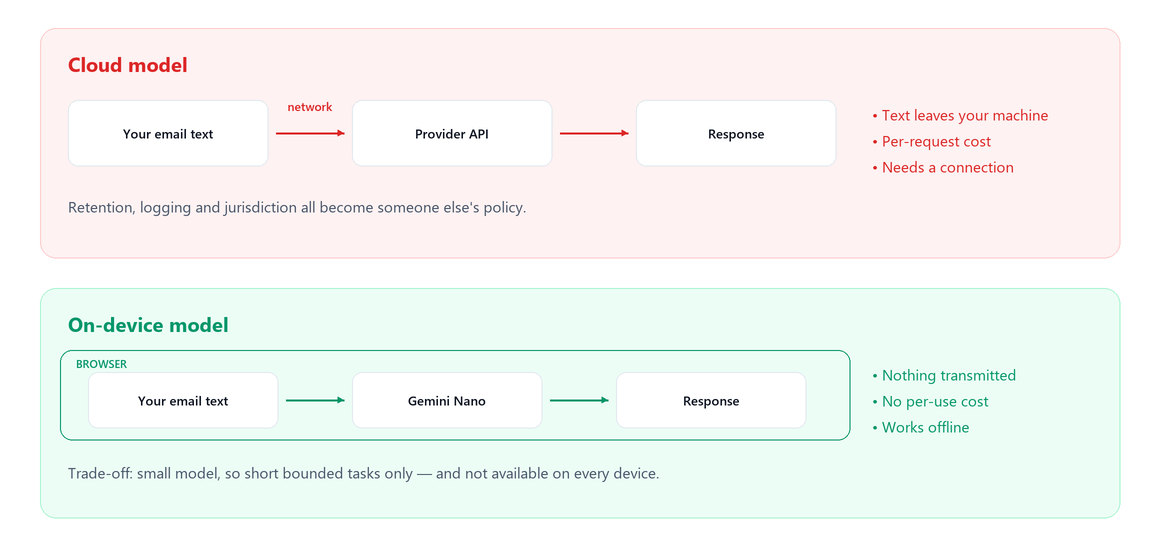
The model weights are downloaded to your computer once, and inference runs locally using your CPU or GPU. When an extension summarises a thread, the text goes to a model in the browser, not over the internet.
Three consequences that matter:
- Nothing is transmitted. No request body containing your email, no provider logs, no retention policy to read.
- No API key, no per-token cost. Which changes what an extension can afford to offer for free.
- It works offline, once the model is downloaded.
The trade is that you’re running a model small enough to sit on a laptop, and that is a real constraint rather than a detail.
Chrome’s built-in AI#
Chrome exposes several JavaScript APIs backed by a local model — a general prompt interface plus purpose-built ones for summarising, writing, rewriting, translating and language detection. The underlying model is Gemini Nano, Google’s smallest model, designed for exactly this.
The important architectural detail: the model is shared. It’s downloaded once by Chrome, not bundled into each extension. So an extension using it adds kilobytes rather than gigabytes — but it also can’t guarantee the model is there, because that’s the browser’s business, not the extension’s.
This surface has moved during Chrome’s rollout — API names, availability and requirements have all changed across versions. Anything you read about it, including this, is worth checking against Chrome’s current documentation before you build on it.
What it’s good at#
Short, bounded, structural tasks over text you hand it:
- Summarising a few paragraphs into a sentence or a bullet list.
- Extraction. Pulling a date, a name, a commitment or an action item out of a message. This is where it’s strongest, and it’s the workhorse for a tool that reads email.
- Classification. Is this thread waiting on me or on them? Two or three categories, reliably.
- Rewriting. Shortening, changing tone, tidying a draft.
- Short drafts from an explicit brief.
The pattern: tasks where the input is a paragraph or two, the output is short, and the answer is largely present in the input rather than requiring outside knowledge.
What it isn’t good at#
Being straightforward about this matters, because oversold on-device AI is how people conclude the whole category is a gimmick:
- Long context. A forty-message thread with attachments is not its territory. Frontier models handle that; a small local model doesn’t.
- Multi-step reasoning. Anything that needs to hold several constraints together and work through them.
- Factual knowledge. It doesn’t know your industry, recent events, or anything outside what you gave it. Don’t ask it questions; give it text and ask it to do something with that text.
- Nuance in short messages. “Let me think about it” is ambiguous to humans too, and a small model will not resolve it reliably.
- Speed on modest hardware. It’s local, which means it competes with everything else your machine is doing.
The honest framing: it’s a capable text tool, not an assistant. Used for extraction and classification it’s genuinely useful. Used as a substitute for a frontier model it will disappoint.
The availability problem#
This is the part that decides whether you can actually ship something on it.
| Requirement | What Chrome asks for | What happens if you miss it |
|---|---|---|
| Platform | Desktop Chrome. | Nothing to tune. There is no Chrome for Android or iOS support, so on a phone the answer is simply no. |
| Operating system | Windows 10 or 11; macOS 13 or later; Linux; ChromeOS platform 16389 or later, and only on a Chromebook Plus. | availability() returns unavailable, and no amount of free disk will change it. |
| Free storage | At least 22 GB free on the volume that holds your Chrome profile — not on any drive, on that one. | No download. Worse: if free space later falls below 10 GB, Chrome removes the model again, so it can appear, work for a month, and quietly vanish. |
| GPU or CPU | Either more than 4 GB of VRAM, or failing that 16 GB of RAM and four CPU cores. | A machine that clears neither path reports unavailable permanently. |
| Network | An unmetered connection for the initial download. | It waits, indefinitely and without a message. Chrome throttles the fetch on a metered connection rather than telling you why. |
| Managed Chrome | Enterprise policy must not disable the local model. | An administrator who sets GenAILocalFoundationalModelSettings to 1 blocks the download and deletes any copy already on the machine. |
Checked against Chrome 153 on 11 September 2026. These thresholds have moved at least once already, and they are not even stated consistently — Chrome’s help pages round the storage figure to about 20 GB where the developer documentation says 22. Confirm against Chrome’s current documentation before you rely on any of them.
From code, the check is one line, and it is worth running in the DevTools console before you debug anything else:
// 'available' | 'downloadable' | 'downloading' | 'unavailable'
const status = await LanguageModel.availability();

if (status === 'downloadable' || status === 'downloading') {
  // create() needs a real user gesture before it will start the fetch
  const session = await LanguageModel.create({
    monitor(m) {
      m.addEventListener('downloadprogress', (e) => {
        console.log(Math.round(e.loaded * 100) + '%');
      });
    },
  });
}
Those four strings are the whole state machine, and e.loaded is a fraction between 0 and 1 rather than a byte count. One thing to rule out before you blame the hardware: older tutorials still show window.ai.assistant or ai.languageModel. Those are pre-GA names, they are now undefined, and a snippet copied from 2024 fails on the property access rather than on availability. In extensions the API has lived on the LanguageModel global since Chrome 138. Rule that out before you rule out the machine.
If you are not writing code, two pages tell you where you stand. chrome://on-device-internals has a model status tab showing whether a download has been attempted and whether it errored. chrome://components lists Optimization Guide On Device Model; a version of 0.0.0.0 means it has never downloaded. Both are diagnostics rather than triggers. There is a switch under Settings → System → On-device AI, and it is the only supported way to manage the model, but it is really an off switch: turning it off deletes the model and keeps it from returning, while turning it on only makes the machine eligible again. None of these controls fetches anything: the download happens in the background once the machine qualifies, or when a page or extension actually calls the API. That is why “I enabled it and nothing happened” is expected behaviour rather than a fault.
From an extension’s point of view, then, there is no single yes or no. There are four answers, any of which can be the true one on a given morning, and a feature built on the model has to handle all four gracefully — and “gracefully” cannot mean an error message, because the user did nothing wrong.
In practice this is the single biggest constraint. Not what the model can do, but that a meaningful share of your users won’t have it — and no figure for that share is published anywhere I can find, so there is no average to design against. Treat the fallback as the ordinary case rather than the exception.
What “gracefully” means, state by state#
The word does a lot of hiding, so it is worth being specific. Each of the four strings has one correct behaviour:
| State | What the feature should do |
|---|---|
available | Use it. This is the only state in which the feature can simply be there. |
downloading | Show progress and keep everything else interactive. On a slow connection the fetch can take a long time, and nothing the user came to do should wait behind it. |
downloadable | Offer the download behind an explicit action, such as a button the user presses. It is a multi-gigabyte fetch on their connection, and starting it unasked is not acceptable — create() will not start it without a user gesture in any case. |
unavailable | Hide the feature and offer the bring-your-own-key path instead. No error text: the user did nothing wrong, and there may be nothing they can do about it. |
The state is also not stable. A machine that answered unavailable in the morning can answer downloadable after a Chrome update or a disk clean-up, and one that answered available can lose the model again once free space falls below the 10 GB eviction line. Check on each page load rather than caching the answer, and write the unavailable branch first, since it is the one no user can be guaranteed to avoid.
Bring your own key as the escape hatch#
The pragmatic answer is to make on-device the default and let people supply their own API key when they want more.
The user pastes a key for Claude, OpenAI or Gemini; the extension calls that provider directly from the browser; the developer never sees the key or the traffic. It’s a good pattern for three reasons:
- The user chooses the trade. They know a cloud call means their text leaves the machine, and they opted in explicitly.
- No middleman. Requests go browser → provider. The extension author isn’t proxying, storing or paying for anything.
- Capability when it’s needed. Long threads and harder reasoning get a bigger model, without forcing everyone through the cloud.
If you use an extension with a BYOK option, it’s worth checking that the key is stored locally and that requests go directly to the provider rather than through the developer’s server. “Stored locally” is itself less precise than it sounds: a key kept in chrome.storage.local stays on the machine it was typed into, while one kept in chrome.storage.sync travels through your Google account to every Chrome you are signed into. Both are legitimate choices, but they are not the same choice, and a key relayed through the developer’s server is a third arrangement again. All three can wear the same label — much like the difference between OAuth and a content script.
Why this matters beyond privacy#
The privacy argument is the obvious one and not the only one.
An extension that calls a cloud model pays per request, which means it must either charge you, limit you, or find another way to make the numbers work. On-device inference costs the developer nothing per use. That changes what a free tier can honestly contain, and it removes the incentive to route your data somewhere it can be monetised.
It also removes an entire failure mode: an extension whose intelligence lives in someone’s server stops working the day that server does. Local inference degrades to “the model isn’t available on this device”, which is a much better worst case.
CommitLatch is built this way — Gemini Nano on-device by default for extracting commitments and summarising threads, with an optional bring-your-own-key path to Claude, OpenAI or Gemini for anything heavier. On that default path no part of your mail is sent anywhere, because there is no inference request to make; add a key, and the text goes from your browser to the provider you chose. For a tool reading a work inbox, that seemed like the right default rather than a feature.
The extraction job is deliberately small, which is why a local model is enough for it. What you’re actually trying to keep track of is a short list of promises, owners and dates — not an understanding of your mailbox. A model that can pull “Friday” and “the revised proposal” out of a sentence you just wrote is doing the whole of the work.
On-device AI FAQ#
What does on-device AI in Chrome mean?
The model weights are downloaded to your computer once and inference runs locally using your own hardware. When an extension summarises something, the text goes to a model inside the browser rather than over the internet — so nothing is transmitted, there is no per-token cost, and it works offline once the model is present.
What is Gemini Nano good at?
Short, bounded tasks over text you hand it: summarising a few paragraphs, extracting a date or a commitment, classifying a message into two or three categories, rewriting for tone or length, and short drafts from an explicit brief. The pattern is that the answer is largely present in the input rather than requiring outside knowledge.
What is it not good at?
Long context such as a forty-message thread, multi-step reasoning, and anything requiring factual knowledge it was not given. It is a capable text tool rather than an assistant — used for extraction and classification it is genuinely useful, used as a substitute for a frontier model it will disappoint.
Why is the model not available on my machine?
Gemini Nano runs only in desktop Chrome, never on Android or iOS, and only where the machine clears every threshold at once: Windows 10 or 11, macOS 13 or later, Linux or a Chromebook Plus; at least 22 GB free on the volume holding your Chrome profile; more than 4 GB of VRAM, or 16 GB of RAM and four CPU cores; and an unmetered connection for the download. It does not arrive with the Chrome installer. It downloads in the background once the machine qualifies, or when a page or extension first calls the API, and it is removed again if free space falls below 10 GB. On a managed machine, enterprise policy can switch it off entirely. Requirements have changed across Chrome versions, so check the current documentation.
What is bring your own key, and is it safe?
You supply your own API key for a provider and the extension calls that provider directly from your browser, so the developer never sees the key or the traffic. It is a good pattern when you need more capability than a small local model offers. Check that the key is stored locally and that requests go straight to the provider rather than through the developer’s server.
Why does on-device inference matter beyond privacy?
Because it costs the developer nothing per use, which changes what a free tier can honestly contain and removes the incentive to route your data somewhere it can be monetised. It also removes a failure mode: a tool whose intelligence lives on someone’s server stops working the day that server does.