How to Find an Old ChatGPT Chat When Search Comes Up Empty
You know the chat exists but search returns nothing. Where ChatGPT's search box is, why it misses, and how to search your whole export offline.
Updated

In this article12 sections
Three weeks ago ChatGPT gave you a genuinely good answer — the one that untangled the deployment problem, or explained the tax rule properly, or produced the paragraph you’ve been trying to write since Tuesday.
You know it exists. You typed the thing you remember into the search box and got nothing back. The sidebar shows four hundred conversations named after their opening line, and scrolling is not a plan.
So: where the search box actually is, why it comes up empty on a chat that is definitely still there, and how to find an old ChatGPT conversation by searching your whole history offline when the built-in search won’t cooperate.
Where the search box is#
ChatGPT. The magnifier at the top of the left sidebar, or Ctrl+K (Cmd+K on a Mac). Type words you remember from inside the conversation, not its title. Archived chats still come back in the results even though they have left the sidebar; deleted ones don’t, because deleting a chat removes it from the search index as well.
Claude. Past chats are listed from the left sidebar, and Anthropic’s help pages don’t say what the chat search there matches. The part that reads message content is the Search and reference chats setting under Settings → Memory (Settings → Capabilities on older accounts): ask Claude about an earlier conversation and it searches your history, answers, and links back to the chats it used. That one is paid plans only. Gemini. Open the navigation menu, click Search, type, press Enter.
| Assistant | Searches message bodies? | Shows the matched passage? | Date range or filters? |
|---|---|---|---|
| ChatGPT | Yes — you search words from inside the conversation | No — you get a list of chats to open | None documented |
| Claude | Yes, with Search and reference chats on (paid plans) | It answers in the chat and links back to the conversations it used | None documented |
| Gemini | Unverified — the help page doesn’t say what it matches | Unverified | None documented |
Checked September 2026. All three products rearrange this menu from time to time, so the date is part of the claim.
The problem isn’t saving, it’s finding#
ChatGPT keeps your history and doesn’t quietly throw it away. One caveat before you go hunting: a temporary chat is never written to your history at all unless you explicitly save it there, so in that case there is nothing to find.
So the archive exists. What’s missing is retrieval — and retrieval fails for four specific reasons:
- Matching is exact. You remember the sense of an answer, not its wording. Search a paraphrase and nothing comes back — the string has to be one that was really on the screen.
- Results are conversations, not passages. The paragraph you want was message eleven of forty. Search hands you a list of chats, and you open four of them looking for it.
- The account is the boundary. A work login and a personal login are two archives inside the same product, and neither search looks at the other.
- There’s nothing to narrow with. No date range, no “only this project”, no stemming or fuzzy matching — so a word you’ve used two hundred times returns two hundred chats and no way to say “the one from March”.
Any solution that only addresses “keep a copy” solves none of this.
Four things people try#
Leaving it in the sidebar is free, takes no effort, and works right up until the archive gets big. Its real weakness is that you’re depending on a company’s product decisions for access to your own thinking — history limits, interface changes and account issues are all outside your control.
Copy-pasting the good bits into notes is genuinely effective, and the most common approach among people who take this seriously. The problem is friction: it interrupts the work, so you do it for the first week and then stop. What survives is the chats you had while feeling organised. Screenshots are the faster version of the same habit and permanently unsearchable — fine for something visual, useless for text you’ll want to grep in six months.
The account-level data export gets written off as a good backup with a terrible reading experience, which undersells it: it puts every conversation you still have on one page you can search, and how to do that is under “Finding it again” below.
What “saved” should actually mean#
Four properties, in order of how often they’re missing:
- Searchable by content, not just by title. If you remember a phrase from the answer, that should be enough to find it.
- Captured in one action, at the moment you recognise the answer is good — not later, when you’ve forgotten.
- Kept with its question. An answer without the prompt that produced it is frequently meaningless six weeks later.
- Yours to export. If you can’t get it out in an open format, you’ve swapped one silo for another.
Capturing: the whole chat, or just the answer#
Both, for different situations.
Save the whole conversation when the value is in the back-and-forth — a debugging session where the path to the answer matters as much as the answer.
Save the fragment when one response is the point. Most long chats contain a lot of throat-clearing; keeping the entire thing to preserve one paragraph makes the archive harder to search later, not easier.
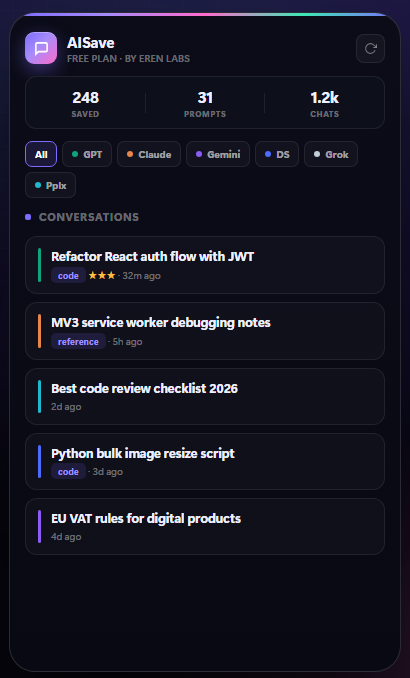
The practical version of this is a select-to-save action: highlight the part that matters, capture it, keep going. It takes about a second, which is the only budget that survives contact with real work.
Finding it again#
This is the part worth being demanding about, and the bar is higher than “reads the message bodies”. ChatGPT already does that. What it won’t do is show you the sentence that matched.
A list of conversation titles answers “which chats mention this word”, which leaves you opening them one at a time. What you want answered is “which paragraph said it” — because you remember a fragment of the answer, not the name of the conversation.
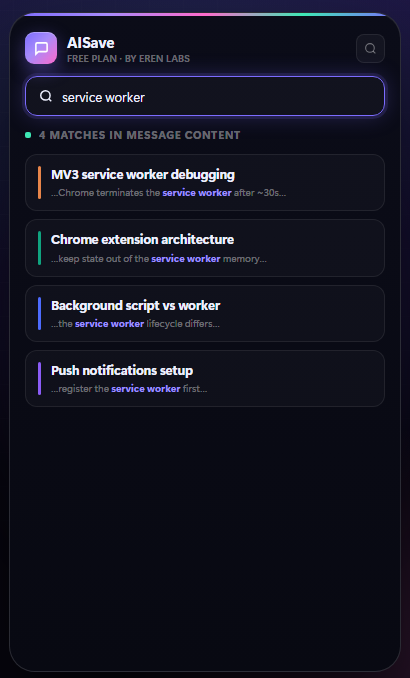
Two things make the difference between search that gets used and search that doesn’t:
- It has to be fast enough to guess with. If a search takes several seconds you’ll try one query; if it’s instant you’ll try five, and the fifth is the one that finds it.
- It has to show enough context to recognise the right result. A list of titles is not a result set. A snippet with the matched phrase in it is.
A keyboard shortcut helps more than it sounds like it should — the difference between “search my saved chats” being a decision and being a reflex.
Searching your whole export offline#
The no-install version of all this is sitting in your data export, and for a one-off hunt it is often the quickest. Requesting the export has its own post, so only the retrieval half is here. OpenAI emails a download link when the archive is ready — its help centre allows up to seven days — and the link expires 24 hours after it arrives, so download it the day it comes.
Inside the ZIP is a file called chat.html. Open it in a browser and it lays out every conversation in the archive on one long page, so Ctrl+F (Cmd+F on a Mac) searches all of them at once, offline, and takes you to the sentence itself rather than to a list of chats. With a large history the page is slow to open; let it finish loading before you search, because the browser can only find text it has already drawn. The exact-words rule still applies, so search for something distinctive.
If you’re comfortable at a terminal, conversations.json from the same ZIP is quicker to query than a very long browser tab. This prints the title of every conversation containing a phrase, ignoring case:
jq -r --arg q "connection pool" '.[] | select([.mapping[]?.message?.content?.parts[]? | strings] | join(" ") | ascii_downcase | contains($q | ascii_downcase)) | .title' conversations.jsonTwo things to know about that line. Each conversation is stored as a tree of message nodes under mapping, and the filter reads only the plain-text entries in each message’s parts list, so images, attachments and anything stored outside parts — code the assistant ran in its Python tool, for instance — are skipped. And a large account can arrive as several numbered conversation files instead of a single conversations.json; run the same line over each one.
All of that works one archive at a time. If the answer could just as easily be sitting in Claude or Gemini, the problem changes shape, and searching across ChatGPT, Claude and Gemini at once is a separate post.
Why you can’t find a chat you know you had#
When search comes back empty on a conversation you’re sure you had, it is usually one of six things. Work down the list before you conclude it’s gone.
- You’re searching for a paraphrase. Matching is on the words that were actually on the screen, so the sentence you’d use to describe the answer finds nothing. Search for something literal and unlikely to appear elsewhere: an error message, a function or product name, a figure, an unusual word from your own question.
- It was in another account or workspace. A second login, or a Business or Enterprise workspace you switch into from the profile menu, keeps its own history, and search only looks at the one you’re in. Switch and search again. The self-serve data export isn’t offered for Business or Enterprise workspaces, so the export route above won’t reach a chat held there.
- It was a temporary chat. A temporary chat isn’t written to your history unless you chose to save it, so there is nothing for search to find and nothing in the export either.
- It was deleted. Deleting a chat takes it out of your account and out of search straight away, OpenAI says deleted chats can’t be recovered, and any export you request afterwards won’t contain it. An export you made before deleting is the only copy left. Archiving is different: archived chats still turn up in search.
- The words were in a file or a canvas. If what you remember was inside a PDF you uploaded, or in a canvas document rather than the replies themselves, it may not be part of the message text that search reads. Search for what you typed around it instead: the file name, or the request that produced the canvas.
- It was someone else’s shared link. Opening a conversation another person shared with you doesn’t copy it into your history. If you never carried on the conversation yourself, it isn’t in your account to search; go back to wherever the link was sent to you.
If none of those fit and the chat should still be there, the export search above is the check that doesn’t depend on ChatGPT’s search box at all.
Organising without spending your life organising#
The failure mode of every personal knowledge system is a taxonomy that costs more to maintain than it returns.
What actually works at this scale:
- A handful of broad folders — work, a specific project, learning. Not a hierarchy.
- Tags for cross-cutting things you’ll want to pull together later:
sql,invoice,recipe. - Nothing else. Ratings, colour labels and Kanban boards are pleasant and rarely load-bearing. Add them if you enjoy them, but don’t confuse them with retrieval.
If search is good, organisation can be lazy. That’s the trade worth making: strong search plus loose folders beats weak search plus an elaborate structure, because you’ll maintain the first one.
Most saved chats only ever need to be found again. A few turn out to be worth building on — a method you’ll reuse, a decision you’ll revisit — and those deserve a home where you write, not just where you search. Getting the survivors into a knowledge base covers which to keep and how to move them into Obsidian.
Where your saved chats should live#
Worth thinking about before you commit to anything, because moving later is painful.
Local storage — in your browser, on your machine. Nothing is uploaded, nothing needs an account, and there’s no third party to trust with your work conversations. The trade-off is that it doesn’t sync between devices, and it’s tied to that browser profile, so exports are your backup rather than a nice-to-have.
A hosted service syncs everywhere and gives you access from a phone. In exchange, your AI conversations — which for most people include work problems, half-formed ideas and occasionally things they’d rather not broadcast — sit on someone else’s server.
Neither is universally right. But be deliberate: read what a tool does with your data before you route months of thinking through it, and prefer anything that can hand your archive back in a format you can read without it.
AISave takes the local route — everything stays in your browser, no account, with export as the way out. That’s a deliberate trade against cross-device sync, and worth knowing before you choose it.
The data export from earlier on this page is also the way in. AISave’s history import reads an official data export, so the backlog you were searching through can join the same archive as everything you save from now on: the recent part of it on the free tier, which also includes full-text search, and all of it on Pro, at $5.99 a month or $29.99 a year. Two limits are worth stating plainly. It searches its own archive, not the live ChatGPT sidebar, so a chat you have neither saved nor imported isn’t in it. And because that archive lives in a single browser profile, keep the original export as your backup rather than deleting it once the import is done.
A setup that survives contact with work#
- Save at the moment of recognition. When an answer is good, capture it then, in one action.
- Keep the prompt with the answer. Always.
- Search by content, with a keyboard shortcut. Make retrieval cheaper than re-asking.
- Use three or four folders and some tags. Stop there.
- Export periodically to something you can read anywhere — Markdown or PDF depending on whether it’s raw material or a finished document.
The test of any of this is simple: in six months, when you half-remember a good answer, can you find it in under a minute? Everything else is decoration.
Finding and saving ChatGPT chats FAQ#
Does ChatGPT save my conversations automatically?
Yes. Ordinary conversations stay in your history until you delete them, and archived ones remain searchable after they leave the sidebar. The exception is a temporary chat: unless you choose to save it, it is never written to your history, so it won’t turn up in search and won’t be in your data export. If a chat you need is missing, check whether it was temporary, deleted, or held in a different account or workspace before assuming it is lost.
Does ChatGPT's search look inside conversations, or only at titles?
Inside them. ChatGPT’s search matches words from the messages, not just the titles, and Claude’s Search and reference chats setting reads past conversations too, on paid plans. The limits are elsewhere: matching is on exact words, so a paraphrase of the answer finds nothing; there is no date range or filter to narrow down a common word; results come back as a list of conversations rather than the passage that matched; and search covers only the account you are signed into.
Why does ChatGPT say it can't find a chat I know I had?
Usually one of six reasons. You searched a paraphrase, and matching needs the exact words, so try an error message, a name or an unusual word instead. The chat was in another account or workspace, which keeps its own history. It was a temporary chat that was never saved. It was deleted, and deleted chats cannot be recovered. What you remember was inside an uploaded file or a canvas rather than the messages. Or it was a conversation someone else shared with you, which never became part of your own history. If none of those fit, open chat.html from your data export and search it with Ctrl+F.
Should I save the whole conversation or just the useful part?
Both, depending on the case. Save the whole thread when the back-and-forth matters, such as a debugging session where the path to the answer is the point. Save just the fragment when one response is the value — keeping forty paragraphs of throat-clearing to preserve one makes your archive harder to search later, not easier.
Is the built-in data export enough?
As a backup, yes — take one occasionally. As a way to find one old answer, it is better than its reputation: open chat.html from the ZIP in a browser and Ctrl+F searches every conversation you still have, on one page, offline. What it can’t do is stay current. Each export is a snapshot, and the next one means requesting it again and waiting for the email.
Where should saved chats be stored — locally or in the cloud?
Local storage means nothing is uploaded and no account is needed, at the cost of no sync between devices. A hosted service syncs everywhere but puts your work conversations on someone else’s server. Neither is universally right; the thing to insist on either way is that you can export your archive in a format you can read without the tool.
How much organising is worth doing?
Less than most people think. Three or four broad folders plus tags for cross-cutting topics is usually enough. If search reads message bodies and is fast, organisation can be lazy — strong search with loose folders beats weak search with an elaborate taxonomy, because you will actually maintain the first one.