How to Search ChatGPT, Claude and Gemini Chat History in One Place
Each assistant only searches itself. What each one's search actually reads, how to search all three exports in one folder, and what nothing can recover.
Updated

In this article11 sections
You asked ChatGPT about it in March. Or was it Claude? It might have been the week you were trying Gemini. You remember the answer clearly enough to know it was good, and you have no idea which tab it happened in.
Using more than one AI assistant is now normal. Searching your chat history across all of them is not, and the gap costs more than people notice.
If you are looking for something right now#
If you are here because of one specific answer you have already lost, start with these three, in order.
- Search each assistant’s own chat history, using a phrase you remember from the answer rather than a guess at the title. What that finds varies by product, and the table below says what each one’s search actually reads.
- If that comes back empty, request the official data export from each assistant and search the downloaded files. It takes hours to arrive rather than seconds, and it contains everything the account still holds. The section below covers how to search one; how to export a ChatGPT conversation covers where the export lives and what comes out of it.
- Accept what is genuinely gone. A conversation you deleted, a temporary or incognito chat, or a work account you can no longer sign into is not recoverable by any tool.
The rest of this article is about not ending up here again.
Why most people ended up with three#
Nobody set out to fragment their own history. It happened because the assistants are genuinely different, and the differences are worth having:
- One writes better prose; another is stronger on code.
- One is bundled with a tool you already pay for.
- One has a free tier you use for throwaway questions and a paid one you don’t.
- One searches the live web; another doesn’t.
- Your employer permits one and blocks the rest.
So you use whichever fits the question, which is sensible. The archives then outnumber the assistants, because the account is the boundary: a work login and a personal login on the same product are two separate histories. Three assistants and one work account is four archives that cannot see each other.
What the fragmentation actually costs#
Three costs, in increasing order of annoyance:
You search the same thing four times. Once per tool, because you don’t remember where it happened. Most of those searches return nothing, which tells you nothing — the answer might be in the fourth, or it might not exist.
You re-ask instead of retrieving. This is the expensive one. Re-asking is fast, so you do it, and you get a different answer — not necessarily worse, but different, which means you now have two versions of a decision you thought you’d settled. Do that enough and you stop trusting your own conclusions.
You lose the comparison. The genuinely valuable thing about using several assistants is that they disagree. When two of them give different answers to the same question, that disagreement is information — but only if you can put the two answers next to each other. Split across four histories, you never see it.
Why each tool’s own history doesn’t help#
Every assistant keeps your conversations. Two of the limits are the same everywhere:
- It only knows about itself. By design. No assistant is going to index its competitors.
- The account is the boundary. Free tier and paid tier, work account and personal account, are separate archives even within one product.
The third limit is the one that gets stated too broadly, because it is the one that keeps changing: how much of a conversation each assistant’s own search will actually read. It is worth knowing per product rather than assuming, and worth re-checking, because these behaviours move.
| Assistant | What its own search reads | Filter or sort by date |
|---|---|---|
| ChatGPT | Message content. The magnifying glass in the sidebar, or Ctrl+K, matches a phrase from inside a conversation, archived ones included. Results come back as titles and dates with no snippet, so you still open them to find the line. | No date filter in the search itself. The sidebar groups chats by Today, Previous 7 days, Previous 30 days, then by month. |
| Claude | Two separate things. The chat list helps you find a conversation you can already name; the search that reads what was said is prompt-driven — you ask Claude to find it — and Anthropic documents that as a paid-plan feature, not available on Free. | No date filter. You can name a timeframe when you ask; the chat list itself is reverse-chronological. |
| Gemini | Not documented. Google’s help page describes a search box over your recent chats without saying whether it reads message text. Separately, you can ask Gemini in a new chat to reference past conversations by topic or timeframe. | No filter documented. Naming a timeframe in the prompt is the nearest thing to one. |
Three rows because those are the three in the title. The same shape of problem applies to DeepSeek, Grok and Perplexity, which AISave also covers. Where each assistant keeps its export differs by product and is not repeated here; exporting from Claude, Gemini and the others walks through the routes one assistant at a time.
Searching the exports by hand#
When an assistant’s own search cannot find it, the account export still can. What arrives is not the same everywhere: ChatGPT’s zip holds the raw JSON with an HTML viewer alongside it, Claude’s is a JSON archive with no viewer, and Gemini’s comes out of Google Takeout. Open the HTML file where there is one, or the JSON where there isn’t, in a browser and use Ctrl+F. Raw JSON is unpleasant to read, but it is not unsearchable. No tools, no terminal, and it is what most people should do.
If you have a terminal, unzip every export into one folder and search them together with ripgrep:
rg -F -i -o -m1 'the phrase you remember' ~/ai-exportsThe flags carry more weight than they look. -F matches the phrase literally, so brackets and question marks in what you remember aren’t read as a pattern. -o prints only the matched text, because these JSON files are frequently one enormous line and anything that prints the line prints the whole file. -m1 stops at the first hit per file. Keep the phrase short and from the middle of a sentence: line breaks and quotation marks are escaped inside the JSON, so a long remembered sentence often won’t match as a single string.
A hit tells you which file the phrase is in, not where in it. Ripgrep narrows the search to one export; open that file in the browser, run Ctrl+F for the same phrase, and read it there — in the HTML viewer if the export came with one.
Elsewhere on this blog the account export gets called an appalling reading experience, and that is fair: you can’t skim it, and pulling one conversation out of it for a colleague is real work. Both things are true at once. It is a bad document, and it is the only route to a conversation you had before you installed anything.
It is also slow, manual and a one-off. It gets you this answer back; it is not a system.
What cross-assistant search actually needs#
Four properties. The first two are the ones that matter:
- One index over everything. A single query, one result set, regardless of which tool the conversation happened in.
- Full-text over message bodies. You remember a phrase from the answer, not the title of the chat.
- Provenance on every result. Which assistant said this, and when. Without it you can’t weigh the answer or go back to the original thread.
- Filtering by source. Sometimes you specifically want “what did Claude say about this”, because you’re checking one against another.
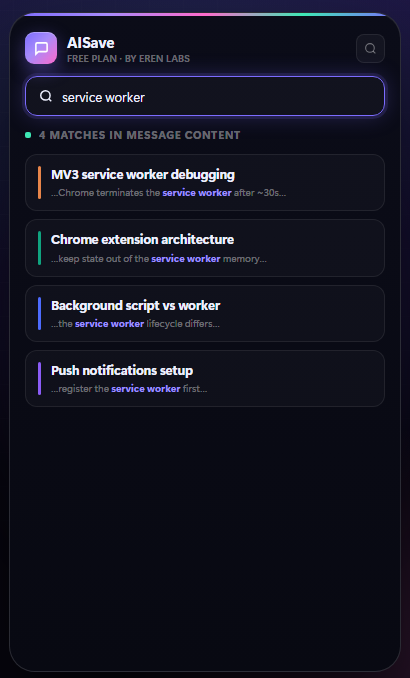
Provenance deserves a moment. An answer stripped of its source is less useful than it looks: assistants have different training cut-offs, different tendencies, and different reliability on different subjects. “This is the answer” and “this is what Gemini said in March” are very different claims, and only the second one lets you decide how much to trust it.
Keeping the comparison#
If you deliberately ask two assistants the same question — which is a reasonable habit for anything consequential — save both answers, tagged so they group together.
What you’re building is a small record of where they agree and where they don’t. Agreement isn’t proof, but consistent disagreement on a topic is a strong signal that you should go and check a primary source rather than trusting either.
This only works if the answers live in the same place. Two right answers in two different archives is the same as no answer.
A folder of saved comparisons is still only a folder, though. Once the habit sticks, the next step is to turn the survivors into a knowledge base — keeping the conclusion you reached and throwing away most of the transcript it came from.
What nothing can do#
No extension and no service can search another assistant’s history live. Every tool in this category is doing one of two things — capturing conversations from the moment you install it, or importing an official data export — and anything that sounds like a third option is one of those two described in nicer words. A conversation you deleted is not recoverable by a third party, and a temporary or incognito chat was never stored in the first place. An account you have lost access to takes its archive with it.
A practical setup#
Whatever tooling you use, the shape is the same:
- Capture into one place, from every assistant, at the moment the answer is good. If saving requires switching tools, you won’t do it.
- Record which assistant it came from automatically. Manual tagging of provenance fails within a week.
- Search full text across all of them, with a keyboard shortcut so it’s cheaper than re-asking.
- Filter by source when you need to, and ignore the filter the rest of the time.
- Backfill once. Capturing from now on does nothing for the last two years — the answer you lost in March is only reachable through an official data export, and importing a whole one is a paid feature in most tools, including this one. If you are starting from scratch, how to save and search AI chats covers the ground floor.
- Export in an open format, so the aggregation layer doesn’t become the fifth silo.
That last point is the one to be careful about. A tool that unifies four archives and then locks the result in its own database has moved the problem rather than solved it — you can now search everything, until the day you can’t. Anything holding your whole history should be able to hand it back as Markdown or PDF without negotiation; what each format keeps and what it quietly loses is covered in export a ChatGPT conversation.
AISave is built around this shape: one archive covering ChatGPT, Claude, Gemini, DeepSeek, Grok and Perplexity, stored locally in the browser with no account, with the source recorded per conversation, full-text search over what you have saved, and export as the way out. It also imports past chats from an official data export — recent history on the free tier, the whole export on Pro.
The boundaries are worth knowing before you route two years of conversations through anything. The free tier holds 25 saved snippets, 10 prompts and 5 folders, with three PDF or Word exports a month. Pro is $5.99 a month or $29.99 a year, with a 14-day refund window.
The habit underneath the tooling#
The tool matters less than the reflex. When an assistant gives you an answer you’d be annoyed to lose, save it in that moment — not later, not “when I’ve finished”.
Everything else in this article is about making retrieval cheap enough that you reach for your own archive before you reach for the prompt box. Once that flips, the fragmentation stops mattering, because there’s only one place to look.
Multi-assistant search FAQ#
Can I search across ChatGPT, Claude and Gemini at once?
No — as of September 2026 each assistant only indexes its own conversations, by design. Two routes work: request the official data export from each one and search the downloaded files together in a single folder, or capture into one archive from now on and import those exports once to cover the past. Nothing searches another assistant’s live history on your behalf, so every tool offering this is doing one of those two things.
Why do I need cross-assistant search at all?
Because using several assistants is now normal, and it splits your history into separate archives that cannot see each other. The practical cost is that you re-ask instead of retrieving, and a re-asked question produces a different answer — so you end up with two versions of a decision you thought you had settled.
Why does it matter which assistant gave an answer?
Because assistants have different training cut-offs, different tendencies and different reliability by subject. “This is the answer” and “this is what one assistant said in March” are different claims, and only the second lets you judge how much weight to give it. Any cross-assistant archive should record the source automatically.
Is it worth asking the same question to more than one assistant?
For anything consequential, yes — the disagreements are the useful part. But it only pays off if both answers end up in the same place, tagged so they group together. Two good answers sitting in two separate histories are the same as no answer.
Won't an aggregation tool just become another silo?
It will if it cannot hand your history back. The thing to check before routing months of conversations through anything is whether it exports in an open format — Markdown or PDF — without negotiation. A tool that unifies four archives and locks the result in its own database has moved the problem.
What is the minimum useful setup?
Capture into one place from every assistant at the moment an answer is good, record the source automatically, search full text with a keyboard shortcut, and be able to export. The reflex matters more than the tool: save it when you would be annoyed to lose it, not later.