How to Get Your ChatGPT Chats into Obsidian (and What to Keep)
Three routes from a ChatGPT chat into an Obsidian vault — paste, Markdown export, bulk import — plus the filter that stops you just moving the pile.
Updated

In this article11 sections
Obsidian is a folder of Markdown files with a good reader on top, so getting a chat into it means producing a .md file and putting it in that folder. There are three routes — paste it into a note, export the one conversation as Markdown, or bulk-export the whole history as a vault — and they are below in that order, with what each one costs you.
The harder half is the one no tool does for you: deciding which chats deserve to make the trip. That comes after the mechanics, because it is the part that decides whether you end up with a knowledge base or with four hundred filed transcripts you never open.
Three routes from a chat into your vault#
In increasing order of effort, with the thing each one actually costs you in the last column:
| Route | Use it when | Survives | Costs you |
|---|---|---|---|
| Paste into a note | One or two keepers, and you’re already in the vault | The words | Pasting into a Markdown editor strips the formatting characters, so headings arrive as ordinary sentences and a table collapses into a run-on line. Re-add the headings and code fences by hand, and don’t paste anything containing a table you care about. |
| Export the conversation as Markdown, drop the file in the vault | Anything containing code or a table | Headings, lists, code blocks and tables, intact | One round trip per conversation — fine occasionally, impossible as a migration strategy — and you need a tool that does it, because neither ChatGPT nor Claude will hand you a single conversation as a .md file. AISave’s free tier exports single conversations as Markdown without a cap; it’s PDF and Word that are rationed, at three a month. |
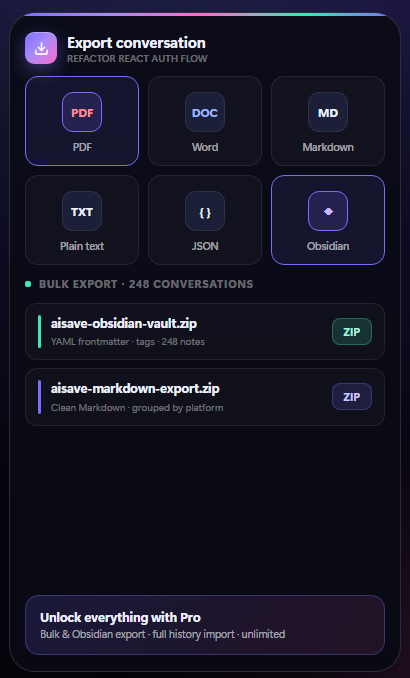
| Bulk-export the whole history as a vault | A migration, or leaving a service | One file per conversation, with the front matter already written | Needs a tool that can do it — in AISave it’s a Pro feature — and you inherit an unfiltered archive, so the filtering further down still has to happen. |
Markdown all the way through, in every route, because Obsidian is a folder of Markdown files and there is nothing to convert. If you’re weighing Markdown against PDF or Word for some other job — sending a conversation to a colleague, filing a client record — that comparison is a post of its own.
AISave does the third route as a Pro feature — a ready-to-open Obsidian vault with YAML front matter and tags, or a plain Markdown ZIP if you use something else — and the limits belong in the same breath: the free tier exports single conversations as Markdown without a cap and as PDF or Word three times a month, and its history import reads recent chats only. For a migration, then, the full import and the vault export both sit on the Pro side, which is the thing to establish about any tool before you plan around it.
What a bulk export hands you, though, is four hundred filed transcripts: a searchable archive, not a knowledge base. It’s a reasonable starting point, but the filtering further down still has to happen — otherwise you’ve moved the pile rather than reduced it, and that is the one part no exporter can do for you.
What a vault actually is#
The vault is that folder. Drop a .md file into it, or into any subfolder, and Obsidian shows the note the next time the window has focus: there is no import step and no re-index button. Two things are worth getting right at the moment the file lands.
The filename. Date first — 2026-07-29 stripe webhook retries.md — so the folder sorts chronologically with no further work. Obsidian won’t accept * " \ / < > : | ? in a filename, and while #, ^, [ and ] are accepted they break wikilinks, so leave those out too. Auto-generated chat titles are full of colons and slashes, which is exactly why a bulk import arrives with mangled names — and why writing your own title, the first of the three things below, pays for itself twice.
The front matter. A small YAML block at the very top of the file, which is what lets the note answer questions later:
---
title: Stripe webhook retries
assistant: ChatGPT
date: 2026-07-29
tags: [payments, verified]
---
The --- has to be the very first line of the file; leave a single blank line above it and Obsidian treats the whole block as ordinary text. Tags written here are real tags, so searching tag:#verified returns only the notes you tested yourself — which is where the confidence problem further down stops being an observation and becomes something you can filter on. The assistant line only earns its place if you use more than one assistant, which is most people now.
If you already downloaded ChatGPT’s data export#
A lot of people arrive at this point having already requested the export from settings, waited for the email and unzipped it. What’s in there is one conversations.json and an HTML viewer — not one Markdown file per chat.
Point Obsidian at that folder and it indexes the JSON as a single enormous text file: no titles, no headings, no per-conversation notes, and a search that matches the whole archive at once or nothing. Something has to walk the JSON and write one file per conversation first — either something you write yourself, or a tool that reads an official data export and emits the files. That’s the third route above. In AISave the history import is the half that reads the export — recent chats only on the free tier, the whole history on Pro — and the Obsidian vault export that writes the files is Pro.
Claude and Gemini leave you in the same place by a different road. Claude’s account export arrives by email as a JSON archive; Gemini’s goes through Google Takeout. Neither hands you one Markdown file per conversation, so the answer is the same — something has to write those files — but the archives are laid out differently, and a converter written for ChatGPT’s conversations.json won’t read either of them. The account export is good at the job it’s actually for, which is being a backup — what each export route actually gives you covers the rest.
Why an archive isn’t a knowledge base#
Saving every AI conversation you’ve ever had does not give you a knowledge base. It gives you a large pile of transcripts, most of which you will never read again, in which a small number of genuinely useful things are hiding.
An archive is optimised for completeness. A knowledge base is optimised for retrieval and reuse. They pull in opposite directions, and the difference shows up in three places:
- Signal-to-noise. A typical useful chat is 10% answer and 90% getting there — clarifications, wrong turns, “actually, let me revise that”. Keeping all of it means every future search returns the noise too.
- Framing. An answer is shaped by the exact question you asked that day. Six months later you won’t remember the context, and the answer reads as more general than it was.
- Confidence. Transcripts record what an assistant said, not whether it was right. A knowledge base that doesn’t distinguish “verified this and it worked” from “sounded plausible” will eventually mislead you badly.
That third one is the important one, and it’s the reason a knowledge base needs a human step. A pile of chats is a record of things you were told.
What to keep#
A blunt filter that works:
| Keep | Don’t |
|---|---|
| Something you tried and it worked | Something you haven’t tested |
| An explanation that finally made a concept click | A summary of something you can look up |
| A decision and its reasoning | The eight options you rejected |
| A snippet, config or command you’ll reuse | Boilerplate you could regenerate in ten seconds |
| A prompt that reliably produces good output | The output itself, usually |
That last row is underrated. A prompt that consistently works is more valuable than any single thing it produced, because it produces the next one too.
The honest test for anything else: would I re-ask this, or would I go and find it? If re-asking is faster, don’t keep it. Assistants are cheap to query; your attention isn’t.
The three things that make a note findable later#
Whatever system you use, a note you’ll actually retrieve has:
- A title that says what it’s about, written by you. Not the auto-generated chat title, which is derived from your opening message and is almost always wrong about what the conversation turned out to be.
- The question that produced it. Keep the prompt with the answer. This is the single highest-value habit here, and it costs nothing.
- One line of your own. “This worked on the staging box”, “wrong about the tax rate, see accountant’s email”, “use this phrasing, it gets better output”. Ten seconds, and it converts a transcript into knowledge.
Structuring the vault#
The most common mistake is building an elaborate folder hierarchy on day one and abandoning it by week three.
What tends to survive:
- A flat folder per broad area — work, a project, learning. Three or four, not thirty.
- Tags for the cross-cutting stuff, since a note about SQL performance belongs to both “database” and “the thing I was building in March”.
- A single inbox folder for anything you haven’t filed. It will always have things in it. That’s fine.
- Links between notes when you notice a connection, and only then. Manufacturing a link graph is a hobby, not a filing system.
If searching your vault is fast, structure can be loose. Invest in retrieval, not in taxonomy.
The prompt library#
Worth treating separately from your notes, because prompts are tools rather than knowledge.
A prompt worth keeping usually has variables in it — the language, the tone, the audience, the input. Storing it with placeholders ({{language}}, {{audience}}) rather than the specific instance you happened to use makes it reusable rather than a souvenir.
Keep the ones that reliably work, throw away the experiments, and note briefly what each is for. A dozen good prompts you can find beats two hundred you can’t.
A weekly routine that takes ten minutes#
- Open the inbox folder — the things you saved this week without filing.
- Delete half. Genuinely. Most of what felt worth keeping on Tuesday isn’t by Friday, and pruning is what stops the vault becoming the sidebar you were escaping.
- For the survivors: rewrite the title, add one line of your own judgement, file it, tag it.
- Move any reusable prompt into the prompt library with its variables.
Ten minutes a week is enough because the filtering happens continuously rather than as an annual archaeology project. The version of this that fails is the one where you save everything for a year and plan to sort it out later.
The point of all this#
Not to build an impressive vault. To make sure that the third time you hit the same problem, you find your own verified answer instead of asking again and getting a slightly different one.
That’s the whole return: a note that says “this worked, here’s why” is worth more than any transcript, and it’s the one thing an assistant can’t produce for you. If you’re not yet at the stage of curating, being able to search your saved chats is the prerequisite — build that first.
AI knowledge base FAQ#
What is the difference between an archive of chats and a knowledge base?
An archive is optimised for completeness; a knowledge base is optimised for retrieval and reuse. A typical useful chat is roughly ten percent answer and ninety percent getting there, and a transcript records what an assistant said rather than whether it turned out to be right. Turning one into the other requires a human filtering step.
Which AI conversations are worth keeping?
Things you tried that worked, explanations that finally made a concept click, decisions with their reasoning, snippets or commands you will reuse, and prompts that reliably produce good output. The test for everything else is whether re-asking would be faster than finding it — if so, do not keep it.
Can Obsidian read ChatGPT's conversations.json export?
Not usefully. The account export arrives as one conversations.json file with an HTML viewer, so Obsidian indexes it as a single blob of text: no titles, no headings and no per-conversation notes. Something has to walk the JSON and write one Markdown file per conversation before there is a vault at all.
How do I get my ChatGPT chats into Obsidian?
Get the conversation out as Markdown, name the file yourself with the date first, and drop it in the vault folder — Obsidian picks it up the next time the window has focus, and there is no import step. For one or two keepers you can paste instead, but pasting into a Markdown editor strips the formatting characters, so headings arrive as ordinary sentences and a table collapses into a run-on line.
Should I bulk import my whole chat history into my notes?
It gives you a searchable archive, not a knowledge base. It is a reasonable starting point, but without the filtering step you have moved the pile rather than reduced it — and every future search will return the noise along with the signal.
How should I structure the vault?
Flat and simple. Three or four broad folders, tags for cross-cutting topics, one inbox folder for unfiled items, and links between notes only when you actually notice a connection. Elaborate hierarchies built on day one are abandoned by week three.
How much time does maintaining this take?
About ten minutes a week if you do it continuously: open the inbox folder, delete around half of what you saved, and for the survivors rewrite the title, add one line of your own judgement, and file it. The version that fails is saving everything for a year and planning to sort it out later.