WooCommerce split payment at the counter: part cash, part card on one order
A WooCommerce order stores one payment method, not two. What that costs at the till, the three workarounds, and how to record…
Read moreRun your shop counter on the products and stock already in WooCommerce. Scan items, take payment and keep in-store sales in the same system.
If you sell in store as well as online, you are probably running WooCommerce for the website and something else — a till system, a notebook, a spreadsheet — for the shop. Every evening the two disagree, and someone has to decide which one is lying.
The shelf sold three this morning and the website never heard about it. Retail POS takes counter stock down through WooCommerce itself, so there is only ever one number.
Counter sales land in your normal WooCommerce order list, under your normal tax rules, in your normal reports. There is no end-of-day transcription because there is no second ledger.
No import, no mapping table, no nightly sync. The WooCommerce POS rings up the products, prices, variations, customers and tax classes that are already in your store.
One system, one stock figure, one set of books.
Everything below is in the free plugin from WordPress.org — complete POS software, with no signup, no key and no time limit.
Beep — the line drops into the cart. Beep. Beep. Tap Cash. The receipt prints, the order is real, stock is already down, and the cursor is back in the scan box before the cashier has looked up.
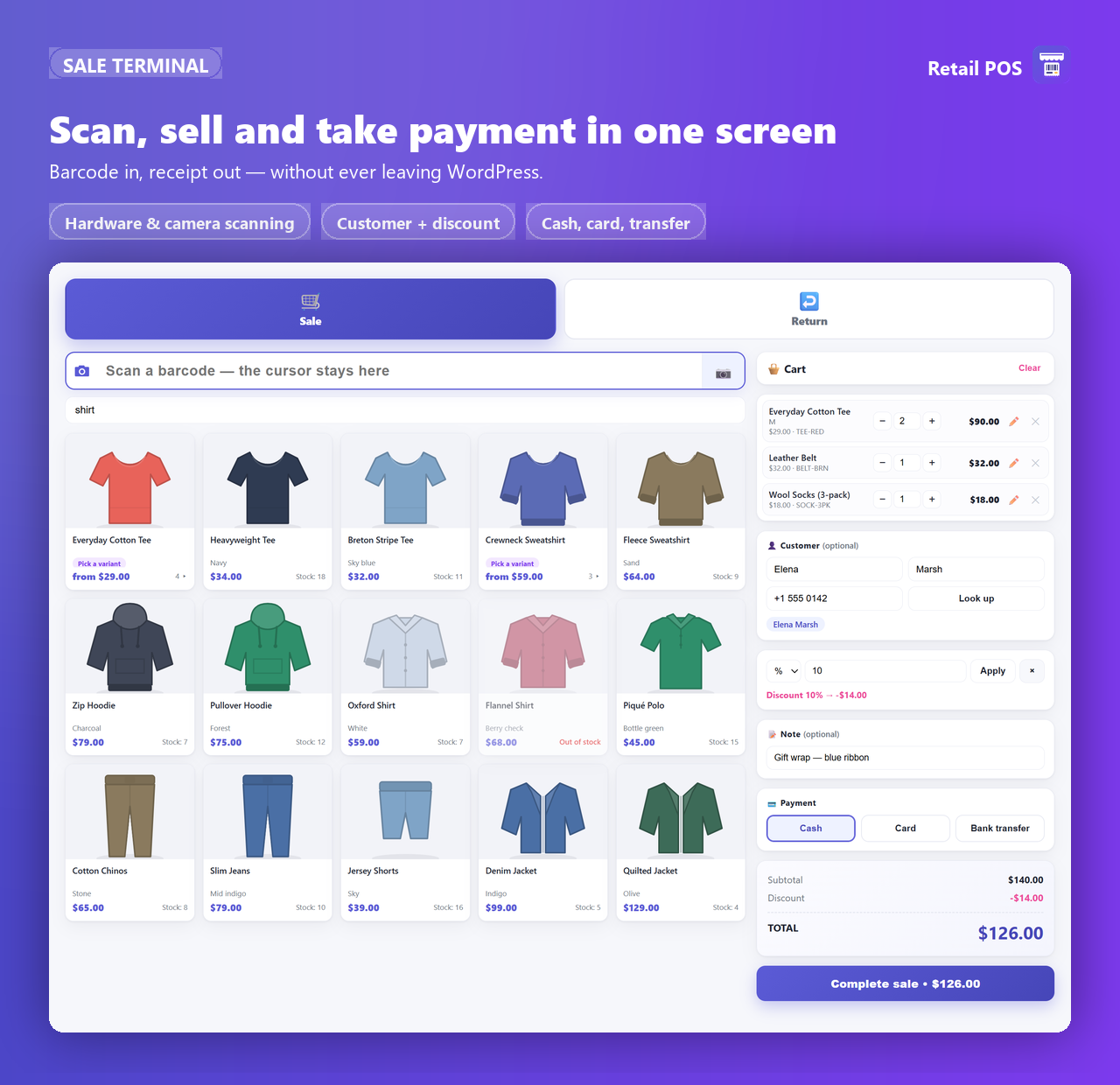
Cart lines, the subtotal and the Complete sale button all show the tax-inclusive amount the customer actually hands over — whichever way your shop displays prices elsewhere.
In the free version a sale is settled by exactly one payment method covering the full total. Splitting a sale across tenders is a Pro feature.
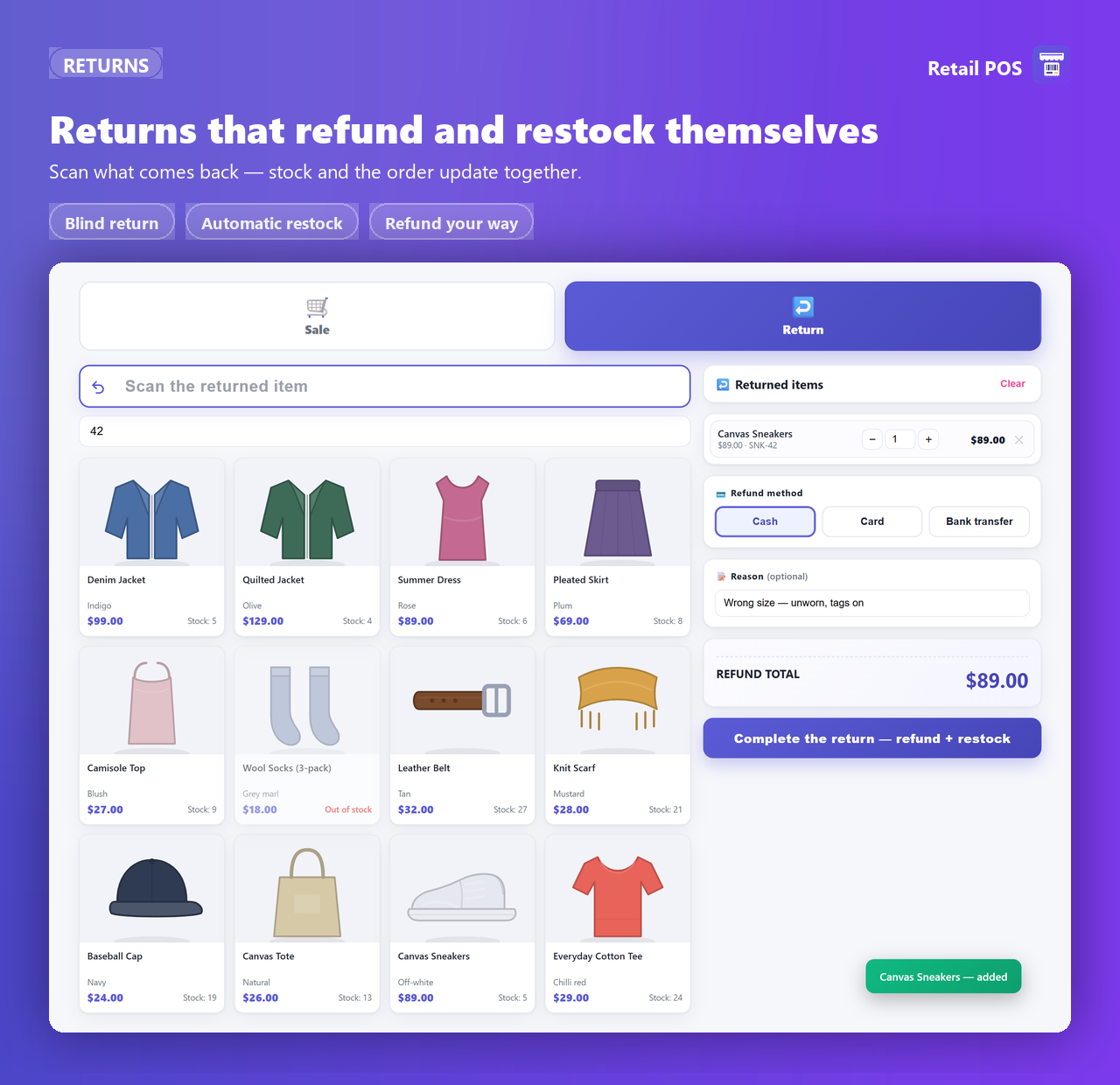
Scan what comes back over the counter, hand over the money, done. The payout is documented as a refunded POS order, and stock is restored automatically when stock reduction is on.
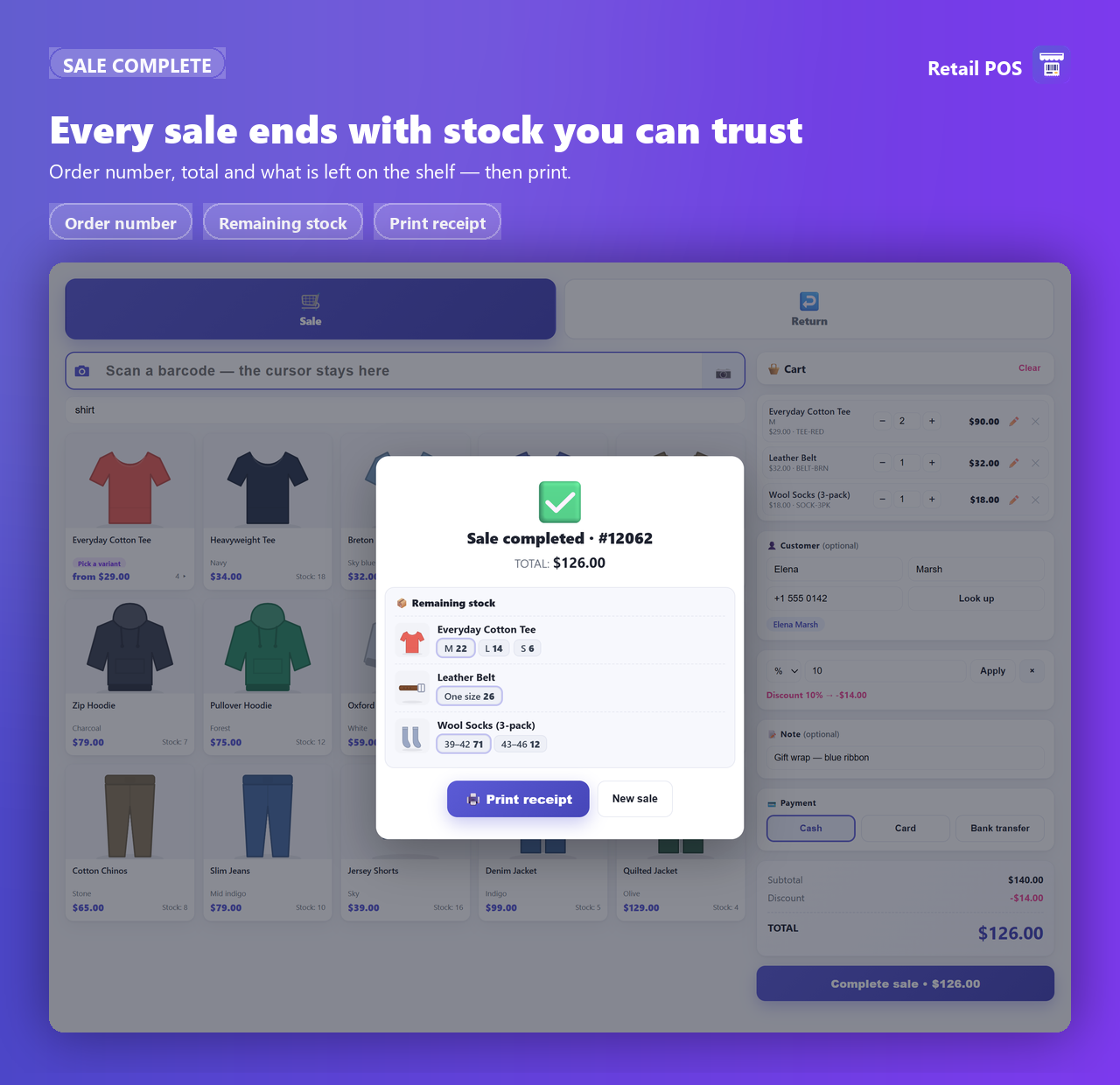
Hit print and a narrow monospace window opens, sized for a roll of thermal paper: store name, address and phone, every line, the subtotal, the discount if there was one, the total, the payment method, and the customer’s name and phone. Any past POS sale can be reprinted from the order list.
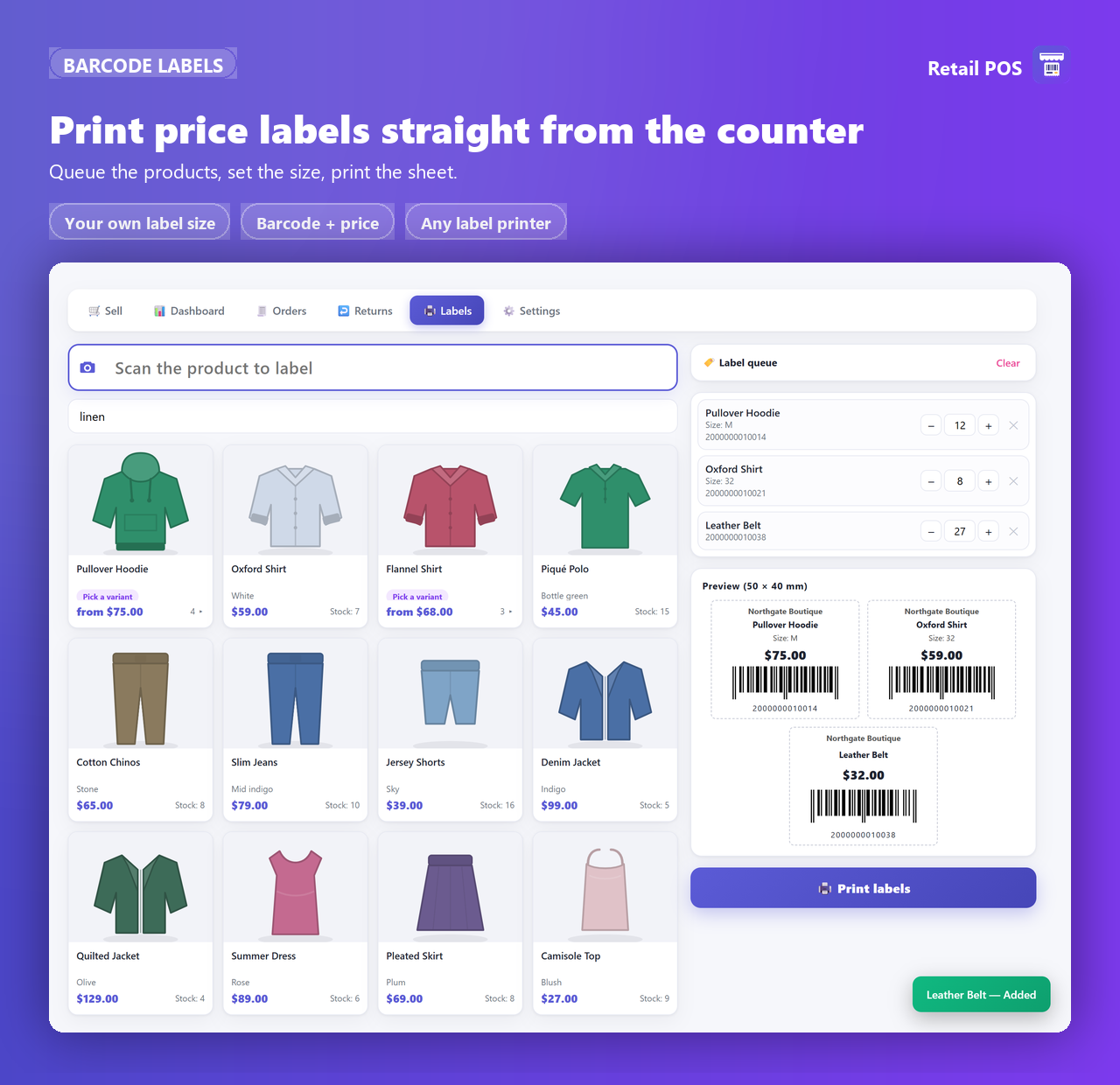
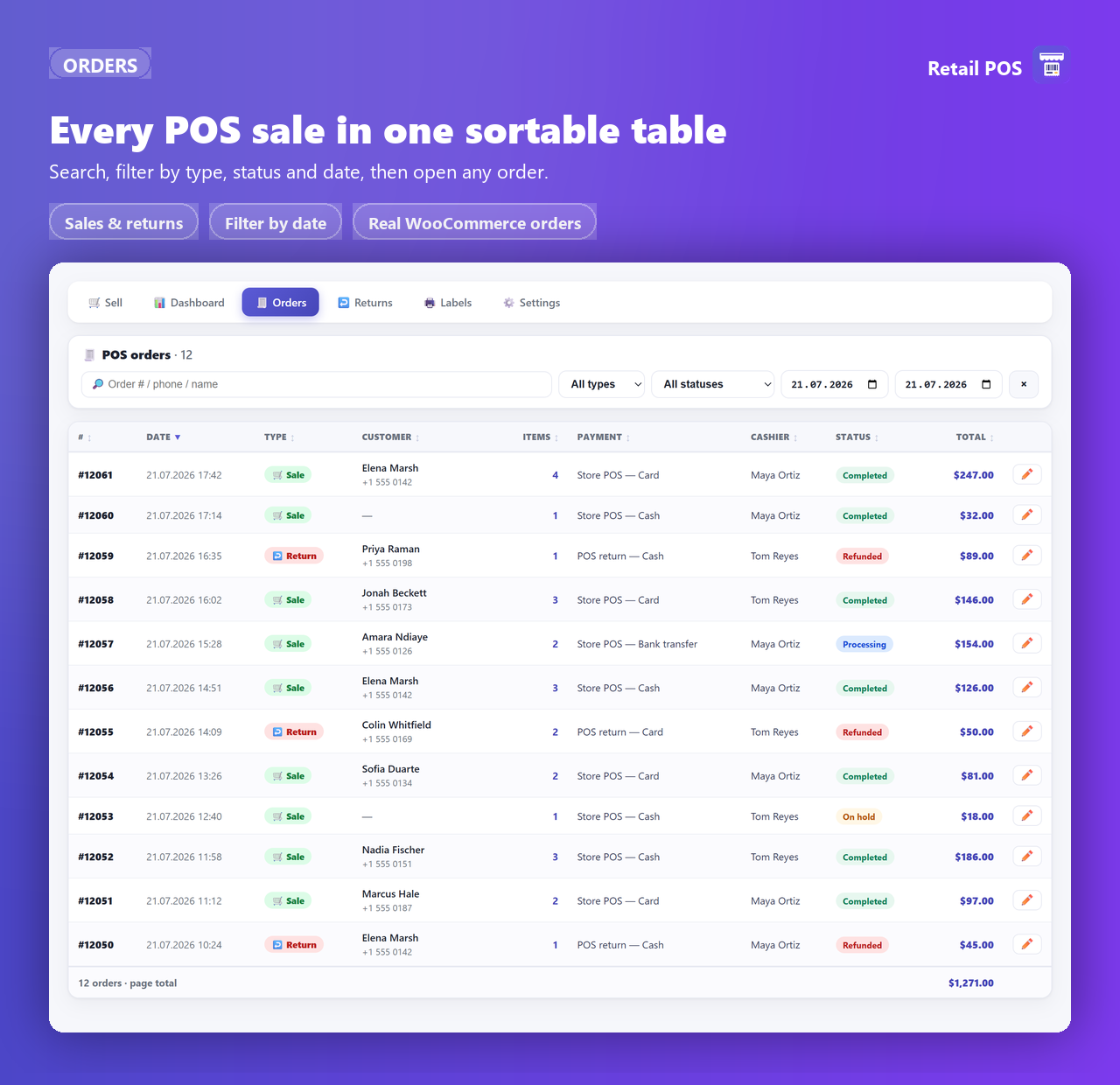
POS sales are ordinary WooCommerce orders tagged as counter sales — they take the status you configure (Completed by default) and appear in your reports and integrations like any other order.
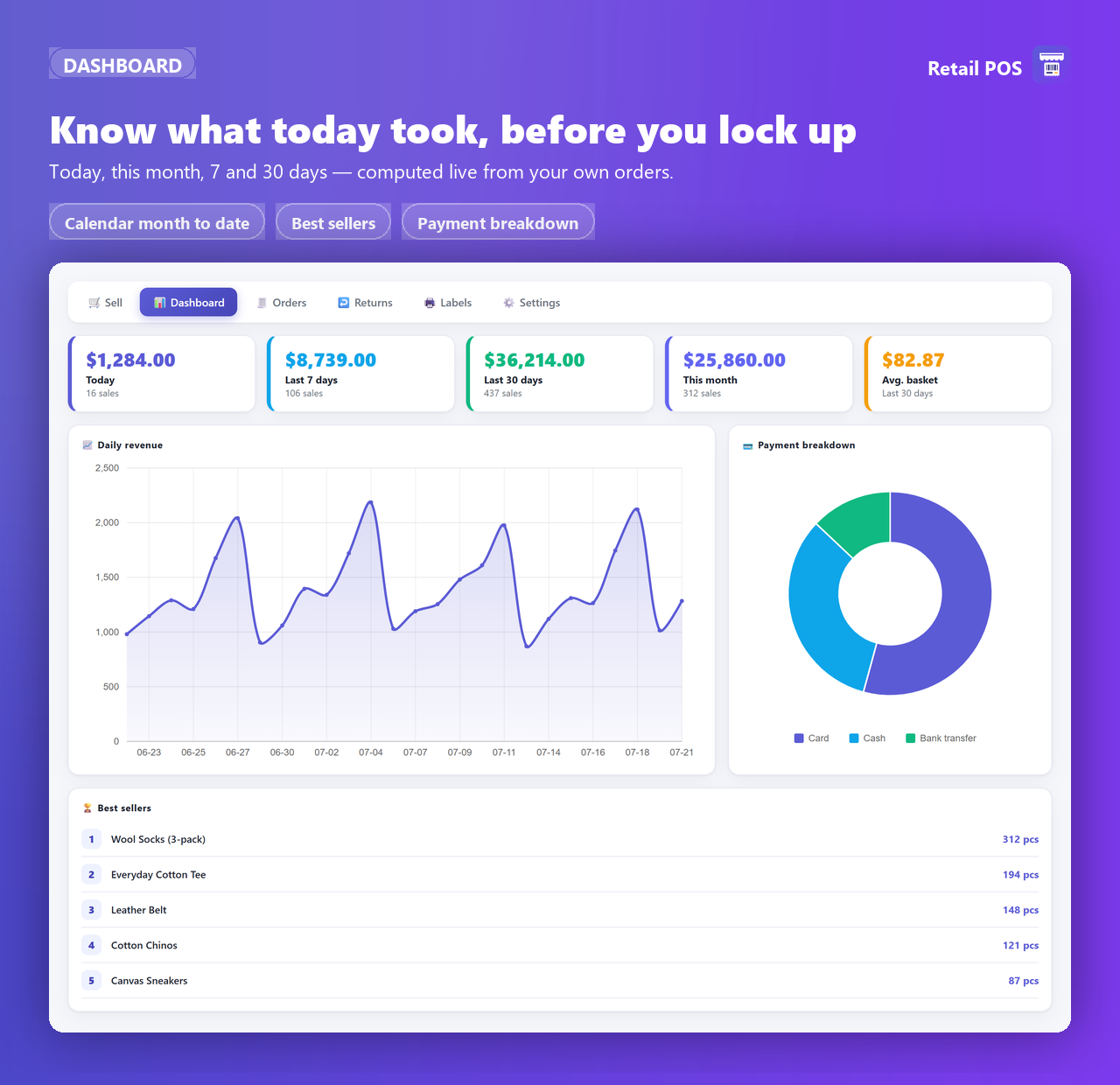
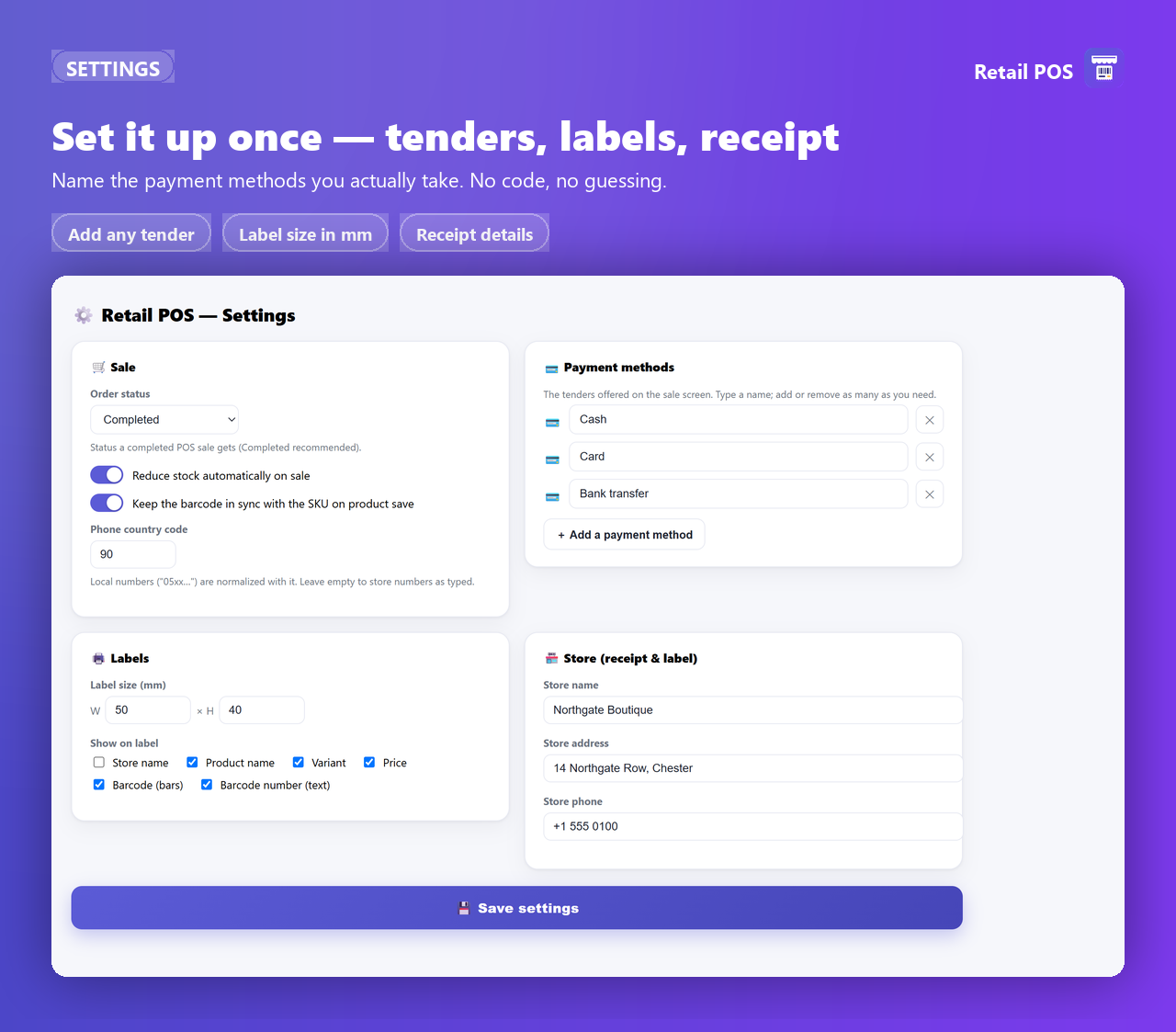
Six working screens — Sell, Dashboard, Orders, Returns, Labels and Settings — plus a built-in Help & support page. The settings page is a single short form.
There is no setup project and no data migration. It sells the store you already have.
Install from WordPress.org like any plugin. WooCommerce must be installed and active; WordPress 6.2+ and PHP 7.4+.
Open Retail POS → Settings: confirm your payment methods and the store name, address and phone that print on the receipt.
Open Retail POS → Sell. Scan or search, adjust quantities, add a discount if you want one, tap the tender that covers the total.
Print the receipt, glance at the remaining-stock snapshot, and the next scan is already in the box. Nothing to reconcile later.
Staff need the WooCommerce manager capability (manage_woocommerce) to open the POS screens — the Shop manager role and administrators have it, so nobody needs a full admin account to work the counter. Full setup notes are in the documentation.
Filmed on a real WooCommerce install. Every number spoken is the number that ends up in the order record — each video goes to the WooCommerce screen that proves it.
 Start here
Full walkthrough 5:01
The whole plugin in the order a cashier actually learns it: ring one up, scan without a gun, take a return with no receipt, and close the day on a number you can reconcile.
Start here
Full walkthrough 5:01
The whole plugin in the order a cashier actually learns it: ring one up, scan without a gun, take a return with no receipt, and close the day on a number you can reconcile.
 Scan, sell, done 1:19
Two scans, cash, receipt — then the WooCommerce order carrying the same $20.50, and stock 36 → 35.
Scan, sell, done 1:19
Two scans, cash, receipt — then the WooCommerce order carrying the same $20.50, and stock 36 → 35.
 Scan with your phone 1:23
The camera button opens a live viewfinder, with no app to install. The bundled decoder reads the code and one unit lands in the cart.
Scan with your phone 1:23
The camera button opens a live viewfinder, with no app to install. The bundled decoder reads the code and one unit lands in the cart.
 A refund with no receipt 1:25
Scan what is in their hand. The payout appears in WooCommerce's own order list, and the product goes from out of stock to in stock.
A refund with no receipt 1:25
Scan what is in their hand. The payout appears in WooCommerce's own order list, and the product goes from out of stock to in stock.
 What stayed in the till 1:32
Zero, then $12.50 after a sale, then $4.50 after an $8.00 refund. The day nets the refund out on its own.
What stayed in the till 1:32
Zero, then $12.50 after a sale, then $4.50 after an $8.00 refund. The day nets the refund out on its own.
Free is a complete single register: scanning, the sale, returns, receipts, labels and the dashboard, with no time limit and no sale caps. Pro is the money-control layer a full retail day needs — credit, the drawer, and the numbers behind the revenue.
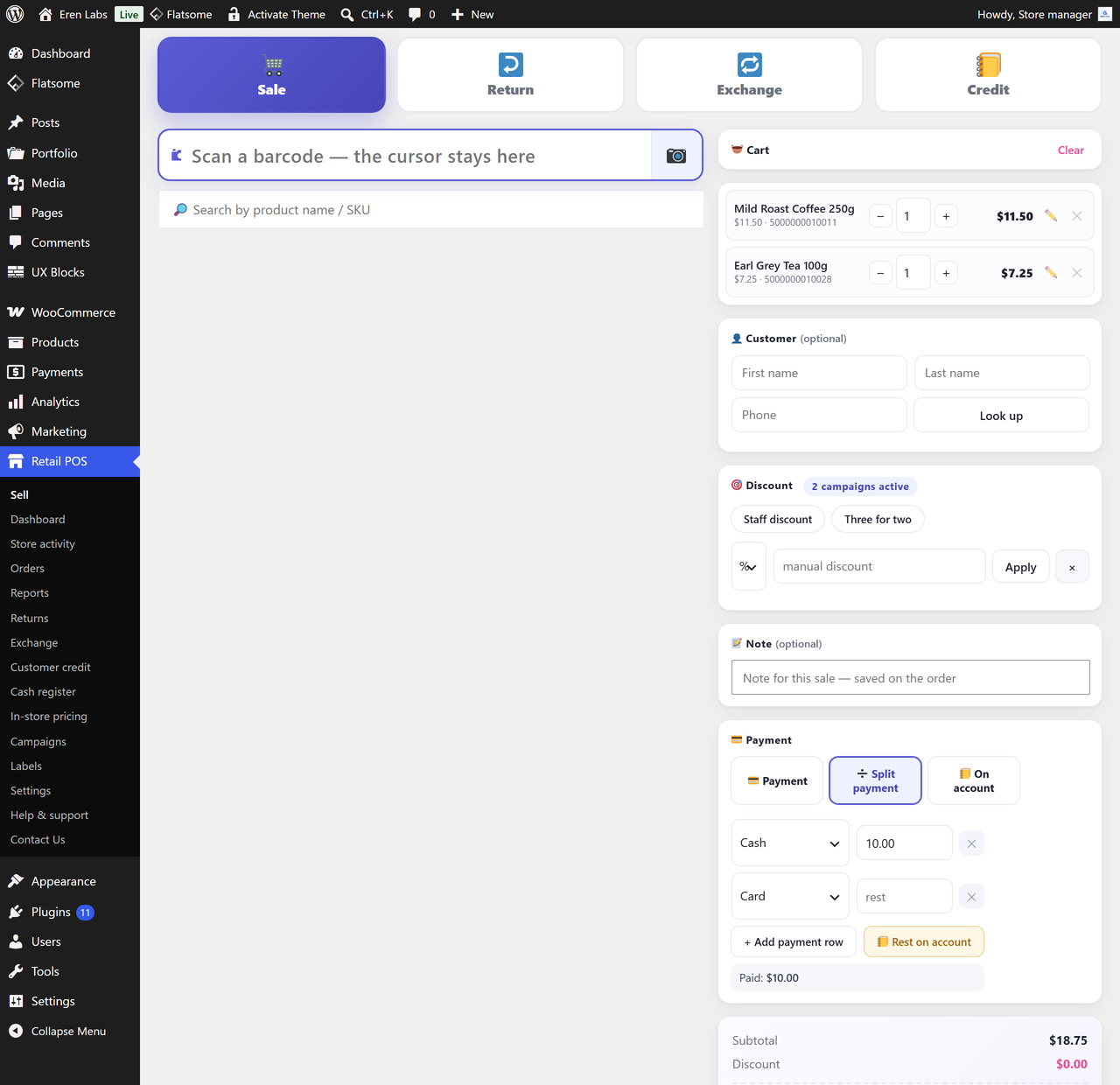
Settle one sale with several tenders — half cash, half card — each recorded separately, so the drawer and the card slip both reconcile.
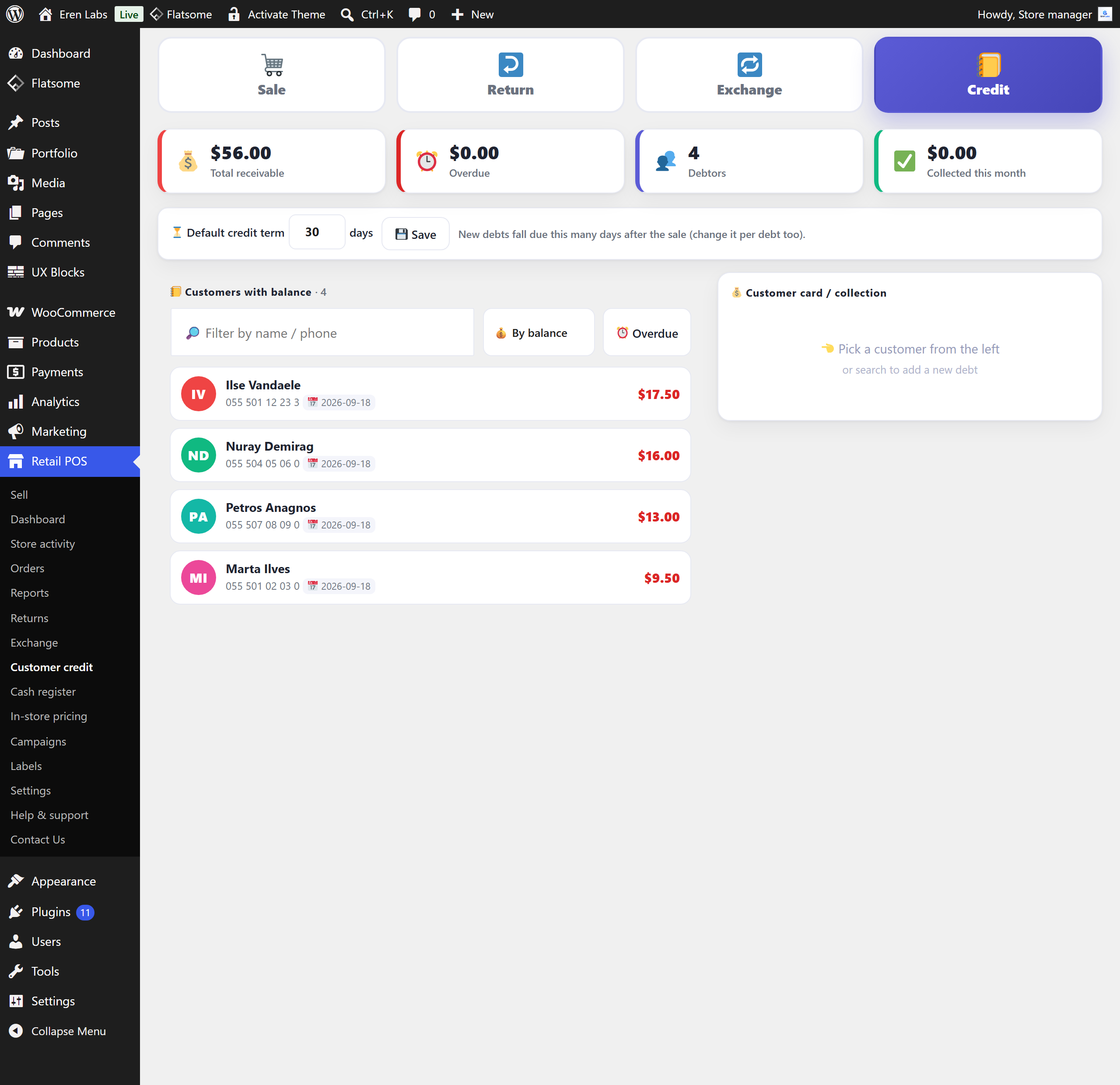
Take what the customer has now and book the remainder to their account. A debtor list with aging, collections, printable statements and WhatsApp reminders keeps it from being forgotten.
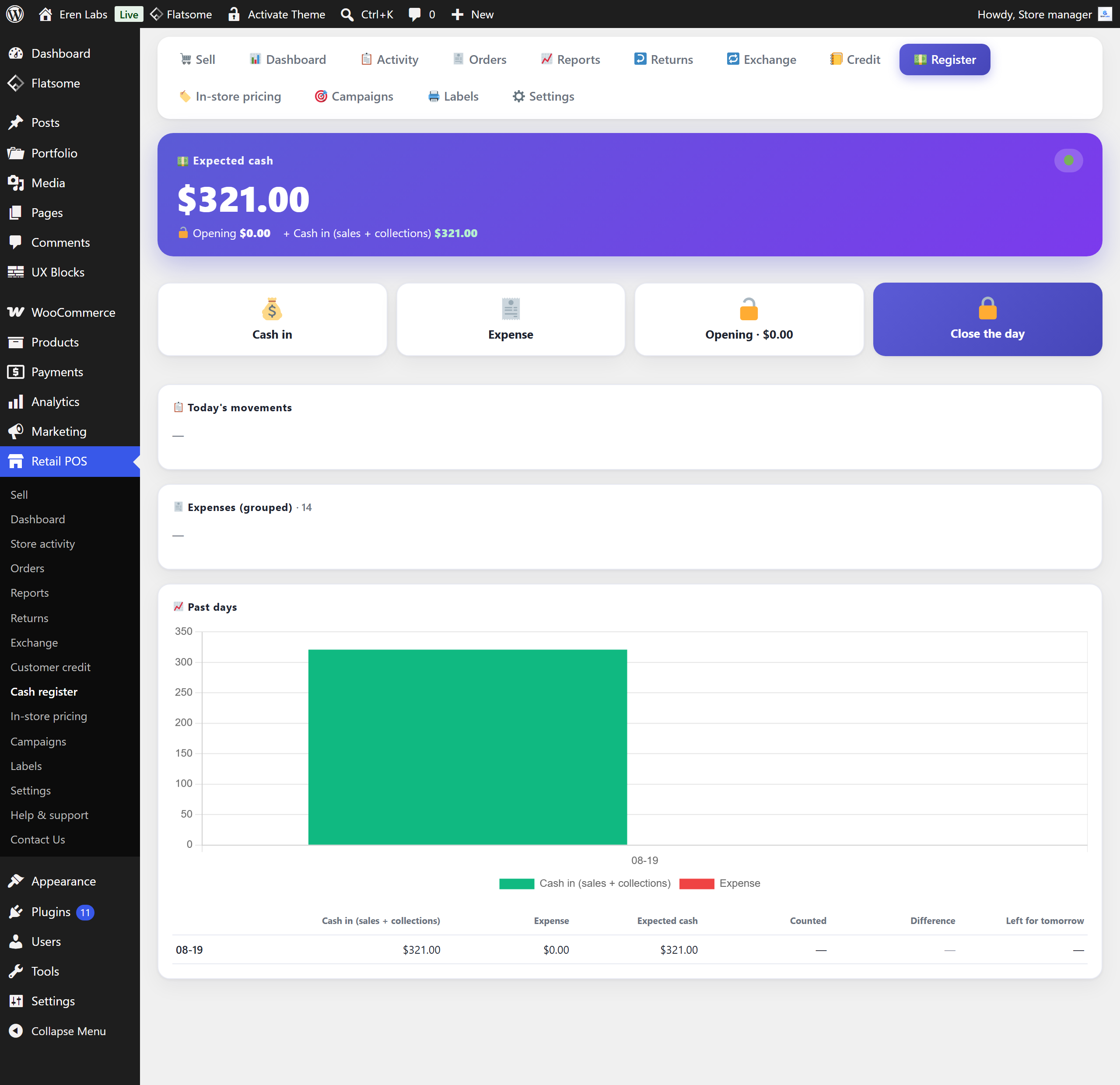
Opening float, cash-ins and expenses on record, then an expected-versus-counted close with carryover — the till either balances or shows exactly where it did not.
Scan what comes back and what goes out in one flow; the tax-correct difference is collected or refunded.
Ring items up at a counter price distinct from the website price. Set it per product, or generate it across the catalogue in bulk — site price ± a percentage, with optional rounding to 0.10/0.50/1/5 or charm endings.
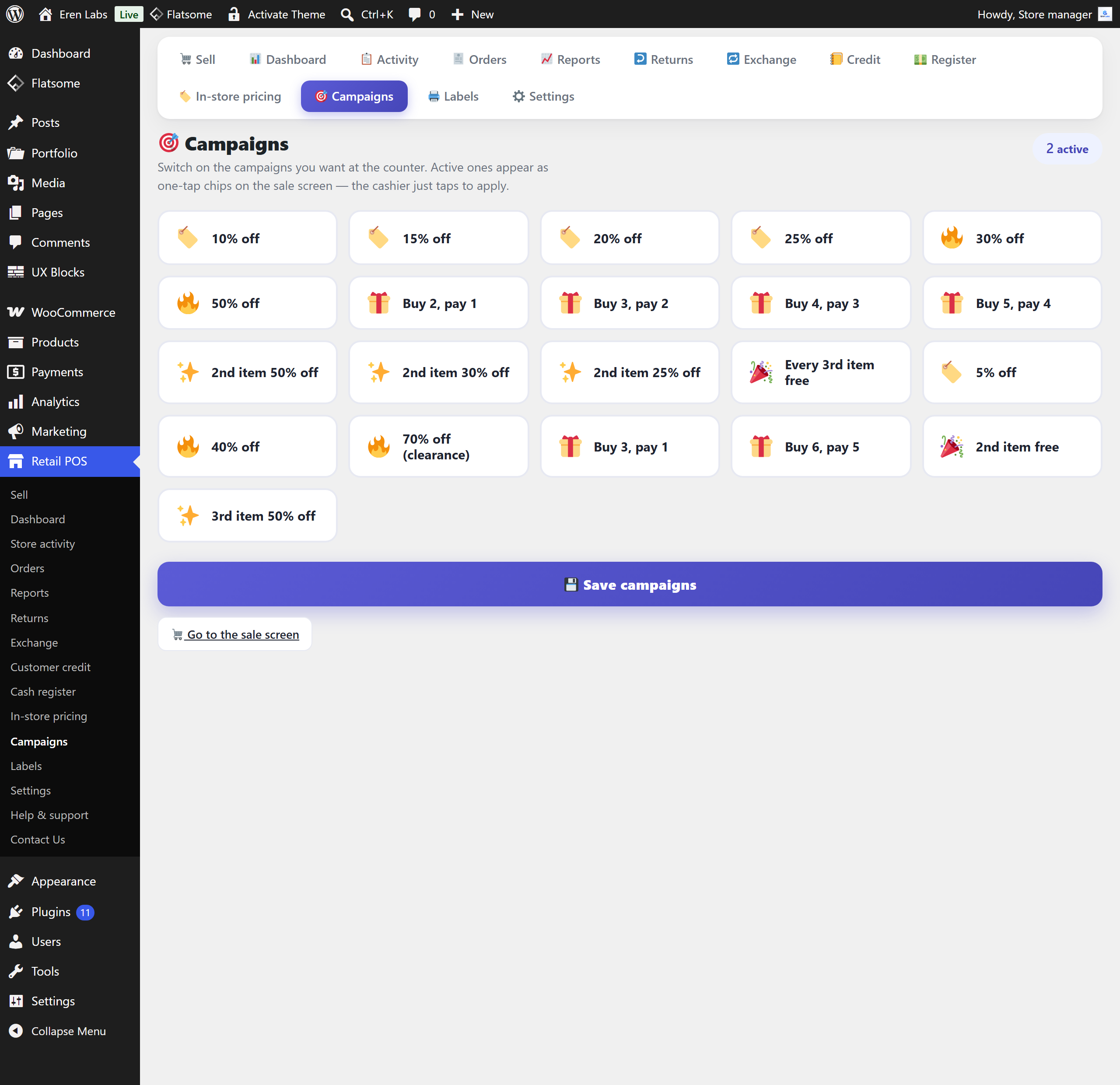
Preset one-tap chips instead of mental arithmetic: “buy 3 pay 2”, “2nd item −50%”, and percentage or fixed presets your staff can apply without a calculator.
Revenue, cost, margin, stock turnover, attribute breakdowns and discount usage. Free records a unit cost when you quick-edit a line, but shows no margin figures anywhere.
Every sale, return, exchange and credit of the day in one chronological stream — what happened at the counter while you were in the back.
Free users get help on the WordPress.org support forum. Pro customers reach the people who built the plugin directly.
Real screens from the Pro build on a live WooCommerce install — the same shop, the same day. The figures on each one reconcile against the order list behind it.
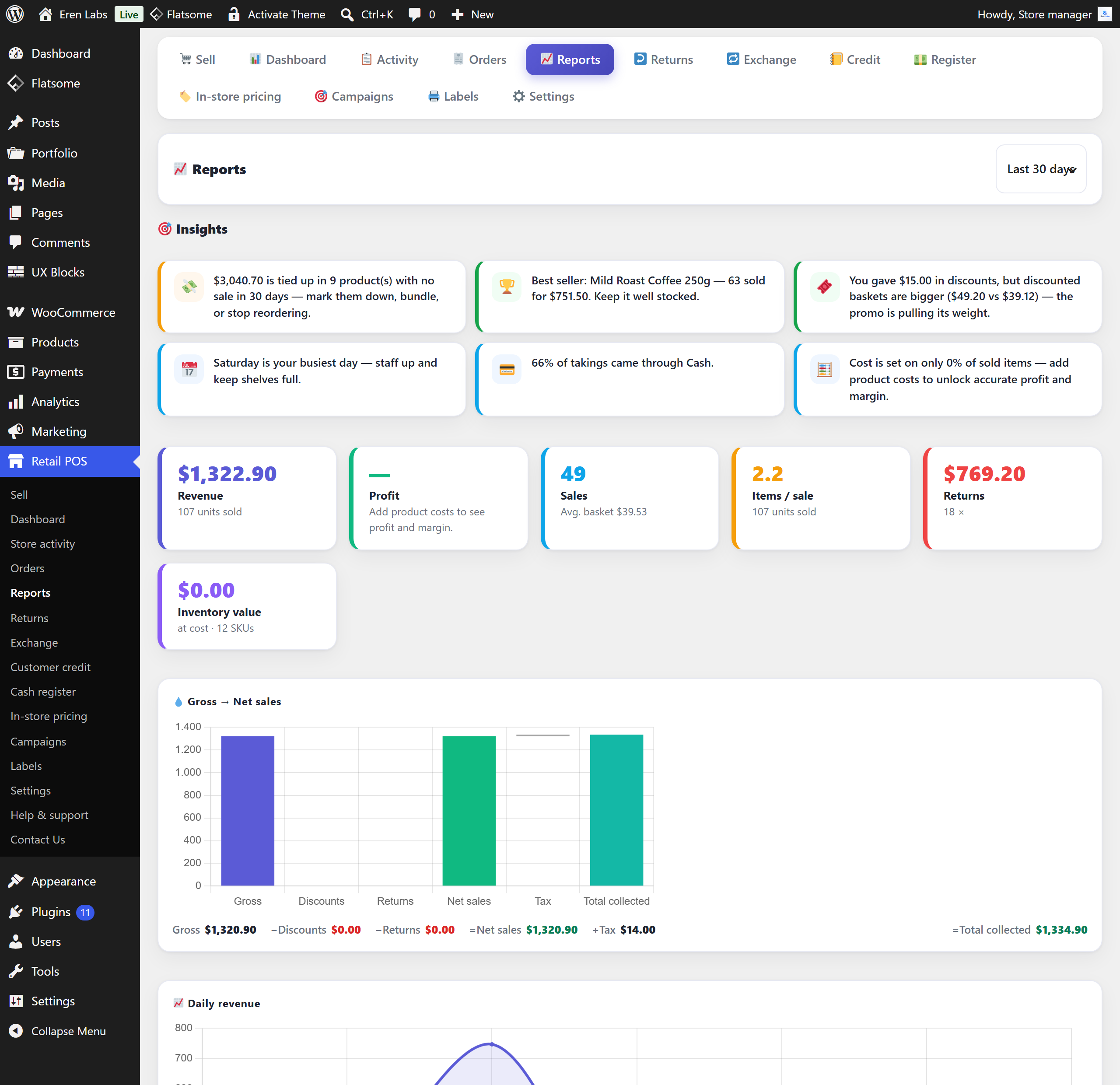
_wc_cog_cost or _cost) and show what you actually kept — margin per product and per period, tax-exclusive and net of refunds.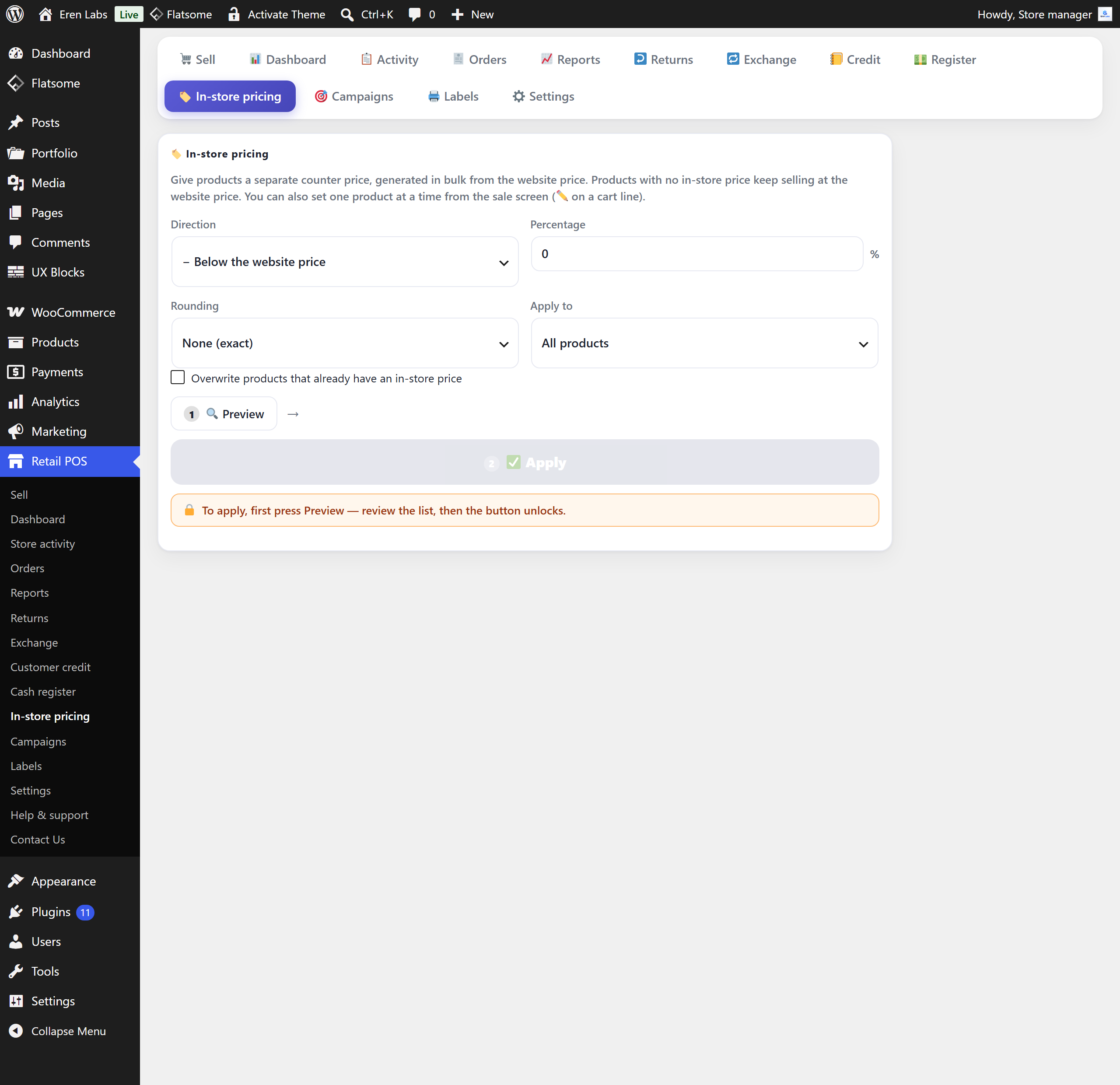
| Feature | Free | Pro |
|---|---|---|
| Sale terminal — scan, cart, receipt | IncludedIncluded | IncludedIncluded |
| Barcode scanner & phone-camera scanning | IncludedIncluded | IncludedIncluded |
| Product search & variant picker | IncludedIncluded | IncludedIncluded |
| Manual discountspercentage or fixed amount | IncludedIncluded | IncludedIncluded |
| Configurable payment methodsone method settles a sale in Free | IncludedIncluded | IncludedIncluded |
| Blind (receiptless) returns | IncludedIncluded | IncludedIncluded |
| Barcode label printing | IncludedIncluded | IncludedIncluded |
| POS order list with safe edit | IncludedIncluded | IncludedIncluded |
| Sales dashboardtoday · 7 · 30 days · month to date | IncludedIncluded | IncludedIncluded |
| Split paymentsseveral tenders on one sale | Not includedNot included | IncludedIncluded |
| Partial payment & customer credit ledger | Not includedNot included | IncludedIncluded |
| Debtor aging, statements & reminders | Not includedNot included | IncludedIncluded |
| Cash register & end-of-day close | Not includedNot included | IncludedIncluded |
| Exchange terminal | Not includedNot included | IncludedIncluded |
| In-store (counter) pricing | Not includedNot included | IncludedIncluded |
| Campaign scenario presets | Not includedNot included | IncludedIncluded |
| Profit & margin reports | Not includedNot included | IncludedIncluded |
| Store activity feed | Not includedNot included | IncludedIncluded |
| Priority support | Not includedNot included | IncludedIncluded |
Pro is a separate download from erenlabs.net, not from WordPress.org. It is the same plugin with the Pro screens unlocked — no re-install of your data, no migration. If a licence lapses, the free features keep selling and the Pro screens lock again; nothing in your database is deleted.
One shop or several, one till or a few — what matters is that the point of sale and the website are selling the same products.
The website and the shelf draw down one stock figure. Ring a sale up at the counter and the product page knows before the customer has left.
Fast repeat items, gross prices, a receipt and the next customer. Scan or search by name — you do not need a barcode on anything.
The till is whatever browser you have with you. Your phone is the scanner, and there is no terminal to hire, ship or configure.
Take the balance, sell the extra item they picked up on the way out, and hand back what did not fit — all against the same order list.
The free version is genuinely free and complete for one counter — no trial, no card. Pro is one flat annual price per licence, whatever the shop’s turnover.
A 20-site licence is $699 a year — 64% off twenty single licences. Pick a licence size and the checkout link follows.
Every paid plan is an annual licence that renews yearly, and you can switch renewal off at any time. Checkout, invoicing and licence management are handled by Freemius. Refunds follow our refund policy, summarised below. The free version stays free either way: it is not a trial and it has no sale caps.
This plugin is new. Rather than quote a review nobody wrote, here is what you can go and verify yourself, right now.
The things a shop owner asks before putting a plugin on the till.
Any scanner gun that types into a text field — the usual USB or Bluetooth HID kind — works, and you do not have to program an Enter suffix into it. The scan box fires by itself once four or more characters land (and on Enter as well), and it takes focus back after every action, so the next scan always lands in the right place. The Labels screen auto-fires at six characters or more.
Yes, with no app to install. A camera button on the scan box opens a live viewfinder: browsers with a built-in BarcodeDetector (typically Android Chrome) decode natively, and where there is none (typically iOS Safari) the bundled ZXing decoder takes over. If a damaged or dense label will not read live, “Read from photo” takes a still and retries it twelve ways. Camera scanning is on the Sell and Returns screens. Browsers only release the camera on a secure connection, so the site has to be served over HTTPS.
No. This is a WordPress admin screen and it needs a live connection to your site — every scan, search and sale is a request to WordPress. If the internet drops at the counter, the terminal stops with it. There is no third-party POS cloud in between, so the terminal is as fast as your own site.
Your theme is not involved. The POS lives entirely in wp-admin — nothing is added to the storefront, no template is overridden, no shortcode or block is needed. What it does need is WooCommerce active, WordPress 6.2 or newer and PHP 7.4 or newer. It is HPOS (High-Performance Order Storage) compatible and works on classic post storage too.
Yes. They are ordinary WooCommerce orders tagged as POS sales, they take the status you configure (Completed by default), and they show up in your reports and integrations like any other order. Stock reduction goes through WooCommerce core, so lookup tables and integrations stay correct — and whether a POS sale reduces stock at all is a setting.
No. Search by product name or SKU and pick from the results; a variable parent opens a variant picker showing each variation with its price, remaining stock and barcode. When you do want barcodes, the Labels screen prints scannable labels for any product that already has a SKU or barcode, and the plugin can keep a product’s barcode in step with its SKU on save.
Yes. Anyone who can manage WooCommerce — the Shop manager role, plus administrators — can open the POS screens, so nobody needs a full administrator account to work the counter. Developers can point the rpsw_capability filter at a different capability.
The free version contacts no external service at all. Sales, customers, orders, settings and reports live only in your own WordPress database, and the free package ships no licensing, analytics or telemetry code of any kind. Every JavaScript library it uses is bundled inside the plugin, so nothing loads from a CDN.
The separately distributed Pro version uses the Freemius SDK for licence validation and updates. On first activation it shows an explicit opt-in screen: nothing is sent unless you click “Allow & Continue”, and “Skip” keeps the plugin fully functional. If you opt in, Freemius receives basic site data — site URL, WordPress and PHP versions, plugin version, admin e-mail. Your sales, customers, credit ledger and reports are never sent.
Not in the free version: one sale is settled with one payment method covering the full total. Split payments, partial payment and the customer credit ledger are Pro features. You can still define as many tender types as you like in the free version — Cash, Card, Bank transfer, or whatever your shop calls them — you just pick one per sale.
Nothing is deleted. The sale terminal keeps selling, and every ledger entry, register day and report stays in your database — the Pro screens simply lock until a licence is active again. The licence renews yearly by default because that is what keeps updates and priority support coming, and you can switch renewal off at any time.
Yes — returns are blind. Scan what the customer brings back, refund it, and stock is restored automatically when stock reduction is on; the payout is recorded as a refunded POS order so the day’s figures stay honest. There is no stock cap on the returns cart, so you can take back more than the shop currently holds.
The plugin removes its own options and scheduled events and stops there. Your products, stock, customers and orders stay exactly as they are — including the POS ones, because they are ordinary WooCommerce orders and always were.
It is an EPOS system in the sense that matters: the terminal, the stock movement and the sales record are one thing instead of three. What it is not is a separate box on the counter. There is no proprietary till system to buy, no cash register to reconcile against the website at closing, and no monthly fee per terminal. Any machine that can open wp-admin in a browser is a till, and that till and the website read the same stock figure because they are the same install.
No. Receipts print through the browser, so an ordinary office printer — or a PDF, or nothing at all — is enough to start selling. If a thermal receipt printer is already on the counter it prints from the same dialog: the receipt is a plain print stylesheet rather than a driver integration, so an 80 mm roll and A4 both come out readable. The store name, address and phone that appear on it are two of the settings you fill in before the first sale.

Install it on the till, ring up a single product, and you will know inside a minute whether the counter likes it. Nothing is held back behind a signup.
A WooCommerce order stores one payment method, not two. What that costs at the till, the three workarounds, and how to record…
Read moreRefunds, date windows, timezone and order statuses: why a WooCommerce sales report disagrees with your orders and your drawer — rarely because…
Read moreA WooCommerce refund needs an order. Here is what to do when there is none — the money, the stock, and why…
Read moreYour phone can be the barcode scanner at a WooCommerce till, with no app. What works on Android, what is slower on…
Read moreA scan that finds nothing is rarely the scanner. WooCommerce keeps product codes in three fields — SKU, GTIN, plugin barcode. Here…
Read moreA 10% discount can leave the total right and the tax wrong. Worked numbers for a coupon, a negative fee and one…
Read moreWooCommerce reduces stock only when an order enters Processing, On hold or Completed. Why yours didn't, and how to move it without…
Read moreYes, WooCommerce has a POS mode since 9.6 - on a tablet, in ten countries. What it needs, what it will not…
Read moreSign in to the Freemius Customer Portal with the email address you used at checkout.