Why Your WooCommerce Best Sellers List Isn’t Updating (and How to Fix It)
WooCommerce ranks best sellers on total_sales, a lifetime counter refunds never reduce. Why old products stay on top, and how to rank the last 30 days.
Updated

In this article12 sections
A WooCommerce best selling products page is simple to build and surprisingly easy to get wrong, and if the list on yours has not moved in months, the reason is one line of database behaviour that the how-to guides skip. WooCommerce decides what is popular by reading a product value called total_sales. It is a lifetime counter. It has been accumulating since the day the product was published, it does not know what month it is, and it is not reduced when you refund someone. A product that sold four hundred units in 2019 will sit above this month’s genuine winner more or less permanently.
Everything else follows from that: what the counter records, the three honest ways to surface it, the harder question of which period you mean, and the reason a best sellers page fills with things nobody can buy.
If the same six products have topped your best sellers since spring, that is why — and you can confirm it in two browser tabs, with no database access and no plugin. Open /shop/?orderby=popularity in one. In the other, open Analytics > Products, set the range to the last 30 days, and sort by items sold. The two lists will not match. The gap between them is the whole subject of this page.
The short answer#
Build a WooCommerce best sellers page by sorting an archive with ?orderby=popularity, using a Product Collection block, or creating a real product category — though WooCommerce’s built-in popularity ranking is total_sales, a lifetime counter, not recent sales.
- Popularity means lifetime, not recent. WooCommerce maintains total_sales through wc_update_total_sales_counts() and rolls variation sales up to the parent; cancellations and deletions reduce the count but refunds leave it untouched, so long-published products permanently outrank newer bestsellers.
- Three ways to build it. Appending ?orderby=popularity sorts an existing archive but gives you no destination of its own, the Product Collection block or [best_selling_products] shortcode creates a real page with a URL but no term behaviour, and a genuine product_cat term brings menus, breadcrumbs, counts and layered navigation at the cost of ongoing maintenance.
- Rolling windows beat lifetime totals. A 30-day window is closer to what people mean by best sellers and self-corrects as products sell out or are discontinued, but it must be aggregated from order line items — the wc_order_product_lookup analytics table holds them, with refunds written as negative rows that net out — and then cached, for example in a six-hour transient.
- Exclude out-of-stock at the source. A best sellers page is structurally the one most likely to fill with things nobody can buy, so drop out-of-stock products from the ranking source or push them to the end of the display, rather than reaching for the blunt global out-of-stock visibility setting.
- Choose by maintenance appetite. Default popularity sorting maintains nothing, a block suits a single campaign you revisit when it ends, and a maintained category needs rolling windows with stock conditions and a sales floor; whichever you pick, write the period into the page description.
Every route this page covers, side by side, because the decision is a trade-off rather than a winner:
| Method | Period it ranks | Real category term | Maintenance | Cost |
|---|---|---|---|---|
| ?orderby=popularity on an archive | Lifetime | No | None | Free |
| Product Collection block, or [best_selling_products] | Lifetime | No | Revisit when the campaign ends | Free |
| Hand-picked product_cat | Whatever was true the day you built it | Yes | By hand, monthly | Free |
| Rule-based product_cat on Total sales count | Lifetime | Yes | Self-refreshing | Free |
| Custom 30-day query on wc_order_product_lookup | Rolling 30 days | Only if you assign the term as well | A scheduled job you maintain | Free, your own code |
| Rule-based product_cat on Units sold 30d | Rolling 30 days | Yes | Self-refreshing, daily | Pro |
Refunds do not survive a yes/no cell, so they get a sentence instead: only the rolling-window routes net refunds out at all, and even then only where a quantity was refunded rather than an amount. Everything in that table is explained below, in the order the rows appear.
What total_sales actually counts#
The counter is maintained by wc_update_total_sales_counts() in includes/wc-order-functions.php. It fires on order status transitions, walks the line items, and adds or subtracts each item’s quantity against the product. Two implementation details matter more than the rest.
First, it writes against $item->get_product_id(), which for a variation returns the parent product. Variation sales roll up to the parent, so you cannot rank variations against one another using this value.
Second, the order carries a flag recording whether its sales have already been counted — _recorded_sales in post meta on legacy storage, a recorded_sales column on the operational data table under HPOS. The function returns early when that flag already agrees with the order’s current state, so an order is counted once no matter how many times its status moves. That prevents double counting. It also explains the drift, because the events that add and the events that remove are not symmetrical.
| Event | Effect on total_sales |
|---|---|
| Order reaches processing | Increases by line quantity |
| Order reaches completed | Increases by line quantity |
| Order reaches on-hold | Increases by line quantity |
| Order moved to cancelled from any of those three | Decreases |
| Order trashed, or permanently deleted | Decreases |
| Order untrashed | Increases again |
| Order refunded, fully or partially | No change |
| Order marked failed | No change |
Two absences from that table are the interesting part. Refunds are not handled at all. There is no hook on the refunded status, so a fully refunded order leaves its units on the product permanently, and a partial refund is invisible to the counter. Failed orders are not handled either, which matters precisely because on-hold already counted. A bank transfer order that is never paid and eventually marked failed keeps its units on the product.
The age problem is larger than either. The counter has no time dimension. It is a hall of fame, not a sales report. There is no admin screen to recalculate or reset it, and once it has drifted the counter holds no record you could reconstruct a correct value from. If you need a product zeroed you do it in code with $product->set_total_sales( 0 ); followed by $product->save();, and you accept that you are guessing.
Three honest ways to build a WooCommerce best selling products page#
1. Sort an archive you already have#
The cheapest option is not a page. Append ?orderby=popularity to any product archive and it re-sorts in place, so /shop/?orderby=popularity or /product-category/jackets/?orderby=popularity both work. Customers can reach the same thing through the “Sort by popularity” entry in the catalogue sorting dropdown. To make it the store-wide default, set it under Appearance > Customize > WooCommerce > Product Catalog, or in code:
add_filter( 'woocommerce_default_catalog_orderby', function () {
	return 'popularity';
} );
WooCommerce registers that panel itself, so it exists whatever your theme is. If Appearance > Customize is not showing in the menu under a block theme, /wp-admin/customize.php still loads it directly.
This is cheap, and it is worth knowing why. Popularity sorting is not a meta query. WC_Query filters the SQL clauses to order on wc_product_meta_lookup.total_sales, with the product ID as a tie-break. That column is not indexed, so the database still sorts rather than reads an index — but it sorts one narrow row per product on a flat table, instead of joining and filtering postmeta. On a normal catalogue that difference is the whole difference.
The limitation is that a sorted view is not a destination. It has no title of its own, no description, no term, and no place in a menu. Search engines generally treat a sort parameter as a variant of the archive rather than a page in its own right, which is one of several reasons category pages fail to get indexed.
2. Drop in a block or the shortcode#
The current approach is the Product Collection block with the Best Sellers collection, which shows the products purchased most on the site and, where two have sold the same number of times, puts the more recently published one first. The older standalone “Best Selling Products” block was soft-deprecated in WooCommerce 9.5 and hidden from the inserter rather than deleted, so it still renders on pages that already use it, but you cannot add a new one. Both that block and the classic shortcode were last checked against WooCommerce 11.1, released 3 September 2026; the shortcode is still registered in core:
[best_selling_products limit="12" columns="4"]All three read the same lifetime counter, so they inherit every caveat above. What you gain is a genuine page with its own URL and copy. What you do not get is a category: there is no term, no term count, no breadcrumb, no archive-level filtering, and nothing in the admin product list that tells you a product appears there.
3. Build a real category#
The third option is to put the products in an actual product_cat term called Best Sellers. It then behaves like every other category, because it is one: menus and breadcrumbs, a term count, layered navigation, and other plugins seeing it without special handling.
Doing this by hand is fine once. You sort the shop by popularity, tick twenty products, bulk assign them, and you are done. The problem is month two, when the list has moved and nothing told you. That is the general case covered in adding products to a category based on rules: the membership needs to be derived from a condition, not from a decision you made in March.
Best sellers of what period?#
This is the question that decides how much work the page is, and most stores skip it entirely. Lifetime best sellers are trivially available and mostly useless as merchandising. They tell a returning customer what was popular before they arrived. They favour old products for the simple reason that old products have had more time, and they will keep favouring them because the counter only moves in one direction for anything still selling at all. A five-year-old product needs to sell one unit a month to stay ahead of a new product selling forty.
What a merchandiser means by best sellers is almost always a rolling window: what has sold in the last 30 days. That reflects a season, a campaign, or a product that has started to move, and it self-corrects, because a discontinued line falls out of a rolling window on its own where it would sit in a lifetime ranking forever. The same reasoning applies to a new arrivals category that expires: a page defined by a window stays honest without anybody maintaining it.
Why a rolling window is a much heavier query#
Lifetime sales are one number per product, sitting on a row you were going to read anyway. A 30-day window cannot work that way, because the information is not on the product at all. It is spread across order line items, each with its own date, and has to be aggregated.
Doing that against the classic order items and item meta tables is genuinely slow. Fortunately WooCommerce Analytics already maintains a table for exactly this shape of question, wc_order_product_lookup, with one row per order line carrying product_id, variation_id, date_created, product_qty and product_net_revenue, and an index on date_created. Refunds are written into the same table as negative rows dated when the refund was created, so summing over a window nets them out. That is the opposite of the total_sales behaviour, and it is why Analytics and the popularity sort disagree. Two WooCommerce figures describing the same sales and not matching is a recurring pattern rather than a one-off bug, and the sales report is the other place it bites.
What the table does not do is filter itself. Every order that is not an auto-draft gets rows, pending and cancelled and failed included. Analytics applies its status exclusions at query time by joining wc_order_stats, and querying the lookup table directly means doing the same. The second join is where “exclude out-of-stock at the source”, from the out-of-stock trap below, actually gets implemented:
SELECT l.product_id, SUM( l.product_qty ) AS units
FROM wp_wc_order_product_lookup l
INNER JOIN wp_wc_order_stats s ON s.order_id = l.order_id
INNER JOIN wp_wc_product_meta_lookup pm
        ON pm.product_id = l.product_id AND pm.stock_status = 'instock'
WHERE l.date_created >= DATE_SUB( NOW(), INTERVAL 30 DAY )
  AND s.status NOT IN ( 'wc-pending', 'wc-failed', 'wc-cancelled', 'wc-auto-draft', 'wc-trash' )
GROUP BY l.product_id
HAVING units > 0
ORDER BY units DESC
LIMIT 20;
wc_product_meta_lookup holds one row per product, so that second join cannot inflate the SUM, and stock_status carries its own index there, so it is a cheap condition to add. Leave it out and you get a miniature version of the lifetime problem back, because the products that sold best over a window are disproportionately the ones that have since sold out.
Statuses are stored there with the wc- prefix, and refund rows inherit the parent order’s status, which is why a refunded order’s negative rows survive that filter and do their job. Cache the result. Nobody needs best sellers computed in real time, and the cost grows with order volume rather than catalogue size:
function my_best_sellers_30d( $limit = 12 ) {
	$ids = get_transient( 'my_best_sellers_30d' );

	if ( is_array( $ids ) ) {
		return $ids;
	}

	global $wpdb;

	$ids = $wpdb->get_col(
		$wpdb->prepare(
			"SELECT l.product_id
			 FROM {$wpdb->prefix}wc_order_product_lookup l
			 INNER JOIN {$wpdb->prefix}wc_order_stats s ON s.order_id = l.order_id
			 INNER JOIN {$wpdb->prefix}wc_product_meta_lookup pm
			         ON pm.product_id = l.product_id AND pm.stock_status = 'instock'
			 WHERE l.date_created >= DATE_SUB( NOW(), INTERVAL 30 DAY )
			   AND s.status NOT IN ( 'wc-pending', 'wc-failed', 'wc-cancelled', 'wc-auto-draft', 'wc-trash' )
			 GROUP BY l.product_id
			 HAVING SUM( l.product_qty ) > 0
			 ORDER BY SUM( l.product_qty ) DESC
			 LIMIT %d",
			$limit
		)
	);

	set_transient( 'my_best_sellers_30d', $ids, 6 * HOUR_IN_SECONDS );

	return $ids;
}
To display it, pass the IDs to wc_get_products(), which maps orderby => 'include' onto post__in so the ranking survives into the output. Guard the empty case, because an empty include is ignored and you would get the whole catalogue:
$ids = my_best_sellers_30d( 12 );

$products = $ids ? wc_get_products(
	array(
		'include' => $ids,
		'orderby' => 'include',
		'limit'   => 12,
		'status'  => 'publish',
	)
) : array();
Four caveats before you rely on any of it:
- The table needs Analytics. It is populated by WooCommerce Analytics. If the historical import has never run, older orders are missing. The import control lives under Analytics > Settings.
- Your exclusions should match the reports. Analytics > Settings > Excluded statuses defaults to excluding pending, cancelled and failed, counting processing, on-hold and completed, and refunded cannot be excluded. Change it there and your own SQL will quietly disagree until you change it too.
- Variations roll up unless you ask.
product_idis the parent; group onvariation_idif you want per-variation ranking, which the lifetime counter cannot give you at all. - Not every refund moves the unit count. Refunding an amount without refunding a quantity writes negative revenue and a zero quantity, so units stay where they were. If units are what you rank on, expect small disagreements with your revenue reports.
The scheduled job that keeps the cache warm
A transient on its own means the first visitor after every expiry pays for the aggregation, so the heaviest query on the page lands on a customer rather than on a cron run. Warm it on a schedule instead. WordPress ships hourly, twicedaily and daily and nothing between them, so register a six-hour interval of your own and match it to the transient’s own six-hour life — recomputing more often than the cache can consume it is pure cost, and this is the query whose cost grows with order volume:
add_filter( 'cron_schedules', function ( $schedules ) {
	$schedules['every_six_hours'] = array(
		'interval' => 6 * HOUR_IN_SECONDS,
		'display'  => 'Every six hours',
	);

	return $schedules;
} );

add_action( 'init', function () {
	if ( ! wp_next_scheduled( 'my_refresh_best_sellers_30d' ) ) {
		wp_schedule_event( time(), 'every_six_hours', 'my_refresh_best_sellers_30d' );
	}
} );

add_action( 'my_refresh_best_sellers_30d', function () {
	delete_transient( 'my_best_sellers_30d' );
	my_best_sellers_30d( 12 );
} );
That is the whole scheduled job, and it is worth looking at for a moment, because it is the part that is usually behind a licence. One honest limit on it: WP-Cron only runs when somebody visits the site, so on a quiet store the refresh is late rather than punctual, and the visitor who triggers it is the one who waits. A real cron entry on the server calling wp-cron.php on a fixed schedule, or moving the job onto Action Scheduler, is the fix.
If you only need to look at the numbers rather than build a page, stop here: Analytics > Products with a 30-day range already gives you items sold and net sales per product, refund-adjusted, for free. That is the correct source for a merchandising decision. The work above is only for putting the result on the storefront.
Why rolling windows are usually a paid feature#
This explains the plugin market for this feature. Reading total_sales is one value already sitting on the product, so essentially every plugin, block and theme offers lifetime best sellers for nothing. A rolling window needs the aggregation above plus a scheduled job to keep it current, which is a real maintenance cost, and that is why the window version is nearly always behind a licence. If a tool advertises best sellers without saying over what period, assume lifetime.
The out-of-stock trap#
A best sellers page is, structurally, the page most likely to be full of things nobody can buy. Selling out is what a best seller does. Combine that with a lifetime ranking and you get a page whose top row is a product you discontinued two years ago.
There is a global setting for this at WooCommerce > Settings > Products > Inventory, “Out of stock visibility”, which hides out-of-stock items from the catalogue and from search, though their product pages remain reachable by direct URL. It is blunt: it applies everywhere, and it can leave categories looking empty for reasons nobody remembers. Use it if that is genuinely your store policy, not as a fix for one page.
The better fix is to handle stock at the level of this page only, in two places. In the ranking, exclude out-of-stock products from the source list, because the point of the page is to sell. In the display, push anything that goes out of stock afterwards to the end rather than removing it, which keeps the page full and is covered in showing out-of-stock products last. A rolling window helps here too: a product that stopped selling because it stopped existing drops out by itself within 30 days.
Both halves lean on stock_status, and a stock status is only as good as the count behind it. A product whose recorded quantity has drifted above zero while the shelf is empty — a miscount, a return restocked on screen but never put back, a breakage nobody wrote off — reads as in stock, passes the filter, and lands on the page anyway. The query cannot tell the difference. Only counting the shelf can.
Where Smart Categories fits#
Everything above works without buying anything. If what you want is the third option — a real category whose membership is derived rather than maintained — that is what our plugin does, and the honest version of that pitch starts with what the free version will not do.
To be blunt about which half is which: if what you want is a 30-day best sellers category, the free version will not build it. Its Total sales count field is the lifetime counter, with every drawback above. The code earlier on this page gives you the rolling ranking for free; what it does not give you is a real category term, with the menus, breadcrumbs and term counts that come with one — not unless you also write the code that assigns and removes it. What Pro sells is those two things together, and not having to maintain the scheduled job that keeps them current.
Smart Categories for WooCommerce attaches a rule set to a real WooCommerce product category. Matching products get the actual term assigned, so admin lists, term counts, breadcrumbs and menus behave normally. A free rule is still worth having for a best sellers category, as long as you read it as lifetime: Total sales count greater than 25 and Stock status equals In stock, which at least stops the page leading with things nobody can buy. The rule builder shows matching products and their count before you save, so you can tune the threshold rather than guess it.
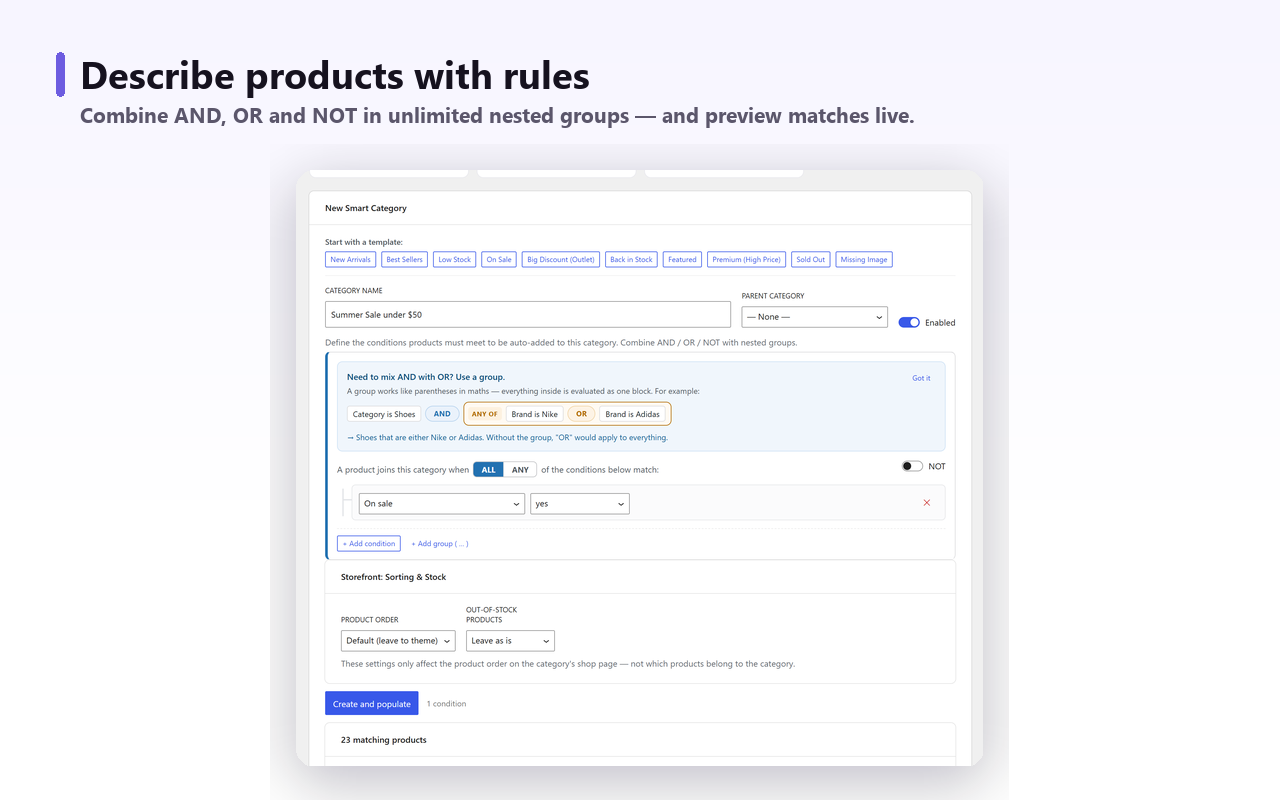
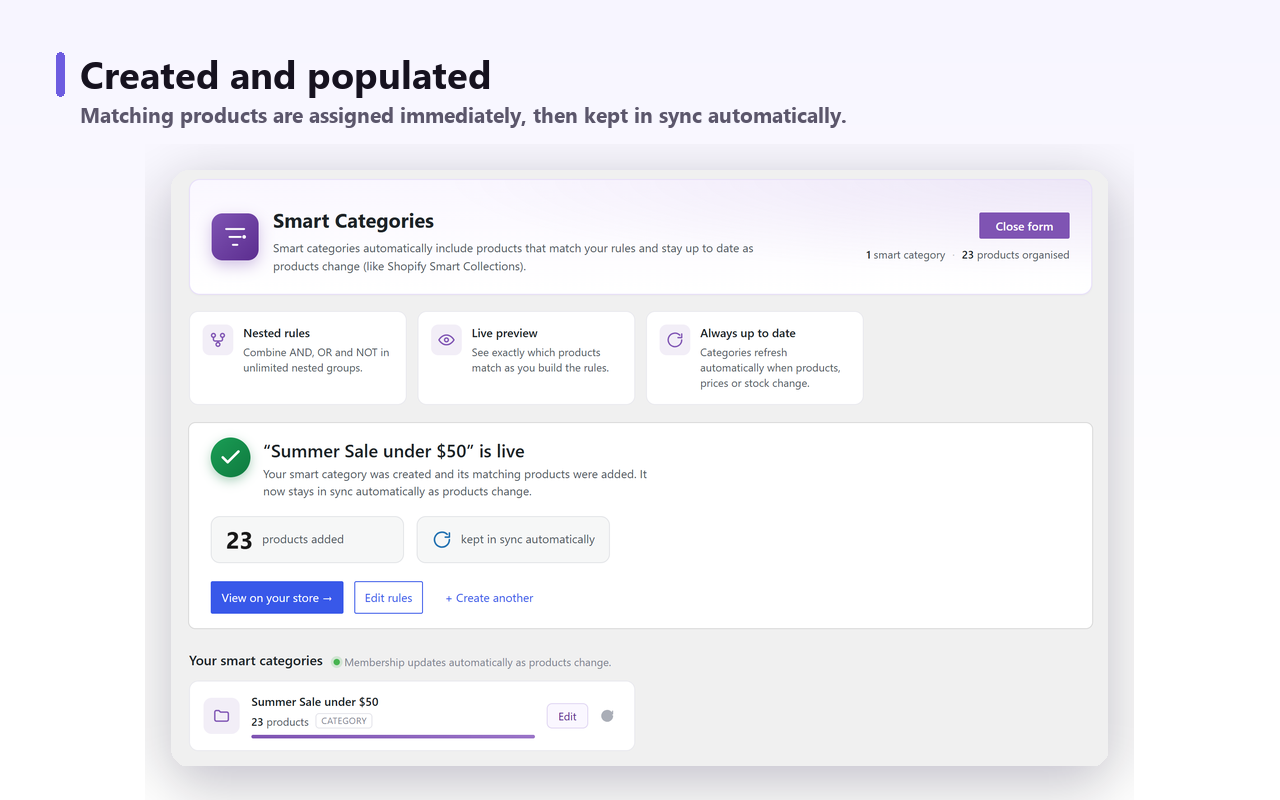
Membership is re-evaluated when a product is created or updated, when price or stock changes, and on a daily sweep, and manual assignments you made yourself are left alone — the plugin only removes the memberships it created. The free storefront settings also cover the two things this page needs: order the category by best-selling, and push out-of-stock products to the end.
The rolling-window fields sit in Pro, for the reason given earlier: Units sold 7d, Units sold 30d, Units sold 90d, Revenue 30d, Sales velocity (units/day) and Days since last sale. A rule of Units sold 30d greater than 10 and Stock status In stock produces the page most merchandisers actually wanted from the start. Pro is $59 a year for a single site with a 14-day money-back period; the free plugin is on wordpress.org and the rule engine in it is not capped on categories, rules or products.
What I would actually do#
- If you want a sort, not a page. Set popularity as the default catalogue order and stop. No plugin, no page, no maintenance.
- If you want a page for one campaign. Product Collection block, Best Sellers collection, accept that it is lifetime, and revisit it when the campaign ends.
- If you want a category that stays true. Define it as a rolling window with a stock condition and a sales floor, then let it maintain itself. Build it in code from the lookup table, or with a plugin that already does.
- Whichever you pick. Write the period into the page description. “Our best sellers over the last 30 days” is a sentence that prevents an argument later, and it is the difference between a merchandising page and a decoration.
The counter is not broken. It counts exactly what it was written to count, which is cumulative units against a product since publication. It just is not the thing anybody means when they ask for best sellers, and once you know that, the rest of the decision is straightforward.