WooCommerce Bulk Variations: Create, Bulk Edit, or Order Form?
In WooCommerce, bulk variations means three unrelated jobs: creating, bulk editing, or a storefront order form. Three questions tell you which is yours.
Updated

In this article8 sections
Search for WooCommerce bulk variations and you’ll get three categories of plugin that solve three unrelated problems. They share a phrase and nothing else, which is why people install one, discover it does something completely different from what they wanted, and leave a one-star review that isn’t really the plugin’s fault.
Here’s what the three meanings are, how to tell which one you’re after, and what actually solves each.
If all you want is to know which of the three is yours, three questions settle it before you read any further.
- Does the product exist yet? If it doesn’t, you want bulk creation — filling in every variation of one new product in a single pass. This one costs nothing: WooCommerce core generates the combinations, and the free tier of our own Quick Variable Products puts price, SKU and stock for all of them on one screen.
- Is the problem yours or your customer’s? If it’s your customer’s — they want six Small, twelve Medium and four Large, and your product page makes them do three separate trips — you want a storefront bulk order form. No Eren Labs plugin builds one; that section names the plugin that does.
- Otherwise you want bulk editing: changing a field across variations that already exist. There’s a free way to do that as well, and it’s in that section before any of the paid tools.
If you answered “both” to the first question — you’re adding new products and maintaining a big existing catalogue — you need two tools, and that’s a normal answer rather than a failure to choose.
The three meanings#
| What it means | Who it’s for | Where it happens | What it costs | |
|---|---|---|---|---|
| 1. Bulk creation | Making many variations at once on a new product | You, adding products | wp-admin | Free — core generates the rows, and Quick Variable Products’ free tier fills them on one screen |
| 2. Bulk order form | Letting a customer buy several variations in one go from a grid | Your customers | The storefront | Paid — Barn2’s plugin or a wholesale order-form plugin; nothing in core does it |
| 3. Bulk editing | Changing fields across variations that already exist | You, maintaining products | wp-admin | Free via the CSV loop; paid via Smart Manager, WP Sheet Editor or Quick Variable Products Pro at $59/year |
Notice that one and three are both yours and both in the admin, but they happen at completely different moments — and two isn’t even the same audience.
Meaning 1: bulk creation#
The problem: you’re adding a product with three colours and four sizes, and WooCommerce wants you to open twelve variation forms to type twelve prices you already know.
What it looks like solved: you type the attribute values, generate every combination in one click, and fill price, SKU and stock on a single screen.
The core sequence, so you can see where the time actually goes:
- In the Product data dropdown, choose Variable product.
- On the Attributes tab, add each attribute with its values — for a custom attribute you type them separated by a vertical bar:
Red | Blue | Green. - Tick Used for variations on every attribute, then Save attributes.
- On the Variations tab, click Generate variations and confirm. Every combination appears as a row.
- Expand each row and type its price. A variation with no price isn’t purchasable, so it won’t appear as an option on the storefront.
- Tick Manage stock? on a row to give it its own stock figure, or leave it unticked and let the parent hold one — whether your variations should share one stock pool is worth settling before you fill twelve rows.
Step four is worth being precise about: core does generate every combination in one click. What it doesn’t do is let you type price, SKU and stock for all of them on one screen. That’s step five, repeated once per row, and it is the entire problem. The full creation workflow — including the decisions worth making before you generate anything — is a separate post.
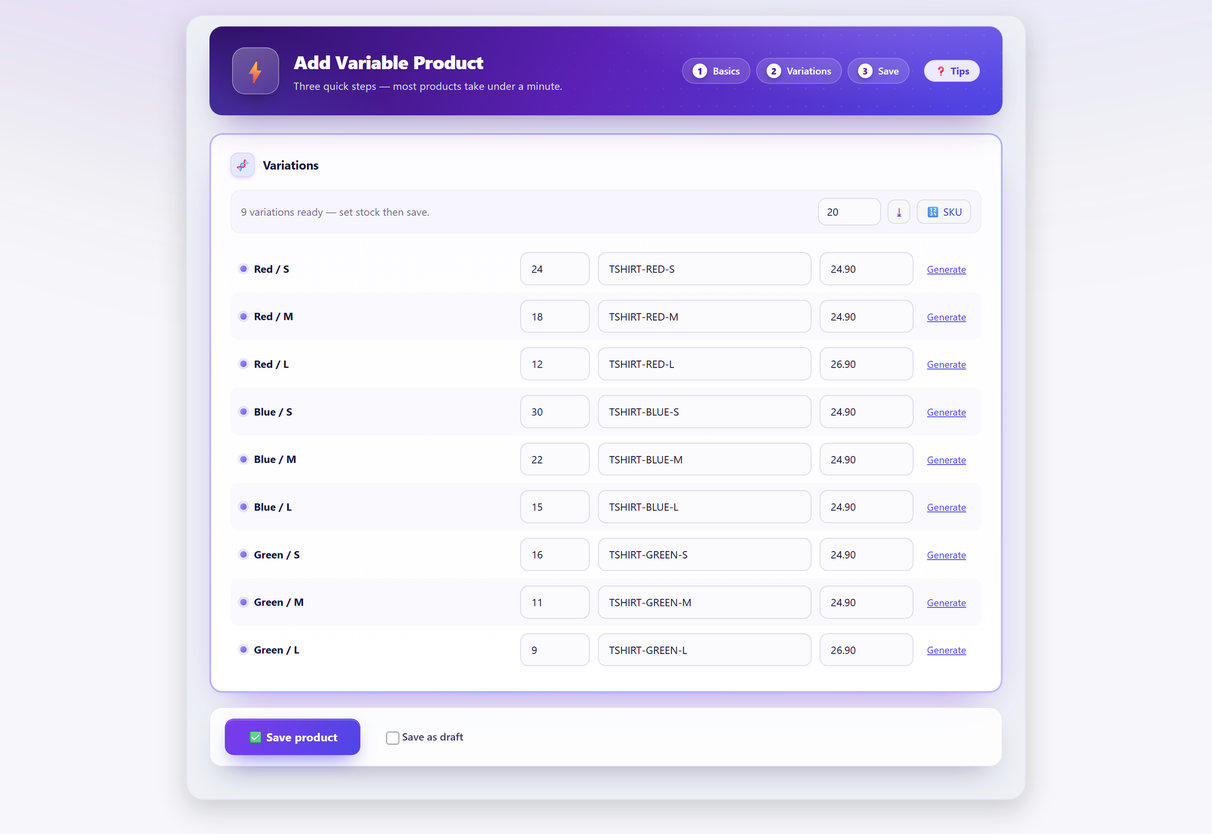
This is the moment most people mean when they search the phrase, because it’s the moment the tedium is most obvious. Tools in this category — including Quick Variable Products — operate at product-creation time and produce ordinary WooCommerce variations as output.
You want this if the sentence in your head is “I’m adding a product and this is taking forever”.
Meaning 2: a bulk order form on the storefront#
The problem: a wholesale or trade customer wants six Small, twelve Medium and four Large, and your product page makes them add to basket three times, choosing from dropdowns each time.
What it looks like solved: the product page shows a grid — sizes across, colours down — with a quantity box in every cell and one Add to Basket button. Often with prices shown in the grid, which is where the name “price matrix” comes from.
This is a front-end feature. It doesn’t create anything and it doesn’t edit anything; it changes how existing variations are presented and purchased. Barn2’s plugin for this job is literally named WooCommerce Bulk Variations, which is a large part of why the phrase is ambiguous in the first place.
None of the Eren Labs plugins does this. Quick Variable Products works in wp-admin and touches nothing on the product page — there is no storefront grid in it, free or Pro. So if this is your problem, Barn2’s is the one to buy, and this is the wrong page to be reading.
The near miss worth knowing about: a grouped product does put several quantity boxes on one page under a single Add to Basket button, and it’s built into core. But it groups separate simple products, not the variations of one variable product — so it can’t give a customer a size-by-colour grid for one t-shirt. It looks like the answer in a screenshot and isn’t one.
You want this if the sentence in your head is “my customers order several variants at once and the page fights them”. Common in B2B, wholesale, uniforms, trade supply.
Meaning 3: bulk editing existing variations#
The problem: you have two hundred products already built and you need to raise every price in one category by 8%, or set a shipping class across a range, or fix the SKUs on everything from one supplier because nobody ever settled on a SKU scheme that survives.
What it looks like solved: a filtered list of variations across many products, with the ability to change a field on all of them at once — ideally with a preview of what will change and a way to undo it afterwards.
Start with what core already gives you, because it’s more than people assume and it stops in exactly the wrong place. Select rows in the products list, then Bulk actions → Edit, and you get Price (change to, or increase or decrease by a fixed amount or a percentage), Sale price, stock quantity, stock status, backorders, weight, dimensions, shipping class and tax class. On a variable product, though, the price fields do nothing: price lives on the variation, not on the parent, so there is nothing there for the bulk editor to change. That one gap is what every tool named below is selling.
The free way, before you buy anything#
For a one-off change — raise every price in one category by 8%, set a shipping class across a range — WooCommerce’s own product CSV exporter and importer will do it for nothing. It’s tedious and it has sharp edges, but it works, and it’s worth doing once before paying for a tool you might need twice a year.
- Export. Products → All Products → Export. Leave the column list as all columns, and under Which product types should be exported? make sure Variations is included — variations are their own rows, and without that you export parents only. Tick Yes, export all custom meta.
- Edit. Open the file in a spreadsheet and change only the columns you mean to change — regular price, sale price, SKU, stock, shipping class. Leave the
IDcolumn exactly as it is; that column is how the importer knows it’s updating a row rather than inventing one. - Import. Products → Import, upload the file, tick Update existing products, and on the column-mapping screen confirm that
IDis mapped to ID. Match on SKU instead only if every single row has a unique one.
Three ways this bites, all of them avoidable:
- Blank cells. An empty cell in a column you’ve mapped can be written through as an empty value rather than skipped. If you only mean to change price, delete the other columns from the sheet instead of clearing their cells.
- Missing IDs. Drop the
IDcolumn from a sheet whose rows have no unique SKU to fall back on and the importer has nothing to match against — so it creates a second copy of your catalogue instead of updating the first. - No undo. There is no rollback on a CSV import. Take a database backup first, and if you can, run it on a staging copy and check ten products before doing it for real.
If you’re doing that loop monthly, it’s time to buy something. This is a different tool from meaning 1 even though both live in the admin, because the hard part isn’t the editing — it’s selecting the right rows and being able to reverse a mistake that touched a thousand records. Smart Manager and WP Sheet Editor are the established options here; Quick Variable Products Pro covers it too, with a dry-run preview and an undo. That one is free on WordPress.org for creating variations; Pro is $59/year for one site, with a 14-day money-back guarantee.
You want this if the sentence in your head is “the products exist and something about all of them needs to change”.
Things that look like this problem but aren’t#
- “I want to bulk edit products, not variations.” Then the built-in bulk editor is probably enough, and it’s free: select products in the list, Bulk actions → Edit. It works at parent level and doesn’t reach inside variations, which is exactly why meaning 3 exists.
- “I want to import a CSV.” As an ongoing habit, different tool again: imports are good at getting data in from elsewhere and bad at the fill-in-the-blanks work of building one product, and you end up maintaining a spreadsheet as a shadow catalogue. As a one-off fix for meaning 3 it’s the free answer, which is why it has its own section above.
- “I want variation swatches.” This is presentation: showing colours as colour circles instead of a dropdown. Nothing to do with bulk anything, but it shares a search neighbourhood.
- “I want to add one more size to fifty existing products.” This is meaning 3, and it’s specifically the hardest version of it — you’re extending an attribute across products rather than editing a field. Check that whatever you pick can actually do it before you commit — adding a variation to products you already have walks through what the job involves.
Before you install anything#
Two checks that save a lot of time:
Does it produce ordinary WooCommerce products? Don’t take anyone’s word for this, including ours — it’s a two-minute test on a staging copy. Build a product with the plugin, deactivate the plugin, then open that product in the standard WooCommerce editor. If the variations, prices and SKUs are all still sitting there and still editable, the data is in WooCommerce’s own tables and you can leave whenever you like. If they’ve disappeared or gone read-only, the plugin owns that part of your catalogue for as long as the products exist.
Can you undo it? For meaning 1 this matters less — a badly-built new product can be deleted. For meaning 3 it’s the whole game: an operation that touched twelve hundred variations with no preview and no rollback is a bad afternoon waiting for a wrong filter.
And whichever you’re solving: decide your variation structure before you scale it. A tool that makes the wrong matrix faster is not doing you a favour — which attributes should be variations and how many is too many are the questions worth answering first.
Bulk variations FAQ#
What does "bulk variations" mean in WooCommerce?
Three different things, which is why the phrase causes so much confusion. It can mean creating many variations at once on a new product, showing customers a bulk order form or price matrix on the storefront, or bulk editing fields across variations that already exist.
Which one do I need?
Ask whether the product exists yet. If not, you want bulk creation. If it does, ask whether the problem is yours or your customer’s: a customer struggling to order several variants at once needs a front-end order form, while a catalogue that needs a field changed across many products needs a bulk editor.
Can WooCommerce bulk edit variations natively?
Not really. The built-in bulk editor in the products list works at parent-product level — price, sale price, stock, weight, dimensions, shipping class — and on a variable product the price fields do nothing, because price lives on the variation rather than the parent. For a one-off change the free workaround is the product CSV exporter and importer; beyond that you need a third-party bulk editor.
Is a bulk order form the same as bulk variations?
No. A bulk order form is a storefront feature that presents existing variations as a grid with a quantity box in each cell, so a customer can buy several at once. It creates nothing and edits nothing; it changes how variations are displayed and purchased.
What should I check before installing a bulk variation plugin?
Two things. First, whether it produces ordinary WooCommerce products: build one on a staging copy, deactivate the plugin, and see whether the variations, prices and SKUs are still there in the standard product editor. Second, whether you can preview and undo an operation, which matters enormously for bulk editing where one wrong filter can touch a thousand records.
Will a bulk tool fix a badly structured catalogue?
No, it will make the wrong structure faster to build. Decide which attributes should be variation axes and how large the matrix ought to be first; a tool that generates six hundred unnecessary variations quickly has not helped you.