WooCommerce Variation Limit: How Many Variations Is Too Many?
WooCommerce has no hard limit on variations — 30 is only a display threshold. Where the slowdown really starts, and how to shrink a matrix that got away.
Updated

In this article14 sections
WooCommerce has no coded cap on how many variations a product can have. The 30 you have probably just run into is the default value of woocommerce_ajax_variation_threshold, and it changes how the variation selectors behave, not what you are allowed to create. The ceiling that does exist is a performance one: product pages get measurably slower somewhere past 50 variations, and past a few hundred hosts start timing out — with the admin degrading well before the storefront does.
The rest of this is why those numbers land where they do, and what to do about a matrix that has already got away from you.
What a variation actually is#
In the database, a variation isn’t a row in a table of options. It’s a full post record of its own — post_type = product_variation, a child of the parent product — carrying somewhere in the region of twenty to thirty meta rows: price, sale price, stock, SKU, weight, dimensions, image, shipping class, tax class, and the attribute values that define it.
Two consequences follow, and everything else in this article is downstream of them:
- Loading a variable product means loading all of its variations. Whatever the size of the matrix, WooCommerce reads every child record to work out the price range and what’s purchasable. Below the AJAX threshold it also embeds a large chunk of that data into the page as JSON, so the front end can react when someone picks a size; above the threshold it fetches combinations over AJAX instead — see the next section.
- The cost is per variation, not per product. A product with 400 variations is, in database terms, closer to 400 products than to one.
The 30 that isn’t a limit#
You’ll see the number 30 mentioned and often misdescribed as a cap on variations. It isn’t.
WooCommerce has a threshold — woocommerce_ajax_variation_threshold, default 30 — that changes how the variation selectors behave. Below it, the dropdowns are dynamic: pick Red and the size list narrows to sizes that exist in Red. Above it, WooCommerce stops shipping all the data upfront and falls back to a less interactive selector that resolves combinations over AJAX.
It’s a display and payload behaviour, not a limit on how many variations you may have. You can filter it. Put it in a child theme’s functions.php or a small mu-plugin, never in the parent theme:
add_filter( 'woocommerce_ajax_variation_threshold', function ( $threshold, $product ) {
    return 60;
}, 10, 2 );
The $product argument is there if you want to raise it only for certain products rather than for the whole shop. Both directions cost something, though. Raising the threshold means WooCommerce goes back to inlining every variation’s data into the page HTML as JSON, so the first load gets heavier and mobile rendering suffers most.
Lowering it below your variation count stops the dropdowns filtering each other, so a customer can pick a combination that doesn’t exist. What they see then is “Sorry, no products matched your selection. Please choose a different combination.” — that’s i18n_no_matching_variations_text, and it is a different message from “Please select some product options”, which appears when Add to Cart is pressed with an attribute left unchosen. Neither direction is a fix for a matrix that’s too large.
Rough thresholds#
Numbers vary by host, theme and how much other work your product page does, so treat these as orientation rather than promises:
| Variations | What you’ll notice |
|---|---|
| Under 30 | Nothing. Dynamic dropdowns, ordinary page weight. |
| 30–50 | Selector behaviour changes. Still comfortable. |
| 50–200 | Product pages measurably slower than a simple product — commonly a second or several. The embedded variation data starts to hurt mobile rendering in particular. |
| 200+ | Memory pressure. Some hosts time out saving or loading the product. Admin editing becomes unpleasant before the front end does. |
The admin side usually degrades first, which is a useful early warning: if editing the product is painful for you, the page is probably not delightful for customers either.
If you would rather have a number than a band, install Query Monitor, then load the big variable product and an ordinary simple product on the same theme and compare the query count and peak memory it reports in the admin bar. The gap between the two is what the variations cost on your host, which is the only figure that describes your site rather than an average of everyone’s. The same comparison in wp-admin, on the product edit screen, is where you will see it first.
Find out which products are the problem#
Before changing anything, find out where the records actually are. This lists the twenty products holding the most variations. It only reads, so it is safe on a live site — but replace wp_ with your site’s real table prefix, which is frequently something else:
SELECT parent.ID, parent.post_title, COUNT(v.ID) AS variations
FROM wp_posts v
JOIN wp_posts parent ON parent.ID = v.post_parent
WHERE v.post_type = 'product_variation'
  AND v.post_status IN ('publish', 'private')
GROUP BY parent.ID, parent.post_title
ORDER BY variations DESC
LIMIT 20;
phpMyAdmin and Adminer both take it as it stands, and so does wp db query on the command line. On most stores the answer is short and lopsided: three or four products account for nearly all the variation records, and those are the only ones worth touching.
The multiplication trap#
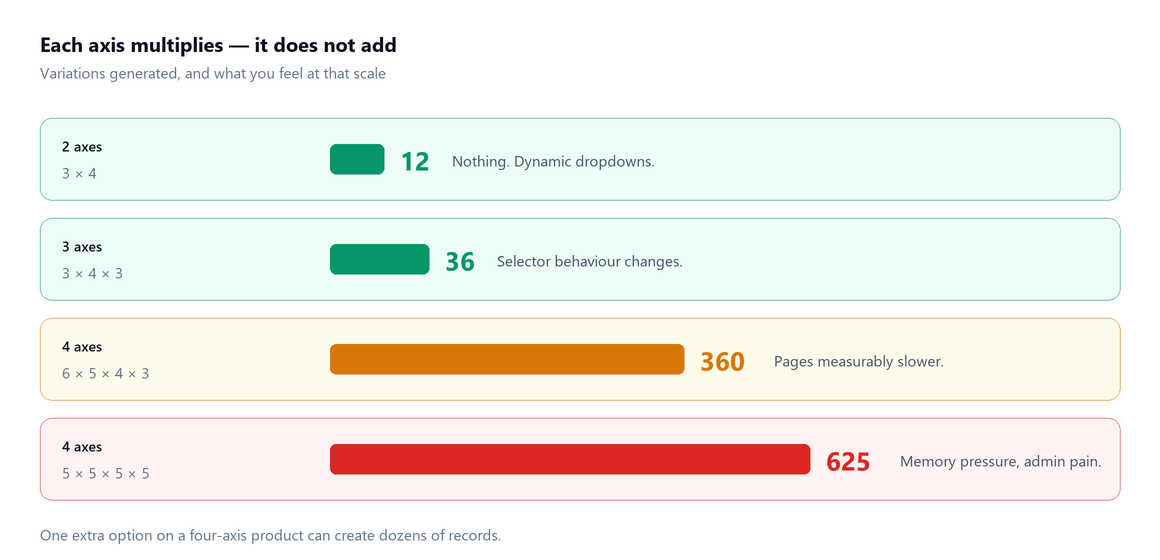
Nobody sets out to build 625 variations. They add a fourth axis.
| Axes | Values each | Variations |
|---|---|---|
| 2 | 3, 4 | 12 |
| 3 | 3, 4, 3 | 36 |
| 4 | 5, 5, 5, 5 | 625 |
| 4 | 6, 5, 4, 3 | 360 |
Each axis multiplies rather than adds. A single extra option — one more colour on a four-axis product — can create dozens of records.
Worse, most of those combinations are usually fictional. If you genuinely stock all 625, fine. If you’re generating every combination so the selector looks complete while only forty of them will ever sell, you’ve paid the full performance cost for a fortieth of the value.
Fixing it: split, don’t stack#
In rough order of how often they’re the right answer:
1. Remove axes that aren’t commercial#
Apply the test: does this change price, stock or SKU? If not, it’s a display attribute, not an axis. Fabric composition, care instructions and country of origin are the usual suspects — see attributes vs variations. Dropping one four-value axis divides your matrix by four.
It sounds like a small edit and it isn’t: nothing in the product editor collapses an axis in place, so you rebuild the matrix instead. In order:
- Export the product’s variations first. The built-in product CSV exporter covers variations, and this is the step that makes the rest recoverable.
- On the Attributes tab, untick Used for variations for the axis you’re removing — or delete the value outright if it’s going entirely.
- On the Variations tab, choose Delete all variations from the bulk-action dropdown.
- Then Generate variations to rebuild the smaller matrix.
Regenerating discards every per-variation price, SKU, stock level and image, and the rebuilt rows come back with new variation IDs. That is why the export comes first, and why this is work for the handful of products the query found rather than a pass across the whole catalogue.
2. Split into separate products#
If a customer would search for it by name, it’s probably a product. Two colourways of a jacket that photograph completely differently, have different names in your supplier’s catalogue, and are stocked separately are arguably two products with a size axis each — twelve variations apiece — rather than one product with twenty-four.
You also get two sets of reviews, two URLs, two chances to rank.
The fear of breaking something is usually what keeps an oversized matrix in place, and what splitting actually breaks is narrower than that. Order history is not at risk: WooCommerce copies the purchased item’s name, price and meta onto the order itself, so past orders and their invoices still read correctly after the variations behind them have gone.
What does break is anything keyed to the variation. A saved or shared URL carrying ?attribute_pa_colour= for an axis that no longer exists stops resolving to a combination, and anything holding variation IDs — product feeds, Google Merchant Center item IDs, external inventory or accounting sync — is pointing at rows that no longer exist, because rebuilt variations get new IDs. Re-submit the feed straight after the split rather than discovering it from a feed error a week later.
3. Move optional extras to add-ons#
Gift wrapping, engraving, an extended warranty. These feel like choices and behave nothing like variants: they double the entire matrix to represent a checkbox, and they aren’t things you hold stock of. A product add-on field is the right tool.
4. Change how the selector renders#
Swapping dropdowns for swatches or thumbnails changes how much the customer has to think, and nothing at all about the record count. Most swatch plugins are a rendering layer over exactly the same variation payload — they replace the select elements and change nothing about what WooCommerce sends — and several add their own per-term images and CSS on top, which makes the page marginally heavier rather than lighter. Thumbnails and swatches also depend on each variation carrying its own image, which is a failure mode of its own. The only selector change that touches the payload is the AJAX threshold above, and that is a trade rather than a saving. It’s a real improvement to the experience — but it’s a mitigation, not a cure for a matrix that shouldn’t be that size.
When many variations is genuinely right#
Sometimes the matrix is real and you should keep it:
- Every combination is a distinct thing you physically hold, with its own barcode and its own place on the shelf. Sizes in a shoe range, for example.
- Prices differ per combination in a way that can’t be expressed as a rule — which is also why the shop shows a price range rather than a price.
- Your supplier catalogue is structured that way, and fighting it means reconciling two different models forever.
If that’s you, keep the variations and accept the cost knowingly. Then plan for it: expect slower product pages, expect admin editing to be heavy, and budget for the host to match.
If you must have hundreds#
- Give every variation its own SKU. At this scale you cannot manage anything by description. A generated SKU scheme is not optional above about a hundred rows.
- Decide the stock model deliberately. Hundreds of individually-stocked variations is hundreds of numbers to keep true — see parent stock versus variation stock.
- Count them. Each stock-managed variation is its own line in a stocktake, and large matrices drift faster than simple products because there are more numbers to be wrong.
- Watch the admin, not just the shop. If saving the product takes thirty seconds, you’ll stop maintaining it, and stale data costs more than slow pages.
The honest summary#
Tools that generate variations quickly — ours included — remove the friction that used to act as an accidental brake. That’s a genuine improvement when the matrix is real, and a genuine risk when it isn’t, because the thing that used to stop you building 400 variations was how tedious it was.
So do the thinking at the point where it’s cheap: before you generate. Ask of each axis whether it changes price, stock or SKU. Ask of the total whether you’d stock all of it. Then build it in a minute, knowing it’s the right size.
Variation performance FAQ#
How many variations can a WooCommerce product have?
There is no hard limit in WooCommerce itself, but there is a practical one. Past roughly 50 variations product pages get measurably slower, and past a few hundred you start meeting PHP memory limits and host timeouts — usually in the admin before the storefront.
Is 30 the maximum number of variations?
No. Thirty is the default value of woocommerce_ajax_variation_threshold, which changes how the variation selectors behave rather than capping anything. Below it the dropdowns filter dynamically; above it WooCommerce stops sending all the data upfront and resolves combinations over AJAX.
Why are my variable product pages slow?
Each variation is a separate post record with twenty to thirty meta rows, and the product page reads all of them to work out the price range and what is purchasable. Below the AJAX threshold it also embeds a large part of that data into the page as JSON. The cost scales with the number of variations, so a product with 400 of them behaves more like 400 products than like one.
How do I reduce the number of variations?
Remove axes that do not change price, stock or SKU; split genuinely different products apart instead of stacking them into one matrix; and move optional extras like gift wrapping into product add-ons rather than variation axes, since an optional extra doubles the entire matrix to represent a checkbox.
Do variation swatches fix the performance problem?
No. Most swatch plugins are a rendering layer over exactly the same variation payload — they replace the select elements and change nothing about what WooCommerce sends — and several add their own per-term images and CSS on top, so the page can end up marginally heavier rather than lighter. They are a real improvement to how much the customer has to think, and a mitigation rather than a cure: if the matrix is the wrong size, presenting it more attractively does not change the underlying record count.
Is it ever right to have hundreds of variations?
Yes — when every combination is a distinct thing you physically stock, with its own barcode and its own place on the shelf, or when prices genuinely differ per combination. In that case keep them, but plan for slower pages, heavier admin editing and a real SKU scheme.