WooCommerce Sale Category: Three Ways to Show On Sale Products
WooCommerce has no built-in sale category. Three ways to show on sale products: shortcode, plugin Page, or real term rules — and why the snippet breaks.
Updated

In this article17 sections
Most stores eventually want the same thing: a /product-category/sale/ URL that fills itself the moment a price drops and clears itself when the price goes back up. WooCommerce has no setting for this. Search for how to make a WooCommerce sale category automatic and the top result is almost always the same functions.php snippet, hooked to woocommerce_product_query, and its own comment thread is a decade-long queue of people reporting it broken.
The snippet is not merely outdated. It is structurally the wrong shape for the job, and understanding why saves you from re-fixing it every time WooCommerce or PHP moves. This post explains the failure mode, gives you a corrected version anyway if you still want it, and then sets out the three honest ways to get a self-maintaining sale page — with what each one actually costs you.
The short answer#
WooCommerce has no built-in automatic sale category: the On Sale Products collection gives you the listing but no category, and a genuine one requires a rule that writes real product_cat term assignments — the popular wc_get_product_ids_on_sale() snippet only fakes membership at query time.
- The snippet fakes membership. Hooking woocommerce_product_query and replacing the category constraint with a list of on-sale IDs creates no term relationships, so the category shows a count of zero in wp-admin, cannot be used to filter the products list, and is invisible to feeds and ERP bridges.
- The empty-array trap. When nothing is on sale, post__in with an empty array returns everything rather than nothing — a WordPress behaviour marked wontfix in ticket #28099 — so the morning a promotion ends the whole catalogue appears at full price under “Sale”.
- Cached and mistimed data. The on-sale list is a 30-day transient that never sees runtime-computed discounts such as dynamic, role-based or bulk pricing, and on WooCommerce older than 10.5 a scheduled sale only starts when the daily woocommerce_scheduled_sales action next runs, rather than at midnight.
- Display-only options are safe, and here is the line. In classic content, [products on_sale=”true” limit=”12″ columns=”4″]; in the editor, a Product Collection block set to On Sale Products. Free, supported and unbreakable, but it is a widget, not a category: no URL, no breadcrumb, no menu entry, no filter interaction.
- Only real terms work everywhere. Assigning genuine product_cat terms by rule puts real rows in wp_term_relationships, so admin lists, counts, breadcrumbs, menus, faceted filters and feeds all behave, and when the sale ends the count simply drops to zero.
The snippet everyone finds#
You create an empty product category with the slug sale, assign nothing to it, and add this:
add_action( 'woocommerce_product_query', 'bbloomer_sale_category' );

function bbloomer_sale_category( $q ) {
   if ( "sale" !== $q->get( 'product_cat' ) ) return;
   $q->set( 'post_type', 'product' );
   $q->set( 'product_cat', null );
   $product_ids_on_sale = wc_get_product_ids_on_sale() ? wc_get_product_ids_on_sale() : array();
   $q->set( 'post__in', $product_ids_on_sale );
}
The logic is easy to follow. When the main product query is for the category sale, throw away the category constraint and replace it with an explicit list of post IDs from wc_get_product_ids_on_sale(). The archive template renders, the URL works, the products appear. On a clean install it looks like it works.
Why it is structurally wrong, not just old#
Everything below follows from one decision: the snippet fakes membership at query time. No product is ever actually in the sale category. The database has an empty term and a filter that lies about it once per front-end page load.
Nothing is in the category in wp-admin#
Open Products → Categories and Sale shows a count of 0, forever. Filter the products list by Sale and you get nothing. Neither is a display glitch — it is the truth. The term has no relationships. That means you cannot bulk-edit “everything on sale”, you cannot see at a glance whether a product is in the promotion, and every warehouse export, feed generator or ERP bridge that reads term relationships sees an empty category. The admin products list filters by category, product type and stock status, with no on-sale option, so you have no second way to check either.
The empty-array trap#
This is the one that will actually embarrass you. post__in with an empty array does not return zero posts in WordPress — it returns everything. WP_Query only applies the constraint when the array is non-empty, so an empty array is silently ignored. This is documented behaviour, raised as core ticket #28099 in 2014 and closed as wontfix for backward-compatibility reasons. It will not change.
So the moment nothing in your shop is on sale — the morning after a promotion ends, exactly when you are least likely to be looking — your sale category stops being empty and starts displaying your entire published catalogue at full price under a heading that says Sale. The standard fix is to pass array( 0 ) instead, because no post has ID 0.
The PHP 8 problem#
Two things in that snippet are wrong on modern PHP. wc_get_product_ids_on_sale() is called twice to build one array, running the entire lookup a second time for nothing. And $q->set( 'product_cat', null ) puts a null into a query var that both core and WooCommerce read as a string. Commenters on the original snippet report an uncaught strstr(): Argument #1 ($haystack) must be of type string, null given on PHP 8.2 sites.
Be precise about the language here, because this detail is repeated wrongly all over the place. Passing null to a non-nullable parameter of an internal function has been a deprecation notice since PHP 8.1, and it stays a deprecation notice for the whole 8.x line — it is scheduled to become a TypeError in PHP 9.0. What throws today is a call made from a file compiled with declare( strict_types=1 ), which is why the same snippet produces a harmless notice on one site and a fatal on another. Either way the fix is identical: pass an empty string, which clears the constraint just as effectively. Corrected, and with the empty-array guard:
add_action( 'woocommerce_product_query', 'el_sale_category_query' );

function el_sale_category_query( $q ) {

	if ( 'sale' !== $q->get( 'product_cat' ) ) {
		return;
	}

	$ids = wc_get_product_ids_on_sale();

	$q->set( 'post_type', 'product' );
	$q->set( 'product_cat', '' );
	$q->set( 'post__in', $ids ? $ids : array( 0 ) );
}
That version runs on current PHP and current WooCommerce, and it shows an empty page rather than your whole shop. It is the best the approach can be. It still has every problem below.
The on-sale list is a 30-day transient#
wc_get_product_ids_on_sale() reads the wc_products_onsale transient and, on a miss, queries the product data store and caches the result for 30 days. The lookup is a query against stored sale prices — it does not build product objects and it does not call is_on_sale(). Anything that computes a discount at runtime rather than storing a sale price is therefore invisible to it: dynamic pricing rules, role-based pricing, bulk-quantity discounts, most currency-switcher setups. Those products are on sale to the customer and absent from your sale page.
The transient is cleared by wc_delete_product_transients(), which is hooked to save_post_product, so ordinary edits do refresh it. Changes that bypass a product save — a direct SQL update, some import tools, a plugin writing meta without triggering WooCommerce’s hooks — do not, and the stale list can sit there for a month.
Scheduled sales do not start when you think#
Until WooCommerce 10.5, sale start and end dates were applied only by wc_scheduled_sales(), run by a single recurring action, woocommerce_scheduled_sales, registered with a 24-hour interval at whatever time it was first scheduled — not at midnight. There were no per-product events at the exact sale time. If that action was first scheduled at 20:20, a sale set to begin today began at 20:20 today. The mismatch is logged in the WooCommerce tracker as issue #63061. Layer WP-Cron’s own request-triggered nature on top and a low-traffic store could be hours later again.
WooCommerce 10.5 changed the mechanism. Setting sale dates on a product now queues an Action Scheduler action for each date — wc_product_start_scheduled_sale and wc_product_end_scheduled_sale — timed to the dates you entered, and the daily action stays on as a safety net rather than the only trigger. So the first fix is the dull one: if the store is on anything older, update WooCommerce. Do not try to move the daily action by hand. It is registered through Action Scheduler, not WP-Cron, so the wp_schedule_event() recipes for rescheduling it do not move it; they add a second copy of the same job alongside it.
An exact-time action is still only as punctual as whatever runs the queue, though. By default Action Scheduler is started by WP-Cron and by admin page loads, and WP-Cron waits for somebody to request a page. On a store with no overnight traffic, a sale set for midnight is a wish rather than a time unless you set DISABLE_WP_CRON to true in wp-config.php and point a real server cron at wp-cron.php, or run wp action-scheduler run from a system cron. Without that, the first visitor of the morning is still your scheduler.
You can read your own queue under WooCommerce → Status → Scheduled Actions: search for wc_product_start_scheduled_sale to see the per-product actions, or woocommerce_scheduled_sales for the daily one — worth doing the week before a promotion rather than the morning it is due. This one is not the snippet’s fault — it affects every approach on this page, including the good ones — but the snippet has no way to compensate.
Filter plugins fight it#
Faceted filter plugins build their index from term relationships and their counts from the taxonomy query. Your sale page has neither. Depending on the plugin you get zero results for every facet, wrong counts, or a collision when it tries to intersect its own post__in with yours — because both are writing to the same query var, and the last one to run wins. Even WooCommerce’s own attribute filter widgets throw warnings on this page while working normally everywhere else, which is exactly what the comment threads report.
One thing the snippet is usually blamed for unfairly#
It is widely repeated that variable products with a sale price on a single variation slip through. They do not. wc_get_product_ids_on_sale() merges the IDs it finds with their non-zero parent IDs, so a variable product with one discounted variation is in the list. The variation IDs are in the list too, but they are inert here — post_type is product, and variations are product_variation, so they never render. Variable products are the part that works. What is worth checking is how they look once they are on the page: a sale price on a single variation lowers the bottom of the displayed price range, so a product with one discounted size advertises that size’s price across your whole sale listing.
Making a WooCommerce sale category automatic: three honest options#
| Approach | Real category URL | Visible in wp-admin | Term count correct | Filters work |
|---|---|---|---|---|
| On Sale Products collection / shortcode | No | n/a | n/a | No |
| Plugin that builds a Page | No — it is a Page | n/a | n/a | Partly |
| Rule-driven real category | Yes | Yes | Yes | Yes |
1. Display only: the On Sale Products collection or shortcode#
Pick this when you want a strip on the homepage or a landing page and nothing more.
If all you need is a block of discounted products somewhere on the site, WooCommerce already ships it and you should use it. In the editor, insert the Product Collection block and choose the On Sale Products collection. The older standalone product grid blocks have been soft-deprecated since WooCommerce 9.5 — they still run where they already exist, but they are not offered in the inserter any more, so do not build anything new on them.
In classic content, use the modern products shortcode. [sale_products] is the legacy form, folded into [products] in WooCommerce 3.2:
[products on_sale="true" limit="12" columns="4" orderby="date" order="DESC"]The attributes combine, which answers the question that always comes next — sale items from one category only. [products on_sale="true" category="hoodies" limit="8"] does that, and in the editor you get there by adding an On Sale filter to a Product Collection already scoped to that category. What neither produces is a /product-category/hoodies/sale/ URL: it is a filtered display sitting on whatever page you put it on, not a narrower category.
Either form is genuinely automatic, needs no code and cannot break. What you do not get: a product category URL, a breadcrumb, a place in your category menu, pagination that behaves like a shop archive, or any interaction with faceted filters. It is a widget, not a category. For a homepage strip that is exactly right. For a page you want to rank and link to in navigation, it is not enough.
2. A plugin that builds a Page#
Pick this when the page can stand outside your category tree.
Several plugins offer “dynamic collections” that are really a WordPress Page with a saved query attached. You get a URL and a template, which is more than option 1. You still do not get a product_cat term, so it is not in the category hierarchy, it cannot be a child of Clothing, WooCommerce’s own category widgets and breadcrumbs ignore it, and your term counts are unaffected. Fine if the page stands alone. Wrong if it needs to sit inside your existing structure.
3. A real category, populated by rules#
Pick this when it needs a URL, a menu entry, working filters and a correct count.
The only approach with no asterisks is the boring one: put the products in the category. Actually assign the term, so wp_term_relationships has real rows. Then everything downstream — admin lists, counts, breadcrumbs, menus, filter plugins, feeds, your theme’s category widget — works because nothing is being tricked. The problem becomes purely one of maintenance: who adds and removes products, and when. That is the same question behind assigning products to a category based on rules generally, and it is answerable by hand, by WP-CLI on a cron, or by a plugin that evaluates rules for you. It is also the question that decides whether a new arrivals category still means anything three months on — identical mechanic, opposite trigger.
Doing it by hand is not ridiculous for a small catalogue and a quarterly promotion. If you are already bulk-assigning products to categories each month, adding Sale to that routine costs you nothing new. It stops being reasonable the moment sale prices change weekly or come from an automated repricer.
The WP-CLI route is two passes over the same list, and it is short enough to print. Clear the cached on-sale list first, because both passes read it:
wp eval 'wc_delete_product_transients();'Then add everything currently discounted:
wp eval 'foreach ( wc_get_product_ids_on_sale() as $id ) { if ( "product" === get_post_type( $id ) ) { wp_set_object_terms( $id, "sale", "product_cat", true ); } }'The post_type check is the part people leave out. wc_get_product_ids_on_sale() returns variation IDs alongside their parents — the same detail that makes variable products work in the snippet above — and assigning a product_cat term to a variation gives you rows that nothing reads and a count you cannot explain.
Then remove everything that is no longer discounted:
wp eval '$t = get_term_by( "slug", "sale", "product_cat" ); if ( ! $t ) { return; } $on = array_map( "intval", wc_get_product_ids_on_sale() ); foreach ( get_objects_in_term( $t->term_id, "product_cat" ) as $id ) { if ( ! in_array( (int) $id, $on, true ) ) { wp_remove_object_terms( (int) $id, "sale", "product_cat" ); } }'The if ( ! $t ) { return; } is not decoration. get_term_by() returns false when the term does not exist or the slug is not exactly sale, and reading ->term_id off false is a fatal on PHP 8 — the same class of carelessness this page has just spent several sections on.
One honest limit before you put that pair on a cron: the removal pass cannot tell a product the script assigned from one you put in Sale by hand. It compares the term’s current members against the on-sale list and strips everything that is not in it, so your hand-picked additions disappear on the next run. That distinction — whose membership is this? — is exactly the one the plugin section below turns on.
Because it is a real term, it can also sit inside the hierarchy you already have: Sale as a child of Clothing, if that is what the menu needs. If you do that and the parent archive then looks wrong, that is a separate and well-worn problem — see products not showing in the parent category.
The 40% off variant nobody answers#
The most common follow-up question on every version of this snippet is tiering: not everything on sale, only things discounted 40% or more. The usual answer is that it needs custom work, which is true but unhelpful, so here is the code.
There is no discount-percentage column to query. You have to instantiate each product and compute it, and for variable products you have to look at each variation, because a product where one size is 50% off and the rest are 10% off is a different thing from a product uniformly 40% off. Decide which one you mean. This version uses the deepest discount available on any variation:
function el_best_discount_percent( $product ) {

	$children = $product->is_type( 'variable' ) ? $product->get_children() : array();
	$targets  = $children ? $children : array( $product->get_id() );
	$best     = 0;

	foreach ( $targets as $target_id ) {

		$item = wc_get_product( $target_id );

		if ( ! $item || ! $item->is_on_sale() ) {
			continue;
		}

		$regular = (float) $item->get_regular_price();
		$active  = (float) $item->get_price();

		if ( $regular <= 0 || $active >= $regular ) {
			continue;
		}

		$best = max( $best, ( ( $regular - $active ) / $regular ) * 100 );
	}

	return $best;
}

add_action( 'woocommerce_product_query', 'el_deep_sale_category' );

function el_deep_sale_category( $q ) {

	if ( 'sale-40' !== $q->get( 'product_cat' ) ) {
		return;
	}

	$ids = get_transient( 'el_sale_40_ids' );

	if ( false === $ids ) {

		$ids = array();

		foreach ( wc_get_product_ids_on_sale() as $id ) {

			$product = wc_get_product( $id );

			if ( ! $product || $product->is_type( 'variation' ) ) {
				continue; // parents are already in the list
			}

			if ( el_best_discount_percent( $product ) >= 40 ) {
				$ids[] = $product->get_id();
			}
		}

		set_transient( 'el_sale_40_ids', $ids, HOUR_IN_SECONDS );
	}

	$q->set( 'post_type', 'product' );
	$q->set( 'product_cat', '' );
	$q->set( 'post__in', $ids ? $ids : array( 0 ) );
}
Note the extra transient. Without it you are loading every on-sale product and its variations on every page load of that category, which on a few hundred discounted products is a visible delay. With it, your tier page is up to an hour stale. Note also that this inherits every structural problem above: still no term, still no admin visibility, still nothing a filter plugin can see. It is a better answer to the wrong question.
If you want it to be a real category#
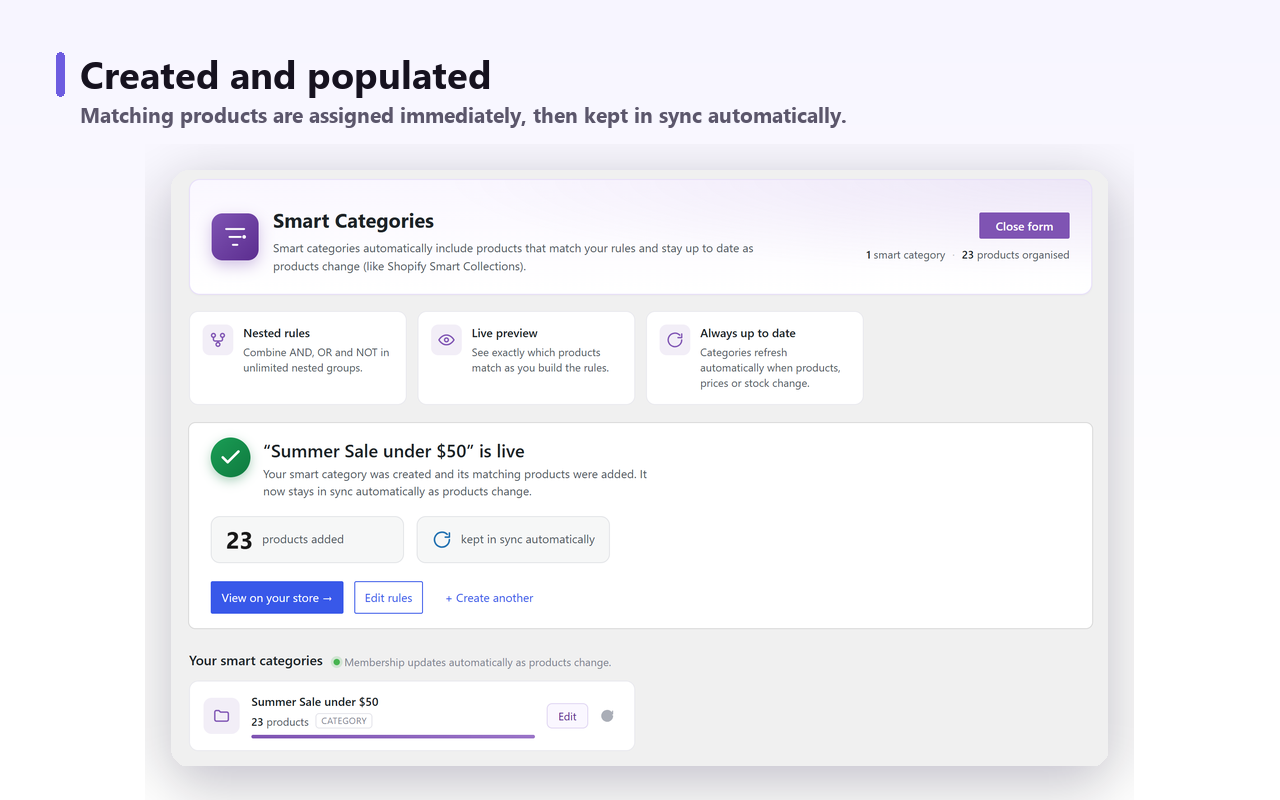
This is the part where I tell you what we build, so weigh it accordingly. Smart Categories for WooCommerce is a free plugin that attaches a rule set to a category you already have — a genuine product_cat term, not a parallel taxonomy — and assigns that term to the products that match. Because the membership is real, the term count is right, the products show up when you filter the admin list, and filter plugins have something to index.
For this job the rule is On sale is true. For the tier variant it is On sale is true AND Discount percentage (%) is greater than or equal to 40 — discount percentage is one of the 35 match fields in the free version, so the tiering problem above is a two-line rule rather than 40 lines of PHP. Groups nest and any group can be negated, so on sale, 40% or more, in stock, but not in Clearance is one rule set.
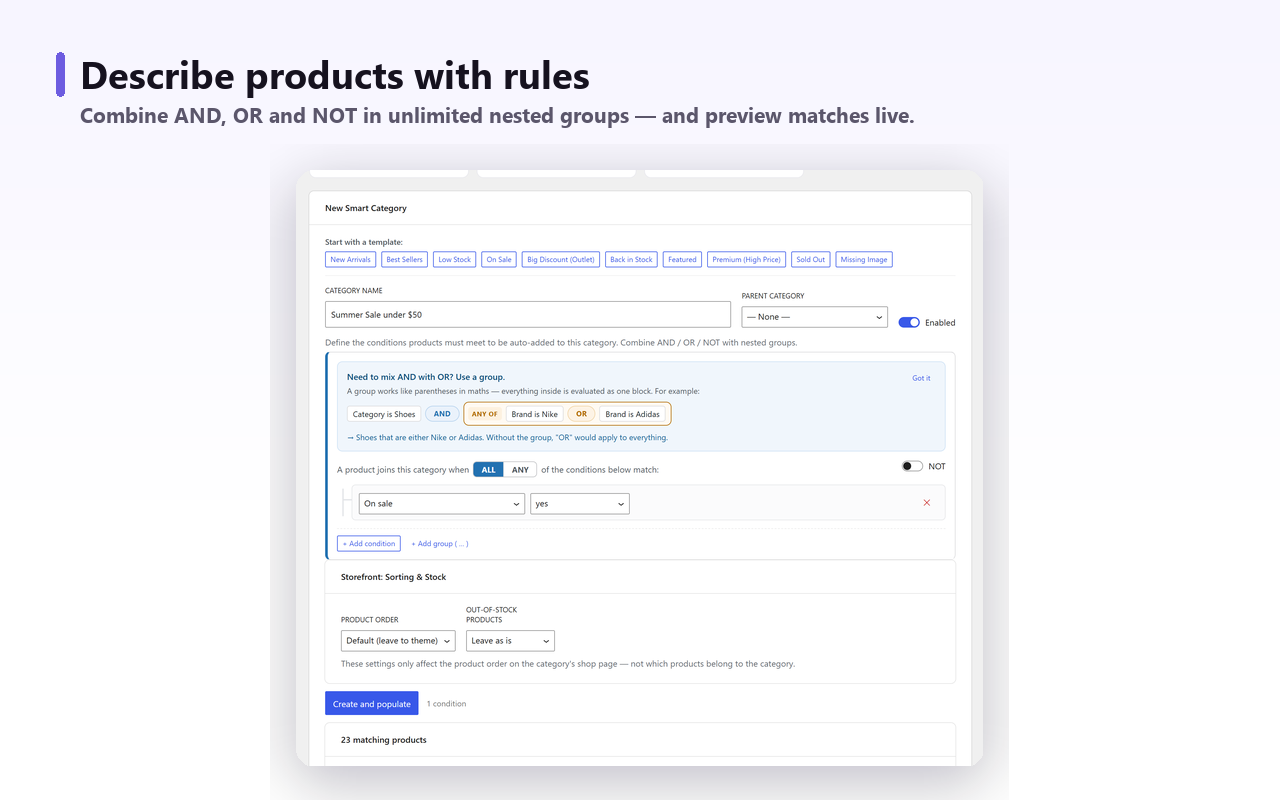
Two details matter specifically for sales. Rules re-run on product create and update and on any price or stock change, and there is a daily sweep in addition — that sweep is what catches a sale that started or ended while nobody was editing anything. Be clear about its limit, though: the sweep reads the sale state WooCommerce has already applied, so it closes the gap between a price changing and the category noticing, but it cannot make WooCommerce apply a scheduled sale any earlier than WooCommerce itself does. The scheduling described above sits upstream of every approach on this page. The second detail: the plugin records only the memberships it created, so a product you added to Sale by hand is never removed by a rule.
Matching runs through Action Scheduler in batches rather than on page load, and you can see the matching products and their count in a live preview before you save anything. Ordering for the resulting page is handled there too, including pushing out-of-stock products to the end, which matters more on a sale page than anywhere else in the shop.
Be equally clear about what it does not cover. It does not write SEO titles, descriptions or canonicals — that stays with your SEO plugin — and it does not create redirects. If you are restructuring categories rather than adding one, read changing your category structure without losing rankings first, because redirects are the part that actually costs you traffic.
The morning the sale ends#
Every approach here is judged by what happens the day the promotion stops, because that is the moment nobody tests.
- The original snippet. WooCommerce ends the sale,
wc_get_product_ids_on_sale()returns an empty array,post__inis ignored, and/product-category/sale/serves your whole catalogue at full price. Google may crawl it before you notice. - The corrected snippet. Empty page, correct behaviour, but the term still says 0 products so nothing in the admin tells you the promotion is over.
- Block or shortcode. Renders nothing, or WooCommerce’s no-products message inside whatever page it lives on. Safe, but that page now has a hole in it.
- Real term membership. The rule stops matching, the terms are removed, the count drops to 0, and the category is genuinely empty — which is a state your theme and your SEO plugin already know how to handle, and which you can see from the categories screen.
- Caching, whichever one you picked. Real term membership fixes the database, not the page. A full-page cache or a CDN will go on serving yesterday’s sale archive at
/product-category/sale/after the terms are gone, and where a persistent object cache is installed the on-sale list sits in that as well. So the morning-after check is three things: confirm the count dropped on Products → Categories, purge the page cache for that URL and for the shop archive if a sale strip appears there, and flush the object cache if you are running one. Nothing on this page purges a CDN for you, the rules engine included.
An empty sale category is still a live URL serving a page with no products, and nothing here will hide or unpublish it for you — not WooCommerce, and not a rules plugin either. Decide in advance whether it should be noindexed between promotions or left alone. The answer usually depends on whether it has accumulated links, and it is the same judgement discussed in why category pages are not indexed. Whichever you choose, it is your SEO plugin that carries it out.
The short version: the snippet is a display trick wearing a category’s clothes. If you only need a display, use the block — it is free, supported and cannot break. If you need a category, make it a category.